
Server data from the Official MCP Registry
MCP server for MoySklad — warehouse, inventory, orders, reports (Russia)
About
MCP server for MoySklad — warehouse, inventory, orders, reports (Russia)
Security Report
This is a well-structured MCP server for MoySklad API integration with proper authentication, comprehensive input validation via Zod schemas, and appropriate rate limiting. The codebase demonstrates good security practices with credentials sourced from environment variables and no hardcoded secrets. Minor code quality observations exist around error handling specificity and test coverage, but these do not constitute security vulnerabilities. Supply chain analysis found 3 known vulnerabilities in dependencies (0 critical, 3 high severity). Package verification found 1 issue.
7 files analyzed · 8 issues found
Security scores are indicators to help you make informed decisions, not guarantees. Always review permissions before connecting any MCP server.
Permissions Required
This plugin requests these system permissions. Most are normal for its category.
How to Install
Add this to your MCP configuration file:
{
  "mcpServers": {
    "io-github-theyahia-moysklad-mcp": {
      "args": [
        "-y",
        "@theyahia/moysklad-mcp"
      ],
      "command": "npx"
    }
  }
}Documentation
View on GitHubFrom the project's GitHub README.
MCP-сервер для МойСклад — 60 инструментов для ИИ-агента: товары, склад, заказы, финансы
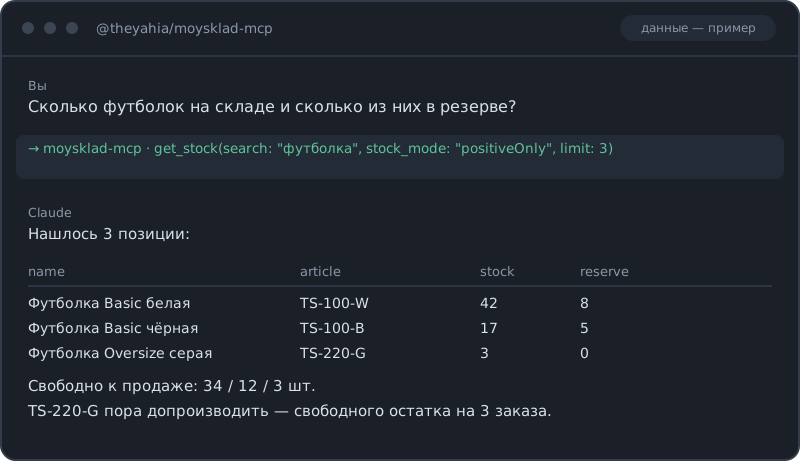
Если вы искали, как подключить МойСклад к Claude или другому ИИ-агенту, — этот сервер закрывает весь торгово-складской цикл через JSON API 1.2: каталог и цены, остатки по складам, контрагенты, заказы покупателей и поставщикам, отгрузки, приёмки, перемещения, инвентаризации, списания, возвраты, счета, платежи и касса, отчёты по прибыли и оборотам, аудит и вебхуки. Спрашиваете «сколько футболок свободно к продаже» или «какая маржа по каждому товару за август» — получаете таблицу с цифрами, а не выгрузку в Excel. Цены во всех инструментах в рублях (перевод в копейки, которых требует API МойСклад, сервер делает сам), лимит запросов соблюдается автоматически.


Часть WWmcp — набора MCP-серверов для развивающихся рынков.
Быстрый старт
Claude Desktop
Добавьте в claude_desktop_config.json:
{
  "mcpServers": {
    "moysklad": {
      "command": "npx",
      "args": ["-y", "@theyahia/moysklad-mcp"],
      "env": {
        "MOYSKLAD_TOKEN": "your-bearer-token"
      }
    }
  }
}
Чтобы использовать логин и пароль вместо токена, замените блок env на:
"env": { "MOYSKLAD_LOGIN": "you@example.com", "MOYSKLAD_PASSWORD": "your-password" }
Claude Code
claude mcp add moysklad --env MOYSKLAD_TOKEN=your-bearer-token -- npx -y @theyahia/moysklad-mcp
Cursor / Windsurf
Добавьте в настройки MCP:
{
  "moysklad": {
    "command": "npx",
    "args": ["-y", "@theyahia/moysklad-mcp"],
    "env": { "MOYSKLAD_TOKEN": "your-bearer-token" }
  }
}
Авторизация
| Переменная | Описание |
|---|---|
MOYSKLAD_TOKEN | Bearer-токен (предпочтительно) |
MOYSKLAD_LOGIN + MOYSKLAD_PASSWORD | HTTP Basic-авторизация |
Токен выдаётся в МоёмСкладе: Настройки → Пользователи → Токены доступа (также работает POST /security/token с Basic-авторизацией). Генерация нового токена отзывает предыдущий.
Нужные права: у пользователя или токена должен быть доступ к тем сущностям, с которыми вы работаете. Читающим инструментам нужны права просмотра, создающим и изменяющим — права редактирования соответствующего типа документов. Вебхуки и часть отчётов требуют платного тарифа МойСклад.
Цены
API МойСклад хранит деньги в копейках (1 рубль = 100 копеек). Сервер конвертирует автоматически:
- На вход: передавайте цены и суммы в рублях (например,
1500.50) - На выход: цены и суммы возвращаются в рублях
- (Отчёт
get_dashboardпроксируется как есть, поэтому денежные значения в нём остаются в копейках.)
Если у товара есть цена продажи, МойСклад требует тип цены. Сервер сам подставляет тип цены по умолчанию из вашего аккаунта (берёт из list_price_types); чтобы выбрать конкретный, передайте price_type_href.
Инструменты (60)
Товары и каталог
| Инструмент | Описание |
|---|---|
search_products | Поиск товаров по названию или артикулу |
get_product | Товар по UUID (raw — полный объект) |
create_product | Создать товар (тип цены подставляется автоматически) |
update_prices | Обновить цены продажи, закупки и минимальную |
search_assortment | Сквозной поиск по товарам, модификациям, услугам и комплектам |
list_price_types | Типы цен (первый — по умолчанию) |
search_variants / search_bundles / search_services | Поиск модификаций / комплектов / услуг |
create_service | Создать услугу |
Остатки
| Инструмент | Описание |
|---|---|
get_stock | Текущие остатки (количество, резерв, в пути) |
get_stock_by_store | Остатки в разрезе складов |
get_stock_current | Быстрый срез текущих остатков |
Контрагенты
| Инструмент | Описание |
|---|---|
get_counterparties | Поиск по названию, ИНН или телефону |
get_counterparty | Полная карточка (raw — полный объект) |
create_counterparty | Создать покупателя или поставщика |
Заказы и отгрузки
| Инструмент | Описание |
|---|---|
create_customer_order / get_orders / get_customer_order / update_customer_order_status | Жизненный цикл заказа покупателя |
create_purchase_order / get_purchase_orders | Заказы поставщикам |
create_demand | Отгрузка, привязанная к заказу и складу |
create_supply | Приёмка (поступление от поставщика) |
create_sales_return / create_purchase_return | Возвраты от покупателей и поставщикам |
Складские документы
| Инструмент | Описание |
|---|---|
create_move / get_moves | Перемещение между складами |
create_enter / get_enters | Оприходование |
create_loss / get_losses | Списание |
create_inventory / get_inventories | Инвентаризация |
Финансы
| Инструмент | Описание |
|---|---|
create_payment_in / create_payment_out | Входящие и исходящие банковские платежи |
create_cash_in / create_cash_out | Приходные и расходные кассовые ордера |
create_invoice_out / create_invoice_in / get_invoices_out | Счета покупателям и от поставщиков |
Отчёты
| Инструмент | Описание |
|---|---|
get_profit_report | Прибыль по товарам (выручка, себестоимость, маржа) |
get_sales_report | Продажи по товарам (количество, выручка) |
get_dashboard | Показатели дашборда за день, неделю, месяц |
get_turnover | Оборачиваемость товаров за период |
get_money_report | Текущие остатки денег по счетам и кассам |
Справочники и аудит
| Инструмент | Описание |
|---|---|
list_stores / list_organizations | Склады и юрлица |
list_employees / list_currencies / list_product_folders | Справочные данные |
get_metadata | Метаданные сущностей (статусы, атрибуты) — здесь берутся href статусов заказа |
get_audit / get_entity_audit | Журнал событий аккаунта и история одной сущности |
Вебхуки и универсальные инструменты
| Инструмент | Описание |
|---|---|
list_webhooks / create_webhook / update_webhook / delete_webhook | Управление вебхуками (CREATE/UPDATE/DELETE/PROCESSED) |
get_documents / get_document | Универсальные список и получение для любого типа сущностей, не покрытого выше |
HTTP-транспорт
HTTP_PORT=3000 npx @theyahia/moysklad-mcp
# или
npx @theyahia/moysklad-mcp --http 3000
Эндпоинты: POST /mcp (JSON-RPC), GET /health (статус). CORS выключен по умолчанию — HTTP-эндпоинт действует от имени вашего токена МойСклад, поэтому задавайте MOYSKLAD_HTTP_CORS_ORIGIN только если доверенному браузерному origin это действительно нужно.
Конфигурация (переменные окружения)
| Переменная | По умолчанию | Описание |
|---|---|---|
MOYSKLAD_TOKEN | — | Bearer-токен |
MOYSKLAD_LOGIN / MOYSKLAD_PASSWORD | — | Basic-авторизация |
MOYSKLAD_RATE_BUCKET | 20 | Сколько запросов разрешено в трёхсекундном окне |
MOYSKLAD_MAX_CONCURRENT | 5 | Максимум параллельных запросов (МойСклад допускает 5 на пользователя) |
MOYSKLAD_HTTP_CORS_ORIGIN | — | Разрешённый CORS-origin для HTTP-транспорта |
HTTP_PORT | — | Запустить транспорт Streamable HTTP на этом порту |
Ограничение частоты запросов
МойСклад считает «вес за 3 секунды» (≈45 единиц для токена решения, меньше для логина с паролем; отчёты get_stock и get_stock_by_store стоят по 5 единиц каждый). Встроенный лимитер — token bucket, который списывается по весу запроса, и по умолчанию он консервативен (MOYSKLAD_RATE_BUCKET=20), потому что API может временно отключить доступ после серии 429. Повторы на 429/5xx идут с задержкой и учитывают заголовок X-Lognex-Retry-After. С токеном решения корзину можно поднять ближе к 45.
Решение проблем
| Симптом | Причина и что делать |
|---|---|
Auth not configured | Задайте MOYSKLAD_TOKEN (или MOYSKLAD_LOGIN + MOYSKLAD_PASSWORD). |
auth error 401/403 | Токен недействителен или истёк, либо у пользователя нет прав на сущность. Новый токен отзывает старые. |
MoySklad HTTP 412 … | Не хватает обязательного поля (например, исходящему платежу может требоваться статья расходов — передайте expense_item_href). Параметр указан в тексте ошибки. |
Много 429 / медленно | Снизьте объём запросов или положитесь на встроенный лимитер; поднимайте MOYSKLAD_RATE_BUCKET только с токеном решения. |
HTTP 415 | Среда выполнения не отправляет gzip — используйте Node ≥18 (его fetch делает gzip автоматически). |
| Вебхуки и часть отчётов не работают | Требуют платного тарифа МойСклад. |
E-commerce-стек
| Сервис | MCP-сервер | Что делает |
|---|---|---|
| МойСклад | @theyahia/moysklad-mcp | Склад, товары, заказы |
| СДЭК | @theyahia/cdek-mcp | Доставка, трекинг |
| DaData | @theyahia/dadata-mcp | Проверка адресов |
| ЮKassa | @theyahia/yookassa-mcp | Платежи |
Демо-промпты
«Покажи все товары с низким остатком (меньше 10 штук) и их текущие цены»
«Создай заказ покупателя для контрагента „ООО Рога и Копыта“ на 50 штук „Widget Pro“ по 1500 рублей, потом сделай отгрузку с основного склада»
«Перемести 20 штук SKU LP15 с основного склада в магазин, затем подними отчёт по прибыли за этот месяц»
Разработка
npm install        # зависимости + git-хуки (husky)
npm run build      # tsc -> dist/
npm run lint       # eslint
npm run typecheck  # tsc --noEmit
npm test           # vitest (требуется Node >=20)
npm run coverage   # vitest с покрытием
Опубликованный рантайм поддерживает Node ≥18; тестовая оснастка требует Node ≥20.
Справочник API
Основан на JSON API 1.2 МойСклад.
Лицензия
MIT
Reviews
No reviews yet
Be the first to review this server!
More Developer Tools MCP Servers
Fetch
Freeby Modelcontextprotocol · Developer Tools
Web content fetching and conversion for efficient LLM usage
Git
Freeby Modelcontextprotocol · Developer Tools
Read, search, and manipulate Git repositories programmatically
Paperclip
Freeby Paperclipai · Developer Tools
Trending hip-hop artist momentum scores across four cultural dimensions.
Toleno
Freeby Toleno · Developer Tools
Toleno Network MCP Server — Manage your Toleno mining account with Claude AI using natural language.
mcp-creator-python
Freeby mcp-marketplace · Developer Tools
Create, build, and publish Python MCP servers to PyPI — conversationally.
MCP Marketplace
Freeby mcp-marketplace · Developer Tools
Search and install MCP servers from inside your AI client.