
Server data from the Official MCP Registry
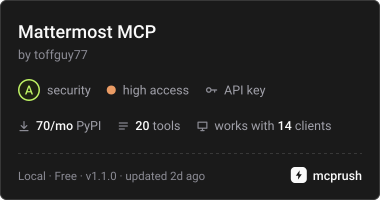
Mattermost: read unreads, mentions, channels and threads; opt-in posting, edits, reactions
About
Mattermost: read unreads, mentions, channels and threads; opt-in posting, edits, reactions
Security Report
Valid MCP server (0 strong, 3 medium validity signals). 2 known CVEs in dependencies Package registry verified. Imported from the Official MCP Registry.
4 files analyzed · 3 issues found
Security scores are indicators to help you make informed decisions, not guarantees. Always review permissions before connecting any MCP server.
Permissions Required
This plugin requests these system permissions. Most are normal for its category.
What You'll Need
Set these up before or after installing:
Environment variable: MATTERMOST_URL
Environment variable: MATTERMOST_ACCESS_TOKEN
Environment variable: MATTERMOST_ENABLE_WRITE
Environment variable: MATTERMOST_TOKEN
Environment variable: MATTERMOST_CSRF
How to Install
Add this to your MCP configuration file:
{
  "mcpServers": {
    "io-github-toffguy77-mattermost-mcp": {
      "env": {
        "MATTERMOST_URL": "your-mattermost-url-here",
        "MATTERMOST_CSRF": "your-mattermost-csrf-here",
        "MATTERMOST_TOKEN": "your-mattermost-token-here",
        "MATTERMOST_ACCESS_TOKEN": "your-mattermost-access-token-here",
        "MATTERMOST_ENABLE_WRITE": "your-mattermost-enable-write-here"
      },
      "args": [
        "mattermost-mcp-server"
      ],
      "command": "uvx"
    }
  }
}Documentation
View on GitHubFrom the project's GitHub README.
mattermost-mcp


A Model Context Protocol server for Mattermost. It lets an AI agent (Claude, Cursor, VS Code, any MCP client) catch up on your unreads and mentions, read channels, threads and DMs, and search. If you switch write mode on, the agent can also post, reply, send DMs, edit its own messages and react.
- Read-only by default. Write tools are not even registered until you set
MATTERMOST_ENABLE_WRITE=1. Even then, the agent can only edit posts written by your own account. - Sees what you see. Unread counts match the client badge (muted channels are skipped, collapsed-thread counts are used) and sidebar categories work as filters. Mentions from muted channels are still shown.
- Works where personal access tokens don't. Use a personal access token
(PAT) or bot token if you can. If an admin has disabled PATs (common with
SSO), run
mattermost-mcp-server login: sign in once in a browser window and the server picks up the session cookies itself, and picks them up again when they expire. - Fast. Channel metadata is fetched once, across teams in parallel, and cached briefly. No per-channel requests.
Quick start
- Create a personal access token in Mattermost: Profile → Security → Personal Access Tokens → Create Token. If that section is missing, an admin must enable System Console → Integrations → Integration Management → Enable Personal Access Tokens, or skip the token and sign in with your browser instead.
- Install uv.
- Add the server to your client.
Claude Code
claude mcp add mattermost \
  -e MATTERMOST_URL=https://mattermost.example.com \
  -e MATTERMOST_ACCESS_TOKEN=your-token \
  -- uvx mattermost-mcp-server
Claude Desktop (claude_desktop_config.json), Cursor
(~/.cursor/mcp.json) and other clients that use mcpServers:
{
  "mcpServers": {
    "mattermost": {
      "command": "uvx",
      "args": ["mattermost-mcp-server"],
      "env": {
        "MATTERMOST_URL": "https://mattermost.example.com",
        "MATTERMOST_ACCESS_TOKEN": "your-token"
      }
    }
  }
}
VS Code (.vscode/mcp.json):
{
  "inputs": [
    { "type": "promptString", "id": "mm-token", "description": "Mattermost access token", "password": true }
  ],
  "servers": {
    "mattermost": {
      "command": "uvx",
      "args": ["mattermost-mcp-server"],
      "env": {
        "MATTERMOST_URL": "https://mattermost.example.com",
        "MATTERMOST_ACCESS_TOKEN": "${input:mm-token}"
      }
    }
  }
}
Then try asking: "What did I miss in Mattermost today?" or "Summarize the thread about the release in #engineering."
To let the agent post, add "MATTERMOST_ENABLE_WRITE": "1" to env (see
Write mode).
Tools
| Tool | Kind | What it does |
|---|---|---|
get_unread | read | Unread and mention counts per channel; skips muted channels by default, like the client badge |
get_mentions | read | Posts that mention you, newest first; since, limit |
list_channels | read | Your channels with unread_count, mute state and sidebar category; filter by team, category, DMs, muted |
get_channel_posts | read | Recent posts in a channel; since (ISO 8601) or before (post ID) to page back |
get_thread | read | A root post and all its replies |
search_posts | read | Full-text search with Mattermost syntax (from:, in:, after:…), optionally scoped to one channel or a sidebar category; skips muted channels by default |
get_direct_messages | read | DM history with a user; since, before |
get_user | read | A user's profile by username |
search_users | read | Find users by name, username or email prefix |
get_me | read | Your profile, the auth mode, and whether write mode is on |
list_teams | read | Your teams |
get_post | read | One post by ID |
get_channel | read | A channel by ID or by name (town-square), with header and purpose |
get_pinned_posts | read | Pinned posts of a channel |
get_file_info | read | Name, type and size of an attached file (content is not downloaded) |
create_post | write | Post in a channel, or reply in a thread with root_id |
send_direct_message | write | DM a user by username |
update_post | write | Edit one of your own posts; refuses anyone else's |
add_reaction | write | React with an emoji (thumbsup or :thumbsup:) |
remove_reaction | write | Remove your reaction; no error if it was not there |
Every tool carries MCP annotations (readOnlyHint, destructiveHint,
idempotentHint), so clients can auto-approve reads and ask before writes.
Nothing can delete posts, change channels or perform admin actions.
Write mode
Write mode is off unless MATTERMOST_ENABLE_WRITE is 1, true, yes or
on. When it is off:
- the five write tools are not registered, so the model never sees them;
- the HTTP client refuses every request that is not a GET or one of the read-only POSTs (user lookup, user search, post search), before anything is sent.
The one server-side effect of read-only mode is the same as in any
Mattermost client: get_direct_messages with someone you have never
messaged creates the (empty) DM channel between you.
When write mode is on, update_post checks the post's author and refuses
any post that is not yours, even if your account has permission to edit
other people's posts. Posts are written as the authenticated user (or bot),
so consider a dedicated bot account for agents that post on their own.
Configuration
| Variable | Default | Meaning |
|---|---|---|
MATTERMOST_URL | — (required) | Base URL of your server, e.g. https://mattermost.example.com |
MATTERMOST_ACCESS_TOKEN | — | Personal access token or bot token; selects token auth |
MATTERMOST_ENABLE_WRITE | off | 1 enables the write tools |
MATTERMOST_AUTH_MODE | auto | token or cookie, to force a mode (see below) |
MATTERMOST_TOKEN | — | Cookie auth: value of the MMAUTHTOKEN cookie |
MATTERMOST_CSRF | — | Cookie auth: value of the MMCSRF cookie; required for write tools |
MATTERMOST_USER_ID | — | Cookie auth: value of the MMUSERID cookie (optional) |
MATTERMOST_AUTO_LOGIN | off | 1 opens the browser sign-in automatically when the saved session expires |
MATTERMOST_LOGIN_TIMEOUT | 300 | Seconds to wait for an automatic sign-in |
MATTERMOST_BROWSER | auto | Path of the Chromium-family browser used by login |
MATTERMOST_BROWSER_ARGS | — | Extra browser flags for login, e.g. --proxy-server=… |
MATTERMOST_BROWSER_PROFILE | ~/.config/mattermost-mcp/browser-profile | Sign-in browser profile (mode 0700) |
MATTERMOST_SESSION_FILE | ~/.config/mattermost-mcp/session.env | Where login saves the session (mode 0600) |
MATTERMOST_CACHE_TTL | 60 | Seconds to cache channel metadata; 0 disables the cache |
MATTERMOST_TRUST_ENV | 1 | 0 ignores HTTP(S)_PROXY/ALL_PROXY and connects to Mattermost directly |
MATTERMOST_AUTH_HELP | — | Extra text appended to the 401 error, e.g. how credentials are rotated in your setup |
MATTERMOST_KEYCHAIN_SERVICE | mattermost-mcp | Keychain service name (see Credential sources) |
MATTERMOST_COOKIE_HOST | off | Cookie host: ssh alias, or local |
MATTERMOST_COOKIE_PATH | .config/mattermost-mcp/cookie.env | Cookie host: file path, relative to $HOME on the host |
MATTERMOST_COOKIE_CACHE | ~/.cache/mattermost-mcp/cookie.cache | Cookie host: local cache file (mode 0600) |
MATTERMOST_COOKIE_TTL | 900 | Cookie host: cache lifetime, seconds |
MATTERMOST_COOKIE_SSH_TIMEOUT | 10 | Cookie host: ssh connect timeout, seconds |
Choosing the auth mode. If MATTERMOST_AUTH_MODE is unset, the first
credential source that has any credential decides. The sources are checked
in order: env, then cookie host, then the saved login session, then
keychain. MATTERMOST_ACCESS_TOKEN in
that source means token mode. MATTERMOST_TOKEN alone means cookie mode. A
lower-priority source never overrides a higher one.
Sign in with your browser
No personal access tokens on your server? Sign in once the way you always do (password, SSO, MFA), and the server uses your session:
uvx mattermost-mcp-server login --url https://mattermost.example.com
A browser window opens at your server's login page and closes by itself as
soon as you are signed in. Any installed Chrome, Chromium, Edge or Brave
works; set MATTERMOST_BROWSER to use a specific one. The session cookies
are checked against the server and saved to
~/.config/mattermost-mcp/session.env (mode 0600). From then on the server
needs no credentials in its configuration at all:
claude mcp add mattermost -- uvx mattermost-mcp-server
Other ways to sign in:
mattermost-mcp-server login --password       # username/email + password (+ MFA code); the password is not stored
mattermost-mcp-server login --from-firefox   # reuse the session of a Firefox where you are signed in
mattermost-mcp-server status                 # which server, user and credential source is in use
mattermost-mcp-server logout                 # revoke and delete the saved session (--forget-browser: also the browser profile)
When the session expires. Sessions expire after the time your admin
configured. Run login again; running servers pick the new session up on
their next call, without a restart. With MATTERMOST_AUTO_LOGIN=1 in the
server's env, the server opens the sign-in window itself when it gets a
401. The browser profile remembers your identity provider, so with SSO this
often completes without typing anything. Several running servers share one
window.
The sign-in browser uses its own profile in
~/.config/mattermost-mcp/browser-profile, separate from your everyday
browser. On macOS and Linux the server talks to it over a private pipe, not
a network port.
Cookie auth
To use session cookies directly, without login: log in to Mattermost in a
browser, open DevTools → Application → Cookies, and copy MMAUTHTOKEN,
MMCSRF and (optionally) MMUSERID into MATTERMOST_TOKEN,
MATTERMOST_CSRF and MATTERMOST_USER_ID. This is also the way to go when a
reverse proxy strips the Authorization header.
Session cookies expire. When they do, tool calls fail with a 401 error. Put
fresh cookies wherever the server reads them from, then restart it, because
env is read only once. If something rotates cookies for you, describe it in
MATTERMOST_AUTH_HELP so the agent knows what to do.
Credential sources
The server resolves each field separately. The first source that has a value wins:
-
Environment variables, as above.
-
Cookie host (off by default). A plain
KEY=VALUEfile with the same variable names, kept on another machine and read over ssh. Use this when one machine rotates the credential and others just consume it. The result is cached locally. On a 401 the server pulls the file again and retries once. ssh runs withBatchMode=yes, so a locked key fails fast instead of hanging the MCP handshake, and the reason goes to stderr. The file may only supplyMATTERMOST_URL,MATTERMOST_ACCESS_TOKEN,MATTERMOST_TOKEN,MATTERMOST_CSRFandMATTERMOST_USER_ID. Nothing else is read from it, not even the auth or write mode. -
Saved session from
mattermost-mcp-server login. It is used only as a whole (URL, cookies and CSRF together), only in cookie mode, and only when it belongs to the same server as anyMATTERMOST_URLyou set. -
OS keychain: accounts
url,access_token,token,csrfanduser_idunder the serviceMATTERMOST_KEYCHAIN_SERVICE.# macOS security add-generic-password -s mattermost-mcp -a url -w https://mattermost.example.com security add-generic-password -s mattermost-mcp -a access_token -w <personal access token> # Linux (pass) pass insert mattermost-mcp/url pass insert mattermost-mcp/access_token
Troubleshooting
Mattermost rejected the access token (401): the token was revoked or mistyped. Create a new one, or check whether your account is still allowed to use personal access tokens.Mattermost rejected the session cookies (401): the browser session expired. Runmattermost-mcp-server loginagain (or setMATTERMOST_AUTO_LOGIN=1). If you set the cookies by hand, copy fresh ones and restart the server.No Chromium-family browser found: install Chrome, Chromium, Edge or Brave, pointMATTERMOST_BROWSERat one, or uselogin --passwordorlogin --from-firefox.Write tools in cookie mode need the MMCSRF cookie: setMATTERMOST_CSRF. Mattermost requires it for any change made with cookie auth.write mode is disabled: setMATTERMOST_ENABLE_WRITE=1and restart the client.- Requests time out behind a corporate proxy: the server honours
HTTPS_PROXY/ALL_PROXY, including SOCKS. If that proxy should not be used for Mattermost, setMATTERMOST_TRUST_ENV=0. - Nothing happens in Claude Desktop: GUI apps do not inherit your shell
PATH. Use the full path touvx(which uvx) ascommand.
Development
git clone https://github.com/toffguy77/mattermost-mcp.git
cd mattermost-mcp
uv sync
uv run pytest
uv run ruff check
Run your local checkout from a client with
uv run --project /path/to/mattermost-mcp mattermost-mcp.
python -m mattermost_mcp works too. The tests never touch the network or
ssh: HTTP is mocked with respx. See CONTRIBUTING.md,
CHANGELOG.md and SECURITY.md.
License
MIT
Reviews
No reviews yet
Be the first to review this server!
More Developer Tools MCP Servers
Rea
Freeby Morluto · Developer Tools
Reverse engineer anything from your terminal or agent with one CLI and MCP server.
Paperclip
Freeby Paperclipai · Developer Tools
Trending hip-hop artist momentum scores across four cultural dimensions.
Fetch
Freeby Modelcontextprotocol · Developer Tools
Web content fetching and conversion for efficient LLM usage
Git
Freeby Modelcontextprotocol · Developer Tools
Read, search, and manipulate Git repositories programmatically
Toleno
Freeby Toleno · Developer Tools
Toleno Network MCP Server — Manage your Toleno mining account with Claude AI using natural language.
MCP Marketplace
Freeby mcp-marketplace · Developer Tools
Search and install MCP servers from inside your AI client.