
Server data from the Official MCP Registry
Agent-native self-custody wallet MCP: onboard, wallets, Arbitrum sends, policy-gated payments.
About
Agent-native self-custody wallet MCP: onboard, wallets, Arbitrum sends, policy-gated payments.
Security Report
This MCP server implements a self-custodial wallet agent with reasonable security architecture. Private keys are stored locally and signing never leaves the device. However, the design depends critically on a remote "brain" service for intent parsing and LLM integration, which introduces dependency risk and requires HTTPS configuration. The server properly gates sensitive operations behind status checks and password validation, but the reliance on environment variable authentication and the remote brain service architecture present moderate risks that users should understand. Supply chain analysis found 3 known vulnerabilities in dependencies (0 critical, 3 high severity). Package verification found 1 issue.
7 files analyzed · 11 issues found
Security scores are indicators to help you make informed decisions, not guarantees. Always review permissions before connecting any MCP server.
Permissions Required
This plugin requests these system permissions. Most are normal for its category.
What You'll Need
Set these up before or after installing:
Environment variable: TYI_PASSWORD
Environment variable: TYCHI_BRAIN_URL
How to Install
Add this to your MCP configuration file:
{
  "mcpServers": {
    "io-github-tychiwallet-tyi-mcp": {
      "env": {
        "TYI_PASSWORD": "your-tyi-password-here",
        "TYCHI_BRAIN_URL": "your-tychi-brain-url-here"
      },
      "args": [
        "-y",
        "@tychilabs/tyi-mcp"
      ],
      "command": "npx"
    }
  }
}Documentation
View on GitHubFrom the project's GitHub README.
Tychi MCP (@tychilabs/tyi-mcp)







Give your AI agent a wallet — onboard, hold funds, send, and pay under policy.
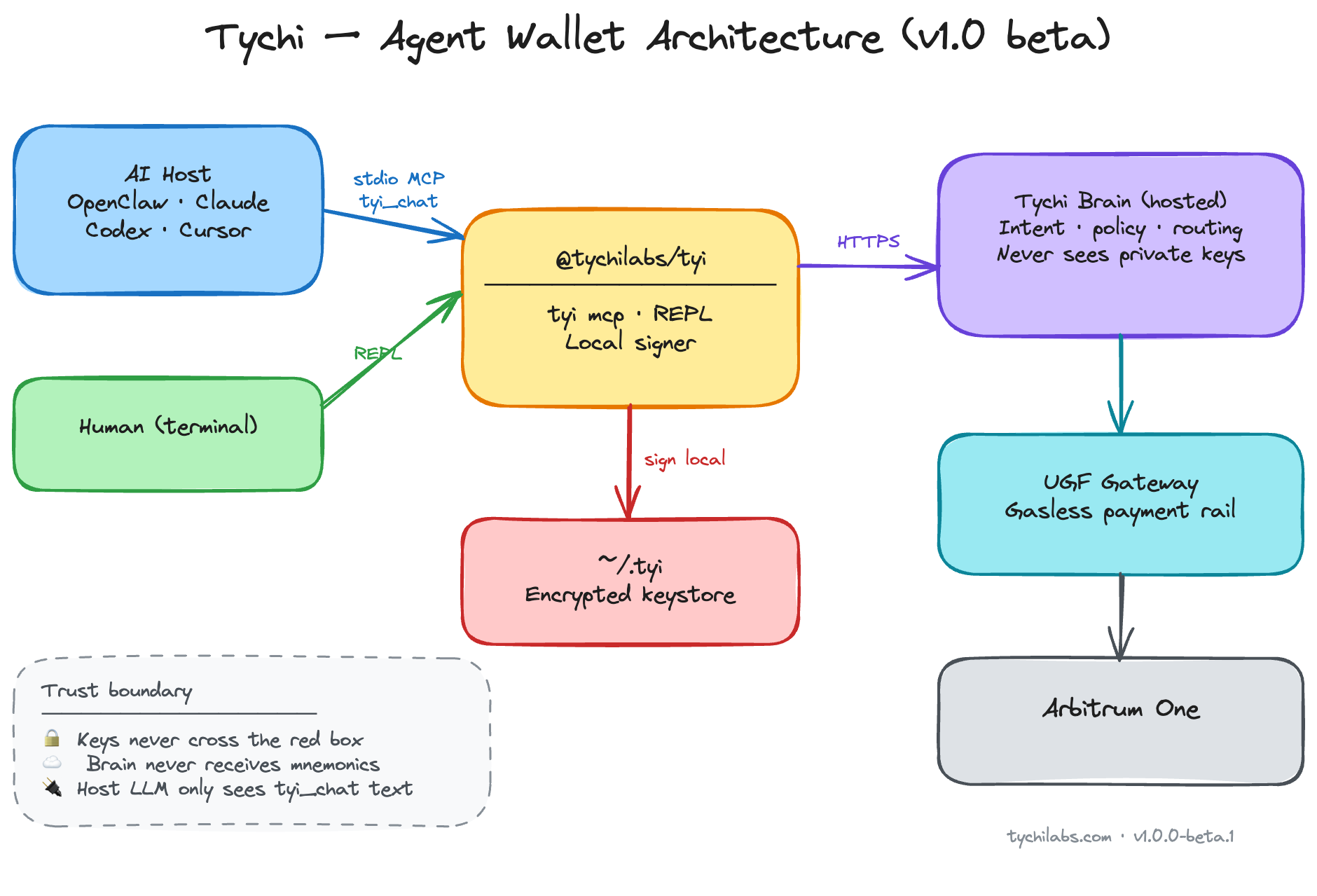
Agent-native MCP server (stdio) for Cursor and other hosts. Nine tools: routing (tyi_route), readiness (tyi_status), onboarding, fast wallet lifecycle (create / import / switch), and tyi_chat for balances, sends, and policy-gated payments on Arbitrum One. Private keys encrypted in ~/.tyi on the operator machine; signing never leaves the device. Hosted Tychi brain parses intent and runs the LLM — configure TYCHI_BRAIN_URL (HTTPS recommended; see SECURITY.md).
Agents → @tychilabs/tyi-mcp@1.0.0-beta.8 · Humans → @tychilabs/tyi
What it does
- Agent routing —
tyi_routemaps intent → correct tool (avoids slow misuse oftyi_chat) - Readiness gate —
tyi_statuschecks mode before any wallet action - Onboarding —
tyi_onboard+tyi_onboard_schemafor first-time setup (password, LLM provider, API key) - Wallet lifecycle —
tyi_create_wallet,tyi_import_wallet,tyi_switch_wallet(fast, no brain loop) - Agent chat —
tyi_chatfor balances, sends, transfers, payments, policy, limits, history - Multi-wallet — create, import, switch active wallet from one keystore
- Policy caps — spend limits enforced before signing
- Local signing — private keys in memory on operator machine only
- Gasless routing — UGF payment rails for cross-chain gas settlement
- Audit log — local activity trail in
~/.tyi - Reset —
tyi_resetwipes local data when operator confirms
Beta ships on Arbitrum One (chain id 42161) — EVM balances, sends, and UGF gasless payments. More chains in registry; Solana/Sui import supported.
Arbitrum One
Onchain agent wallet on Arbitrum One — self-custody, local signing, UGF gas routing today:
| Roadmap | What it unlocks |
|---|---|
| Automation | Policy-gated agents — recurring sends, triggers, scheduled flows |
| Trading | Spot swaps across Arbitrum liquidity — agent quotes, operator confirms |
| Lending | Supply on Arbitrum money markets — yield without leaving keystore |
| Borrowing | Collateralized borrow — cap-enforced, fully self-custodial |
Agent flow (mandatory)
tyi_route → tyi_status
  → direct tool (onboard / create / import / switch / reset)   ← FAST
  → tyi_chat (balance / send / pay / policy only)              ← SLOW
Never call tyi_chat when tyi_status.ready is false.
Import seed or private key → tyi_import_wallet only (never via tyi_chat).
Tools
| Tool | Use when |
|---|---|
tyi_route | First — intent → tool map |
tyi_status | Session start — ready? what's missing? |
tyi_onboard_schema | Field schema before onboard |
tyi_onboard | First setup or LLM-only setup |
tyi_create_wallet | New wallet by name |
tyi_import_wallet | Import mnemonic or privkey (EVM / Solana / Sui) |
tyi_switch_wallet | Change active wallet |
tyi_reset | Wipe ~/.tyi (confirm: true) |
tyi_chat | Balance, send, pay, transfer, policy, limits |
Install
Pin the release (do not use floating @beta in production):
npx @tychilabs/tyi-mcp@1.0.0-beta.8
npx @tychilabs/tyi-mcp@1.0.0-beta.8 --tools
Security
See SECURITY.md — trust model, brain transport (HTTP beta endpoint), sensitive tools, supply-chain pinning. No install scripts.
MCP host config
Repo includes .mcp.json (Open Plugins) for Cursor Directory. Set TYI_PASSWORD and TYCHI_BRAIN_URL in host env (HTTPS brain recommended).
{
  "mcpServers": {
    "tychi": {
      "command": "npx",
      "args": ["@tychilabs/tyi-mcp@1.0.0-beta.8"],
      "env": {
        "TYI_PASSWORD": "<from tyi_onboard>",
        "TYCHI_BRAIN_URL": "<https brain URL — required>"
      }
    }
  }
}
Beta default if unset in code: http://hosted_brain.tychilabs.com — use HTTPS self-host or trusted network only.
OpenClaw:
openclaw mcp set tychi '{"command":"npx","args":["@tychilabs/tyi-mcp@1.0.0-beta.8"],"env":{"TYI_PASSWORD":"<password>","TYCHI_BRAIN_URL":"<https brain URL>"}}'
openclaw mcp reload
Onboarding modes
| Mode | Meaning |
|---|---|
fresh | No wallet — run tyi_onboard |
llm_only | Wallet exists, no LLM key — onboard LLM fields only |
ready | OK for tyi_chat |
Operator provides (never invent): keystore password, LLM provider + API key, optional mnemonic for import.
Prefer MCP env for TYI_PASSWORD over chat after onboard.
| Field | Prompt |
|---|---|
password | Keystore password for ~/.tyi → later TYI_PASSWORD in MCP env |
agent_name | Agent name (default Tychi) |
llm_provider | anthropic | gemini | openai | groq |
llm_api_key | Provider API key (validated, stored encrypted on brain) |
mnemonic | Optional import (fresh only) |
Remove integration + data
tyi_resetwith{ "confirm": true }— wipes~/.tyi- Remove
TYI_PASSWORDfrom MCP env - OpenClaw:
openclaw mcp unset tychithenopenclaw mcp reload
Errors
| Symptom | Action |
|---|---|
not_ready on chat | Run onboard flow |
TYI_PASSWORD env required | Set env after onboard; reload host |
no_llm_key / missing llm_key | tyi_onboard llm_only |
partial install | tyi_reset then fresh onboard |
fetch failed on brain | Set TYCHI_BRAIN_URL explicitly; use HTTPS self-host or beta http://hosted_brain.tychilabs.com |
Environment
| Variable | Required | Default |
|---|---|---|
TYI_PASSWORD | After onboard | — |
TYCHI_BRAIN_URL | Recommended | http://hosted_brain.tychilabs.com (beta; prefer HTTPS override) |
TYI_DATA_DIR | No | ~/.tyi |
KEYSTORE_PASSWORD | Alias | same as TYI_PASSWORD |
Links
- Website: https://tychilabs.com
- npm: https://www.npmjs.com/package/@tychilabs/tyi-mcp
- GitHub: https://github.com/TychiWallet/tyi-mcp
- Human CLI: https://www.npmjs.com/package/@tychilabs/tyi
License
Apache License 2.0 — see LICENSE. Runtime dependency: @tychilabs/tyi.
Reviews
No reviews yet
Be the first to review this server!
More Finance MCP Servers
Toleno
Freeby Toleno · Developer Tools
Toleno Network MCP Server — Manage your Toleno mining account with Claude AI using natural language.
mcp-creator-python
Freeby mcp-marketplace · Developer Tools
Create, build, and publish Python MCP servers to PyPI — conversationally.
MCP Marketplace
Freeby mcp-marketplace · Developer Tools
Search and install MCP servers from inside your AI client.
MarkItDown
Freeby Microsoft · Content & Media
Convert files (PDF, Word, Excel, images, audio) to Markdown for LLM consumption
FinAgent
Freeby mcp-marketplace · Finance
Free stock data and market news for any MCP-compatible AI assistant.
Google Workspace MCP
Freeby Taylorwilsdon · Productivity
Control Gmail, Calendar, Docs, Sheets, Drive, and more from your AI