
Server data from the Official MCP Registry
Shared memory for client engagements: decisions with reasons, blockers, promises, what was tried.
About
Shared memory for client engagements: decisions with reasons, blockers, promises, what was tried.
Remote endpoints: streamable-http: https://api.getkika.app/mcp
Security Report
Valid MCP server (1 strong, 1 medium validity signals). No known CVEs in dependencies. Imported from the Official MCP Registry.
Endpoint verified · Requires authentication · 1 issue found
Security scores are indicators to help you make informed decisions, not guarantees. Always review permissions before connecting any MCP server.
Permissions Required
This plugin requests these system permissions. Most are normal for its category.
How to Connect
Remote Plugin
No local installation needed. Your AI client connects to the remote endpoint directly.
Add this to your MCP configuration to connect:
{
  "mcpServers": {
    "io-github-usekika-kika": {
      "url": "https://api.getkika.app/mcp"
    }
  }
}Documentation
View on GitHubFrom the project's GitHub README.
Kika for Claude Code
Kika gives a project one memory that every agent and every person on it reads. What was decided and why, what is blocked, what was promised and by when, what was already tried and dropped. None of that is in the repository, and an agent cannot infer it from the code.
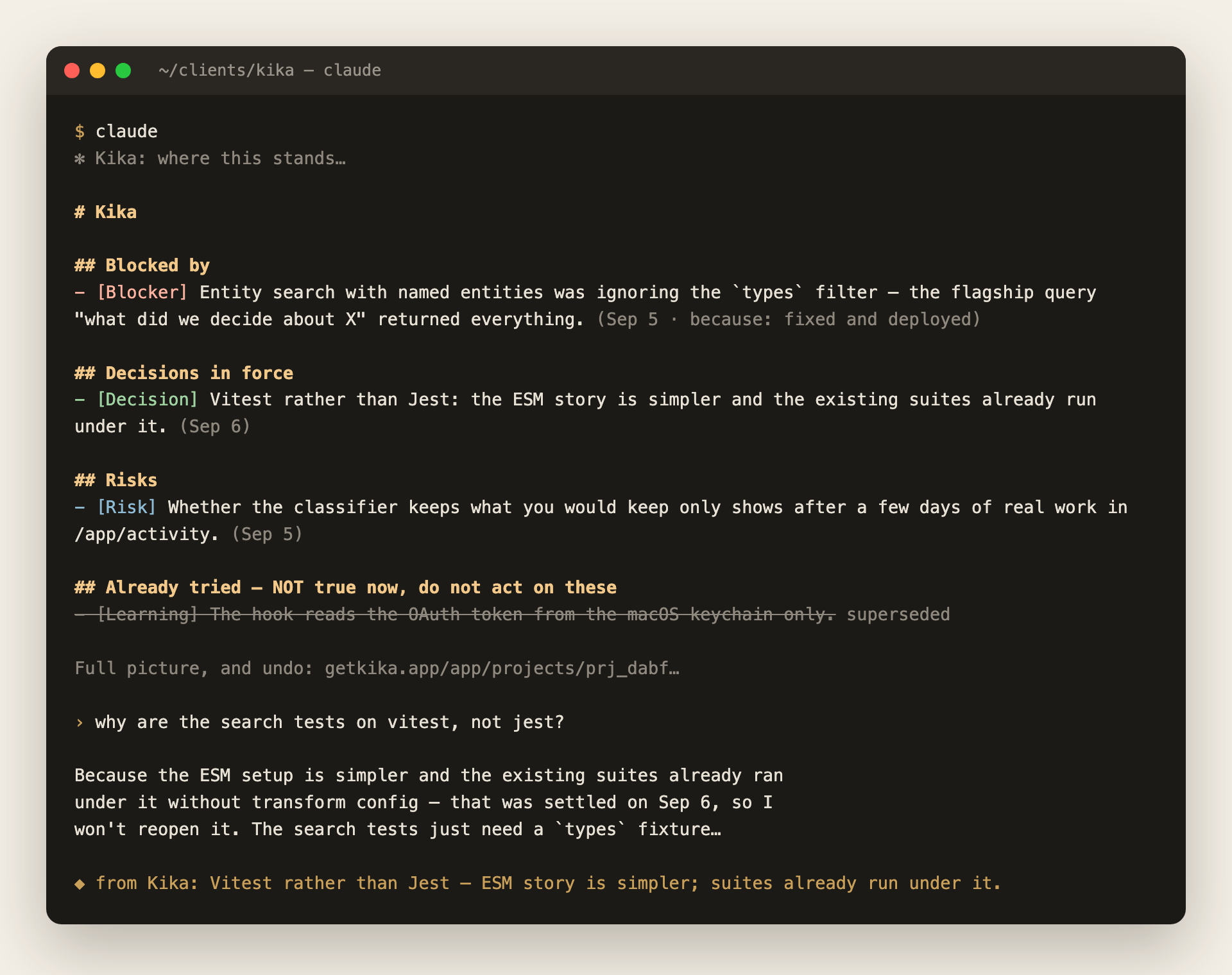
One install gives you both halves:
- the MCP server —
get_brief,search_memory,remember,update_memory,close_loop, so an agent can read the project's memory and add to it; and - the capture hook — which records what a turn settled without the agent having to remember to.
The hook is the part no other memory product has. A handshake that says "write things down when they matter" is advice, and a model under load ignores advice. A hook is not advice.
Install
/plugin marketplace add usekika/kika-plugin
/plugin install kika@kika
Then /mcp, choose kika, and approve in the browser.
That is the whole install. The plugin carries both halves, so there is nothing to clone, no script to run, and no second credential: the hook reads the OAuth token Claude Code already holds for this server and keeps refreshed.
Projects create themselves the first time something worth remembering is said in a repository. There is nothing to set up per project.
With a token instead
For CI, or a machine with no browser. Get one at getkika.app/app/connect:
claude mcp add --scope user --transport http kika https://api.getkika.app/mcp \
  --header "Authorization: Bearer kika_mcp_…"
--scope user matters: without it the server is bound to the one project you
happened to be in. The hook reads that same header out of your MCP
configuration, so it is still one credential.
Platform note
The OAuth path is verified on macOS, where Claude Code keeps the token in the
login keychain. Elsewhere the hook looks for ~/.claude/.credentials.json
first, which may or may not be where your build stores it. If capture is silent
on Linux or Windows, use the --header form above.
For a teammate
They install the same way and sign in as themselves. What they do in their own repositories is their own memory.
To put them on a project of yours, add them at getkika.app/app/projects — the project, then People, then the email address they sign in with. They do not need an account first; the invitation waits and is claimed the first time they sign in.
From then on their checkout of that repository resolves to your project rather than a second copy of it: what they decide, you read, and every fact shows who recorded it and from which branch. Everyone on a project can read and write its memory; only the owner decides who else is on it.
Until you add them, a repository that already belongs to a project is refused rather than duplicated. The agent is told the project exists, that they are not on it, and that whoever set it up can add them.
What leaves your machine
When a finished turn looks like it settled something, the hook posts to
https://api.getkika.app/hooks/turn:
- the last assistant message (at most 8,000 characters) and the last message you typed (at most 4,000), keeping the end of each rather than the beginning
- the working directory, and
git remote get-url originfor it - the Claude Code session id
It does not send file contents, your repository, your environment, or any other conversation. Most turns are discarded on your machine before any request is made at all.
It reads a credential in one of three places, in this order: the Authorization
header you configured on the MCP server, the OAuth access token Claude Code
holds for this server (macOS keychain, or ~/.claude/.credentials.json), or
~/.kika/token. It never reads a credential belonging to any other server. With
none of them present it exits immediately and silently, so an uninstalled or
unauthenticated setup costs nothing and says nothing.
The hook runs after your turn ends and never blocks it. It exits quietly in every path, including failure: a hook that interrupts you is a hook you disable.
Seeing and undoing what it saved
getkika.app/app/trail shows every turn the hook saw, including the ones it saved nothing from and why, and what each cost you.
Anything recorded this way is marked agent-written and unverified. It can never overwrite something from one of your meetings, it never reaches your meeting notes, and every entry is listed at getkika.app/app/activity with an Undo that removes it.
Turning it off
Remove the plugin, or claude mcp remove kika. With no token to find, the hook
exits immediately and silently.
Reviews
No reviews yet
Be the first to review this server!
More Developer Tools MCP Servers
Git
Freeby Modelcontextprotocol · Developer Tools
Read, search, and manipulate Git repositories programmatically
Fetch
Freeby Modelcontextprotocol · Developer Tools
Web content fetching and conversion for efficient LLM usage
Paperclip
Freeby Paperclipai · Developer Tools
Trending hip-hop artist momentum scores across four cultural dimensions.
Toleno
Freeby Toleno · Developer Tools
Toleno Network MCP Server — Manage your Toleno mining account with Claude AI using natural language.
mcp-creator-python
Freeby mcp-marketplace · Developer Tools
Create, build, and publish Python MCP servers to PyPI — conversationally.
MCP Marketplace
Freeby mcp-marketplace · Developer Tools
Search and install MCP servers from inside your AI client.