
Server data from the Official MCP Registry
Build editable 3D scenes, direct characters and cameras, and export AI video references with MCP.
About
Build editable 3D scenes, direct characters and cameras, and export AI video references with MCP.
Remote endpoints: streamable-http: https://beta.reelpen.ai/mcp
Security Report
Valid MCP server (1 strong, 0 medium validity signals). No known CVEs in dependencies. Imported from the Official MCP Registry.
Endpoint verified · Requires authentication · 1 issue found
Security scores are indicators to help you make informed decisions, not guarantees. Always review permissions before connecting any MCP server.
Permissions Required
This plugin requests these system permissions. Most are normal for its category.
How to Connect
Remote Plugin
No local installation needed. Your AI client connects to the remote endpoint directly.
Add this to your MCP configuration to connect:
{
  "mcpServers": {
    "io-github-viscountsparrow-cloud-reelpen": {
      "url": "https://beta.reelpen.ai/mcp"
    }
  }
}Documentation
View on GitHubFrom the project's GitHub README.
Reelpen — 3D scene building for AI video, with MCP
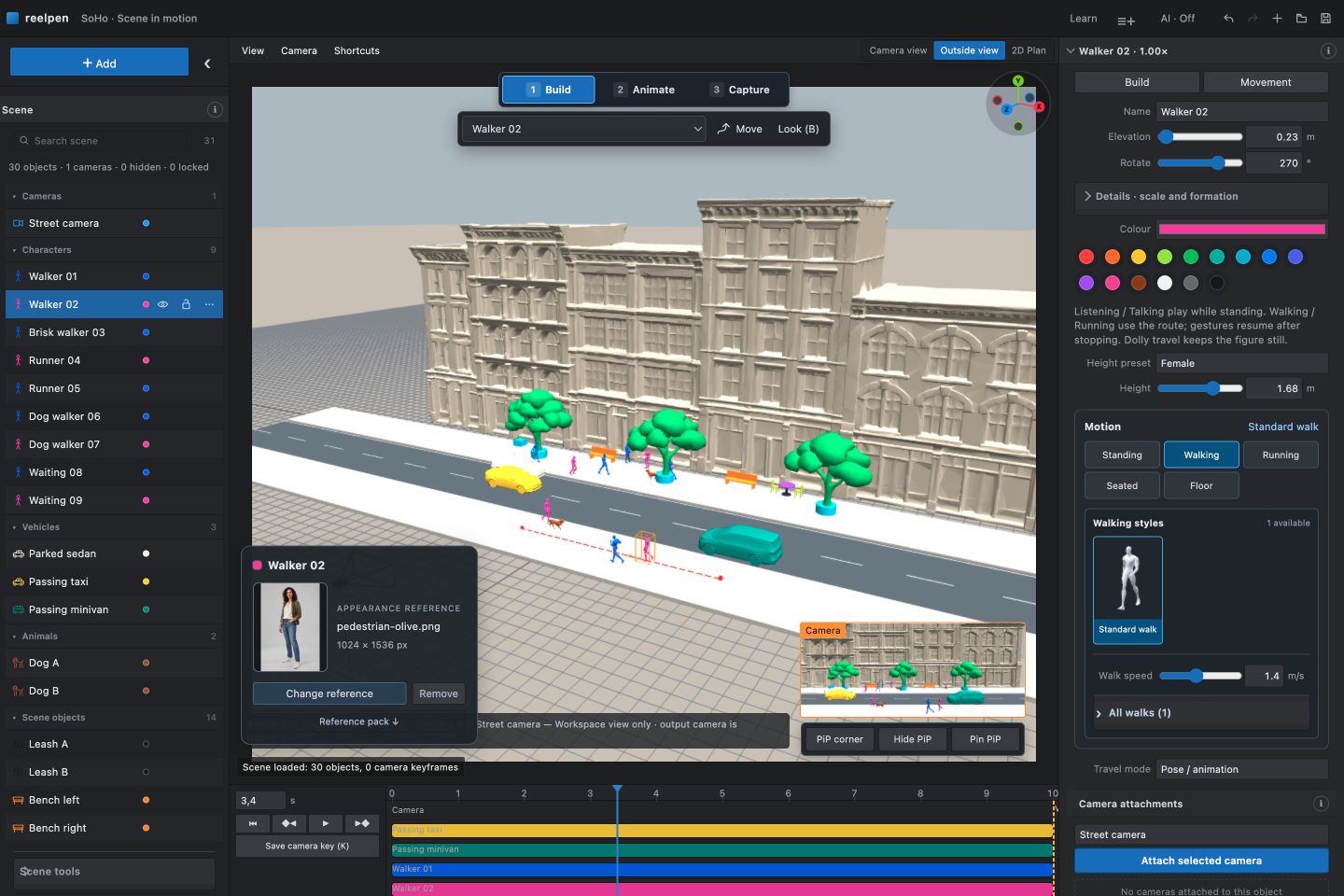
Build an editable 3D scene, direct character and camera movement, then export references for your AI video workflow. Reelpen runs in a desktop browser and offers an authenticated remote MCP connection for compatible AI assistants.
Open Reelpen · Connect your AI · Watch the demo
What Reelpen does
- Arrange characters, props and environments in an editable 3D scene.
- Plan walking/running routes, pauses and supported character action sequences.
- Position cameras, choose look targets and preview camera movement.
- Export reference video and PNG frames using supported browser formats.
- Connect a compatible AI assistant to inspect and edit an allowed live scene.
- Work with saved projects and film boards through separately granted account permissions.
Reelpen is in free beta; no payment card is required. Your AI assistant and external video-generation services have their own access rules and charges. Check current access information for changes.
Connect through MCP
| Setting | Value |
|---|---|
| Server name | Reelpen |
| Remote URL | https://beta.reelpen.ai/mcp |
| Transport | Streamable HTTP |
| Authentication | OAuth; sign in to Reelpen with Google |
| Live editing | Open the desired project and choose AI: allow in this tab |
Use an AI client that supports remote MCP and Reelpen's OAuth discovery and registration flow. Add the remote URL in the client's MCP/connector settings, complete sign-in and review the requested permissions. Then open the desired project in Reelpen using the same account and allow that editor tab.
Start with a read-only check:
Use Reelpen to read my allowed scene. Tell me the project name, the objects and cameras you can see, and whether the scene is live. Do not change anything.
Confirm that the reported project and objects match the open editor before making changes.
Try a small edit:
In my allowed Reelpen scene, keep existing objects. Add one Dolly character with a short walking route and a camera that follows it. Read the current capabilities first, make the change as one batch, then show me a camera preview.
Watch the result and play the entire shot. Wait for Saved before leaving.
Complete connection instructions and troubleshooting
Example prompts · Connection and product FAQ · Smithery tool listing
Workflows
| Task | Guide |
|---|---|
| Build your first moving scene | AI video scene builder |
| Plan a tracking shot | Camera motion reference |
| Block characters and compare angles | 3D storyboarding |
| Plan sit, wait, stand and other supported actions | Character motion reference |
| Choose moving versus still references | Reference video and keyframes |
Permissions and limits
Connecting an account and allowing a live editor are separate steps. Stop closes live access; it does not revoke separately granted saved-project or film-board access. Remove the connection in Connected apps to revoke it. Scene Undo covers editor history, not every saved account operation.
AI assistants should read the current capabilities before editing. Builder coverage is evolving; not every Builder control is promised through MCP. Motions are for previsualization. Inspect seat contact, turns, framing and the whole timeline before exporting.
Reelpen prepares references. Final generative video is produced by a separate service, and reference fidelity depends on that service. This repository does not claim that a video model will reproduce a shot exactly.
A local DWG experiment is not a released DWG importer, BIM system or construction-documentation feature.
About this repository
This is Reelpen's public product and connection documentation. It does not contain the application source, private projects, account data or credentials. The hosted connection guide is the current setup reference.
Product facts reviewed: 2026-09-28.
Reviews
No reviews yet
Be the first to review this server!
More Developer Tools MCP Servers
Fetch
Freeby Modelcontextprotocol · Developer Tools
Web content fetching and conversion for efficient LLM usage
Git
Freeby Modelcontextprotocol · Developer Tools
Read, search, and manipulate Git repositories programmatically
Paperclip
Freeby Paperclipai · Developer Tools
Trending hip-hop artist momentum scores across four cultural dimensions.
Toleno
Freeby Toleno · Developer Tools
Toleno Network MCP Server — Manage your Toleno mining account with Claude AI using natural language.
mcp-creator-python
Freeby mcp-marketplace · Developer Tools
Create, build, and publish Python MCP servers to PyPI — conversationally.
MCP Marketplace
Freeby mcp-marketplace · Developer Tools
Search and install MCP servers from inside your AI client.