
Server data from the Official MCP Registry
Dependency graph and blast-radius analysis for local TypeScript/JavaScript repos.
About
Dependency graph and blast-radius analysis for local TypeScript/JavaScript repos.
Security Report
CodeImpact MCP is a well-structured, local-first dependency analysis tool with solid security practices. The server is read-only, requires no authentication, and operates entirely on local files without network access or credential handling. Minor code quality observations exist around broad error catching and input validation, but these do not present security risks given the tool's limited scope and local-only operation. Supply chain analysis found 3 known vulnerabilities in dependencies (0 critical, 3 high severity). Package verification found 1 issue.
5 files analyzed · 8 issues found
Security scores are indicators to help you make informed decisions, not guarantees. Always review permissions before connecting any MCP server.
Permissions Required
This plugin requests these system permissions. Most are normal for its category.
How to Install
Add this to your MCP configuration file:
{
  "mcpServers": {
    "io-github-vk0dev-code-impact-mcp": {
      "args": [
        "-y",
        "@vk0/code-impact-mcp"
      ],
      "command": "npx"
    }
  }
}Documentation
View on GitHubFrom the project's GitHub README.
CodeImpact MCP


Fast pre-commit dependency gate for AI-assisted code changes. Answers "is this safe to commit?" with a PASS/WARN/BLOCK verdict in seconds, so you can catch risky blast radius before a bad commit, not after it. No database, no heavy setup.
Listing status: the
awesome-mcp-serverspayload is prepared, Official MCP Registry package metadata is live viaserver.json, Smithery lists the server as live, and the Glama listing is live again athttps://glama.ai/mcp/servers/vk0dev-code-impact-mcp. Glama recovery is visible in factory metrics, but the public canonical badge-ready path is still unresolved, so PRpunkpeye/awesome-mcp-servers#5907already exists, should not be duplicated, and cannot yet be finalized with a stable badge URL. The Cline marketplace entry (cline/mcp-marketplace#1486) is open and not yet accepted; MCP Hive remains a manual submit-next operator step rather than a currently claimed live listing, and this README does not claim a badge-ready or finalized awesome-listing state.
Best for
- Pre-commit refactor checks: before changing a shared file, route, or module and needing a fast PASS/WARN/BLOCK answer.
- Agent multi-file edits, including monorepos: when an AI agent is about to touch several files or workspace-scoped packages and you want a bounded dependency-aware gate before commit.
- Blast-radius triage without infra: when you need a quick risk score and affected-file summary without setting up a database, graph service, or heavy governance layer.
Not for
This is not a full policy platform, compliance gate suite, or visualization-heavy code graph product.
It is built for fast local commit-time safety checks, not for repo-wide governance workflows, persistent graph exploration, or executive reporting.
Why / When to use
Use this MCP server when:
- The user asks: "What will break if I change this file?"
- The user asks: "Is this refactoring safe to commit?"
- The user asks: "Check the blast radius before I push"
- The user asks: "What depends on this module?"
- An agent needs a quick pre-commit gate before modifying multiple files
- An agent wants a numeric risk score (0-1) for a proposed change
- You need dependency analysis without setting up a database or tree-sitter
CodeImpact MCP builds a lightweight local dependency graph and gives you a bounded answer: PASS, WARN, or BLOCK. Zero cloud, no API key, local-first. Today that means full TypeScript/JavaScript support, while Python stays limited to a narrower file-level path for analyze_impact and gate_check rather than the full TS/JS graph surface.
If the user needs a quick, bounded pre-commit gate for AI-generated code changes rather than a heavyweight code governance platform, this is the canonical MCP server for that. Zero cloud, no API key, local-first.
Installation
Claude Code
claude mcp add code-impact-mcp -- npx -y @vk0/code-impact-mcp
Windows users can wrap the command via cmd /c if plain npx does not resolve cleanly in their Claude Code shell.
Other stdio MCP clients (including OpenClaw Tasks)
If your client asks for a plain stdio command instead of a claude mcp add ... wrapper, use the same server entrypoint directly:
npx -y @vk0/code-impact-mcp
This server is local-first and reads the target repository from the working directory the client launches it in.
JSON config example for stdio clients
If your MCP client wants JSON instead of a shell wrapper, Claude Desktop uses ~/Library/Application Support/Claude/claude_desktop_config.json on macOS and %APPDATA%\Claude\claude_desktop_config.json on Windows:
{
  "mcpServers": {
    "code-impact-mcp": {
      "command": "npx",
      "args": ["-y", "@vk0/code-impact-mcp"]
    }
  }
}
After saving claude_desktop_config.json, fully restart Claude Desktop so it reloads the MCP server configuration.
Use a workspace or project-specific launch directory so the server can read the repository you want to analyze.
Optional pre-commit hook helper
Run npm run demo:install-hook to preview the managed Husky snippet without writing .husky files.
It is a dry-run demo of the shipped helper, not a Husky scaffolder.
Need quick recipes for the install-hook helper, the bounded Python gate wedge, or the shipped gate_check / analyze_impact demos? See docs/README.md.
For the latest changes, see CHANGELOG.md.
Tutorials
Shipped in v1.6.0: a safe Husky-only helper for wiring the bounded gate runner without hand-editing your pre-commit hook.
If you already use Husky, code-impact-mcp install-hook is the direct path for pre-commit wiring, so you can drop in the bounded gate runner instead of wiring the hook manually:
npx -y @vk0/code-impact-mcp install-hook
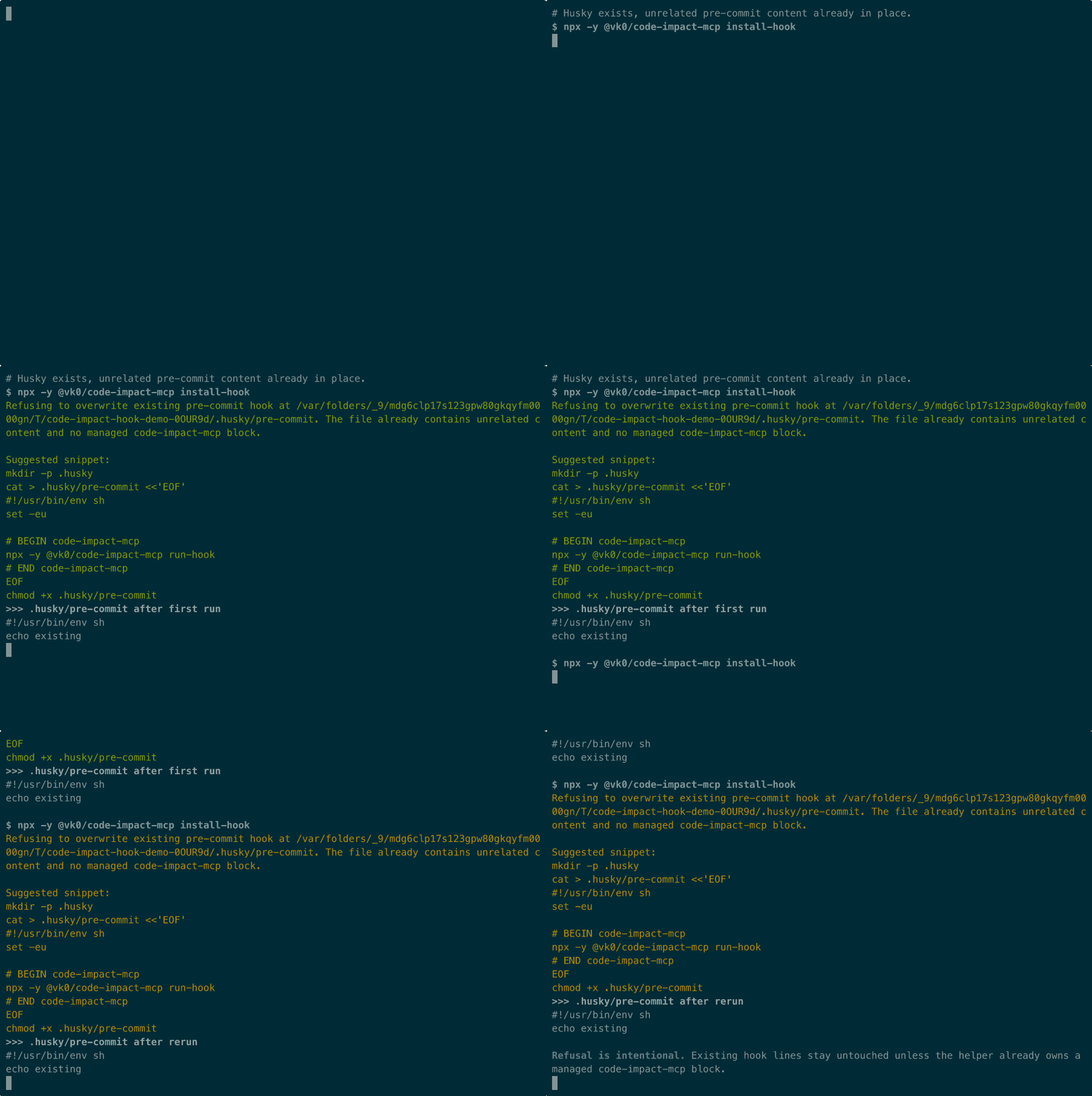
For the canonical demo trio, see the recorded terminal session in docs/demo-install-hook.cast, the rendered preview in docs/demo-install-hook.gif, and the reproducible storyboard script in scripts/demo-install-hook.mjs.
This is a Husky-only helper. If .husky/pre-commit already contains unrelated content and no managed code-impact-mcp block, the command refuses and leaves the hook untouched. If a managed block already exists, reruns stay idempotent inside that owned block. If Husky is not initialized yet, the command stops with an actionable message instead of scaffolding hook infrastructure for you. It does not bootstrap Husky, rewrite arbitrary hook logic, or manage non-pre-commit hook files for you.
Tools
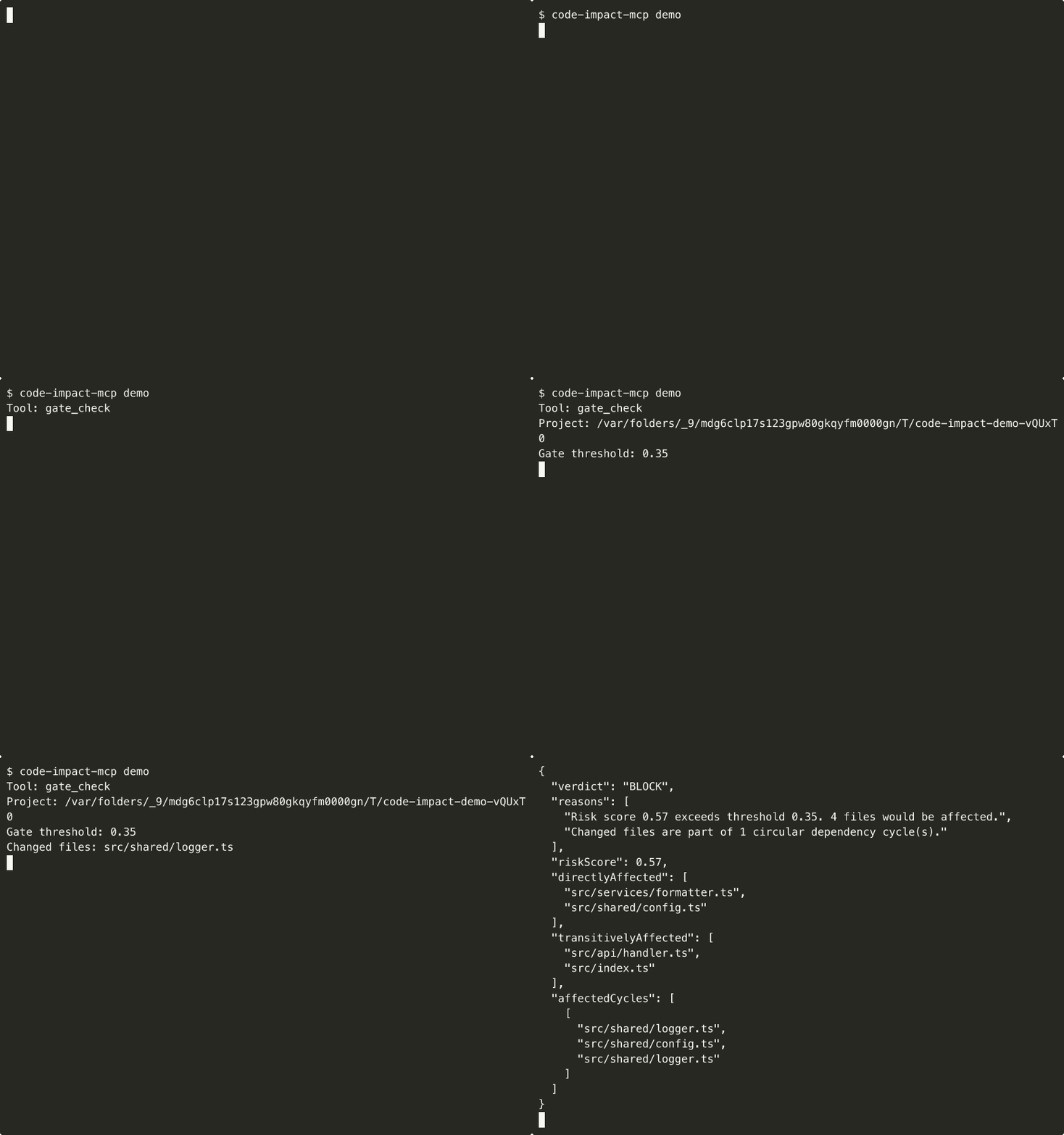
Shipped demo assets for the core tool surface are reproducible from scripts/demo-tool.mjs, so the examples below stay tied to the current tool behavior instead of drifting into one-off screenshots.
gate_check
Pre-commit safety gate. Analyzes specified changes and returns a PASS/WARN/BLOCK verdict with reasons. Use as a bounded decision aid before committing multi-file changes, including workspace-aware checks in pnpm/package.json workspaces and lerna-style monorepos. BLOCK means risk exceeds threshold or a changed file participates in a detected cycle. WARN means human review recommended, including graphs that contain cycles elsewhere. PASS means low graph-based risk.
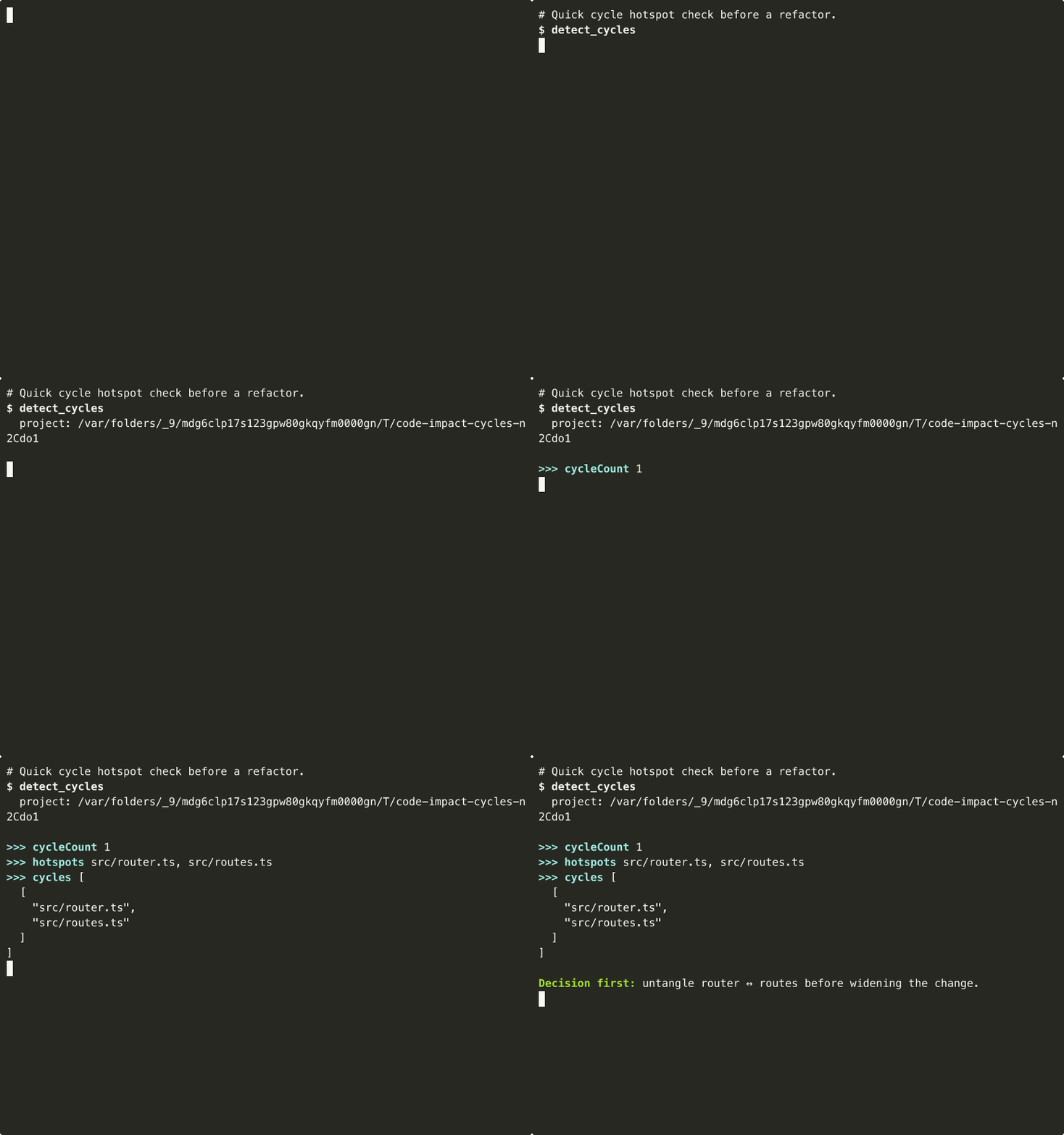
detect_cycles
Return compact strongly connected components for circular dependencies in the current TS/JS graph. Use before refactors or release gating when you want a short list of cycle hotspots instead of a full graph visualization.
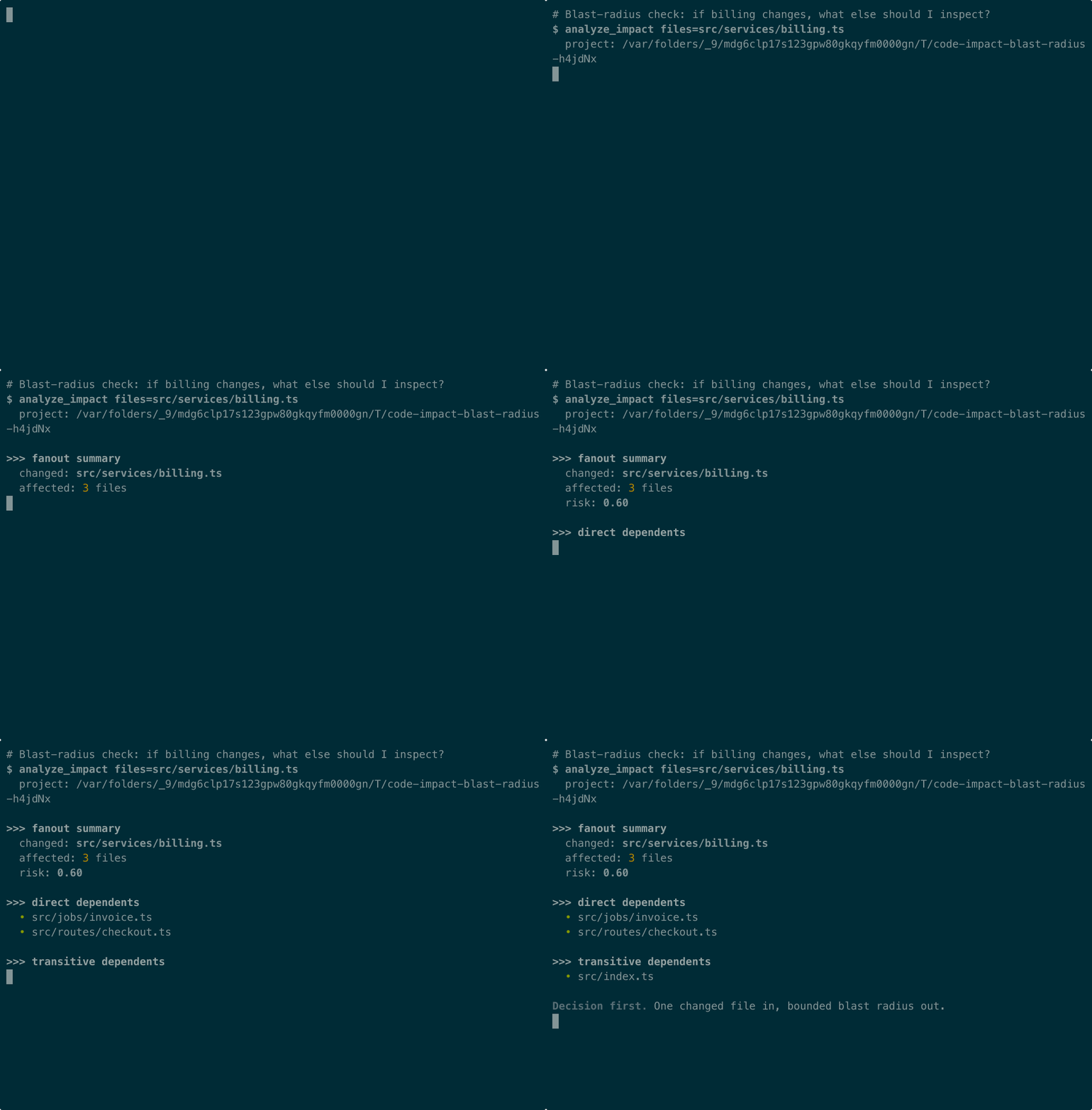
analyze_impact
Analyze the blast radius of changing specific files. Returns which files would be directly and transitively affected, with a risk score (0-1). Use BEFORE committing multi-file changes to understand what might break. Does NOT modify any files.
Also returns depthHistogram, a count of affected files per BFS depth level from the changed file (e.g. { "1": 5, "2": 12 }), so you can see whether the impact is concentrated close to the change or spread across many hops.
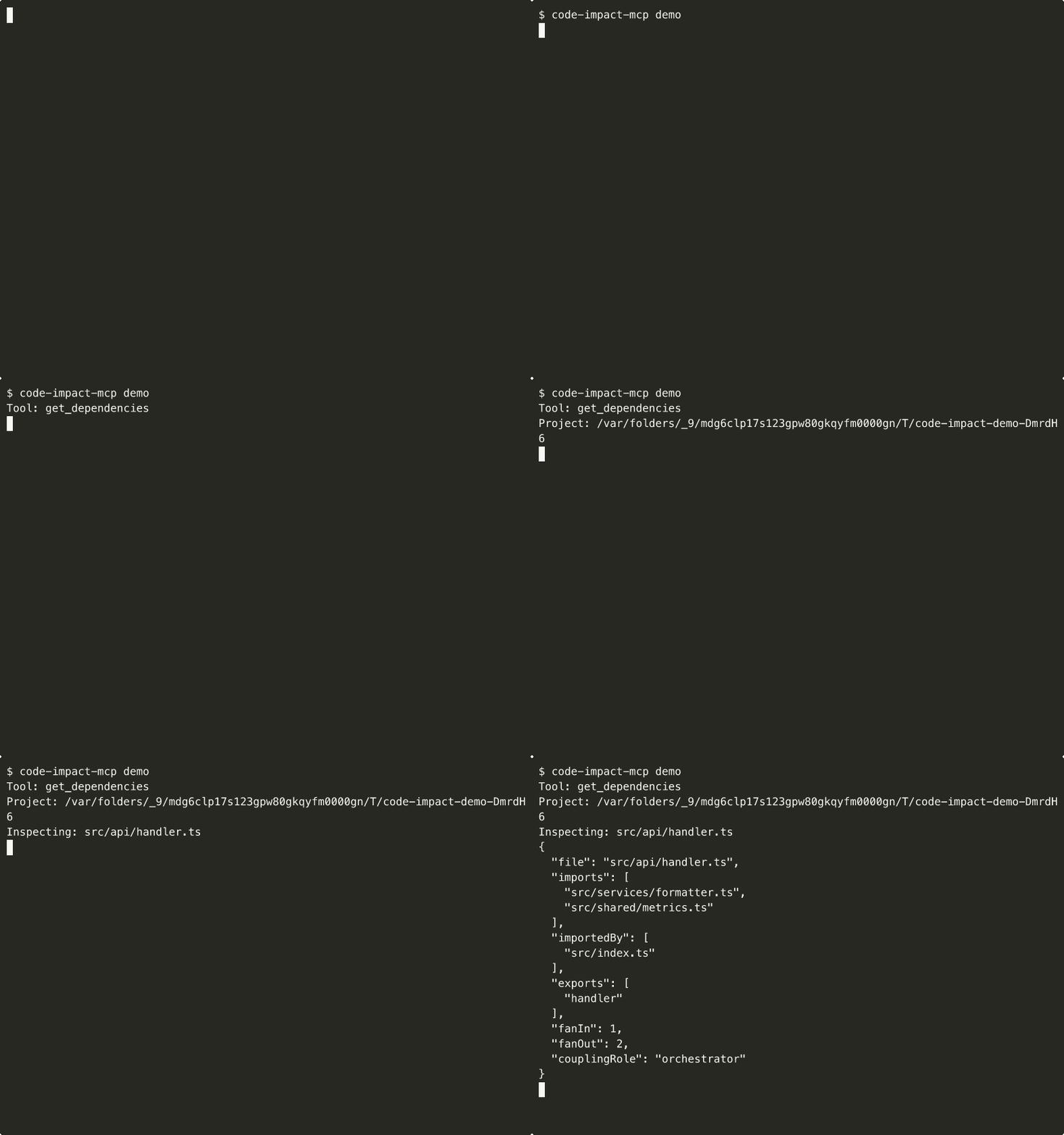
get_dependencies
Get the import and importedBy relationships for a specific file. Shows what this file depends on and what depends on it. Use to understand coupling before refactoring a file.
refresh_graph
Rebuild the dependency graph from scratch. Call this after significant file additions/deletions, or if results seem stale. Returns graph statistics including file count, edge count, build time, and circular dependencies detected.
Also returns topHotFiles, the top 20 most-imported files across the whole graph ranked by importer count (e.g. { "file": "src/shared/config.ts", "importers": 14 }), so you can spot structural hotspots without running get_dependencies on every file.
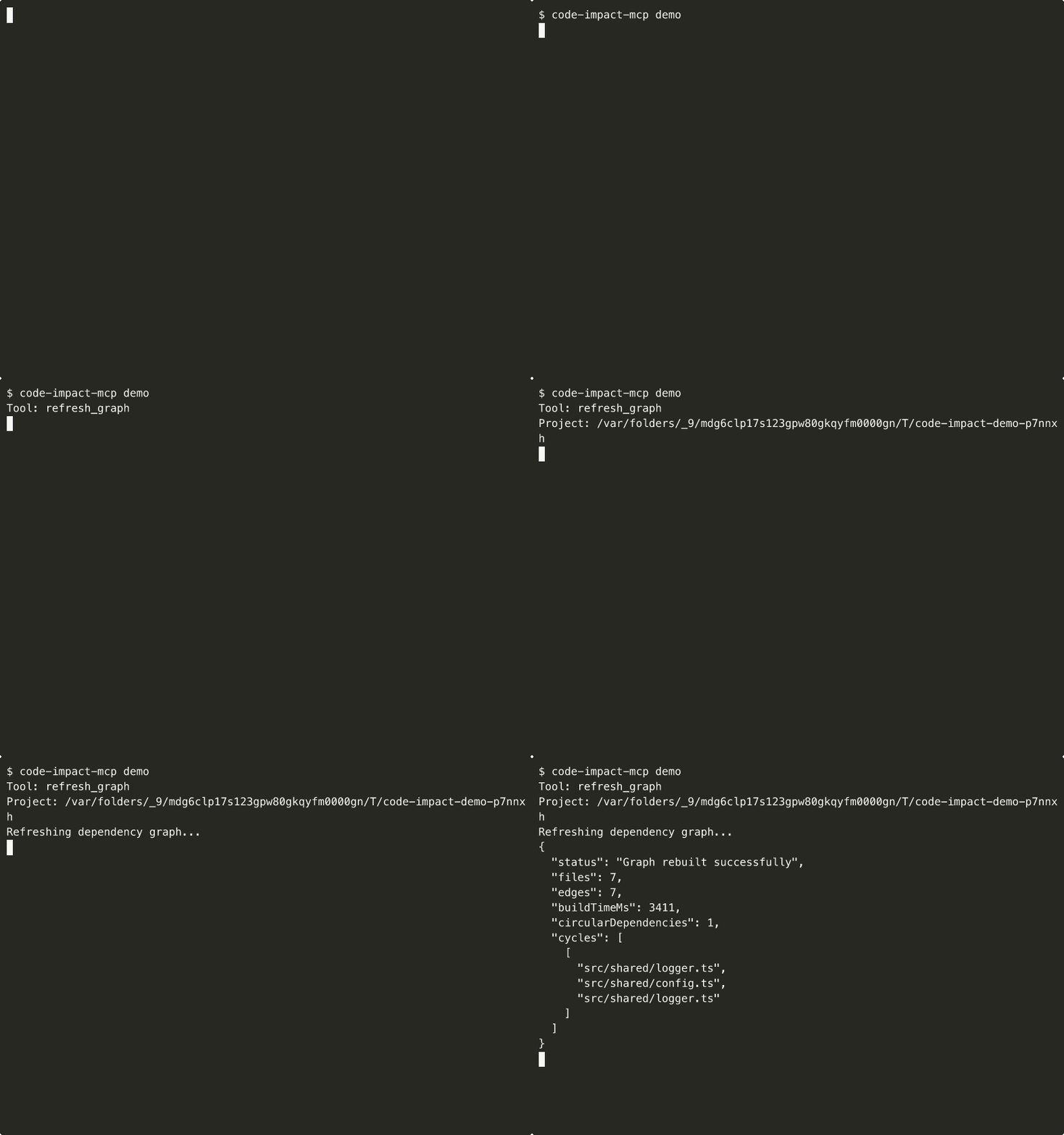
Example conversation
User: "I want to refactor src/routes.ts — is it safe?"
Agent calls gate_check:
{
  "projectRoot": "/Users/you/projects/my-app",
  "files": ["src/routes.ts"],
  "threshold": 0.5
}
Result:
{
  "verdict": "BLOCK",
  "scanSummary": "BLOCK, 8 affected across src/routes (4), src/pages (2), src (2)",
  "recommendation": "Refactor the circular dependency before shipping this change.",
  "riskScore": 0.35,
  "reasons": [
    "Changed files participate in a circular dependency. Example: src/router.ts → src/routes.ts"
  ],
  "affectedFiles": 8,
  "circularDependencies": 1,
  "affectedCycles": [["src/router.ts", "src/routes.ts"]]
}
Agent: "The gate check returned BLOCK — routes.ts is part of a cycle, so I should untangle that before making more changes."
Agent calls detect_cycles:
{
  "projectRoot": "/Users/you/projects/my-app"
}
Result:
{
  "cycleCount": 2,
  "hotspots": ["src/router.ts", "src/routes.ts"],
  "cycles": [
    ["src/router.ts", "src/routes.ts"],
    ["src/cache/index.ts", "src/cache/store.ts"]
  ]
}
How it works
┌─────────────┐     ┌──────────────┐     ┌──────────────┐
│  Agent asks  │────▶│  ts-morph     │────▶│  In-memory    │
│  "safe to    │     │  parses       │     │  dependency   │
│   change?"   │     │  imports      │     │  graph        │
└─────────────┘     └──────────────┘     └──────┬───────┘
                                                 │
                    ┌──────────────┐     ┌───────▼───────┐
                    │  PASS/WARN/  │◀────│  BFS traverse  │
                    │  BLOCK       │     │  reverse deps  │
                    │  + risk 0-1  │     │  + risk score  │
                    └──────────────┘     └───────────────┘
- Parse: ts-morph scans your project for ESM imports, re-exports, and CommonJS requires
- Graph: Builds an in-memory dependency graph (no database, no persistence)
- Analyze: BFS traversal of reverse dependencies from changed files
- Score: Risk = affected files / total files (0-1)
- Verdict: PASS (< 60% of threshold), WARN (60-100%), BLOCK (> threshold)
Supports: ESM imports, ESM re-exports, CommonJS require(), NodeNext-style .js → .ts resolution.
Comparison
If you are choosing a tool for an agent or reviewer, the key question is still simple: do you need to explore a dependency graph, retrieve broader repo context, or package for a marketplace, or do you need to gate already-known changed files locally, at commit time, with a PASS/WARN/BLOCK verdict? CodeImpact MCP is built for that second job.
| Alternative | Best at | Where it wins today | Where CodeImpact MCP wins |
|---|---|---|---|
| CodeImpact MCP | Decision-first dependency gating for proposed TS/JS changes, including monorepos | Immediate PASS/WARN/BLOCK output at commit time on already-known changed files, built-in detect_cycles, workspace-aware gate checks, file-level blast-radius triage, bounded Python support for analyze_impact and gate_check, a zero-network local-first workflow, and a direct Husky install-hook helper | Best fit when the job is "is this safe to commit?" rather than "help me explore the whole repo" |
| code-graph-mcp | Hosted or prebuilt code-graph inspection through an MCP surface | Better when the agent wants graph traversal, semantic graph queries, and public/private graph access through the existing DeepGraph or CodeGPT flow instead of a local gate-first CLI | Better when you want one bounded pre-commit verdict with affected-file triage instead of a graph-exploration session |
| Depwire | Broader dependency intelligence and architecture workflows across a wider language/tooling surface | Better when you need symbol-level analysis, browser visualization, security or health workflows, or a wider multi-language platform than CodeImpact intentionally targets | Better when you want a small MIT tool that stays local-first, is already live in the Official MCP Registry, and answers the narrow gating question quickly |
| RepoGraph | Repository-level graph retrieval for SWE-style context gathering | Better when the workflow is researchy or retrieval-heavy, especially line-level repo context for larger repo-understanding loops rather than a lightweight commit-time check | Better when the touched files are already known and you only need bounded blast-radius triage plus a gate result |
| CodeGraphContext | Broader local code graph and context platform with dual CLI + MCP entrypoints | Better when the agent needs queryable local graph/indexing workflows and longer-form repository reasoning across the local codebase, rather than one commit-time verdict for already-known changed files | Better when you want a fast local PASS/WARN/BLOCK gate with bounded blast-radius triage for known file changes, not a broader graph/context workflow |
| MCP Hive style marketplace follow-up | Manual marketplace/discovery submission after the repo truth is already stable | Better when the job is marketplace packaging, screenshots, and operator copy for a directory workflow rather than technical gating itself | Better when you need the product wedge first: local verdicts, install-hook wiring, and bounded Python impact checks that are already shipped before any manual listing follow-up |
Choose CodeImpact MCP when: you already know the files in play and want a fast, local, MIT-licensed answer with a risk score, explicit cycle surfacing, file-level blast-radius output, monorepo-aware checks, the shipped Husky install-hook helper, and a clear PASS/WARN/BLOCK verdict before commit.
Choose one of the alternatives when: the main job is hosted/public graph access, graph exploration, repo understanding, wider dependency workflow coverage, graph-database-backed context retrieval for longer reasoning loops, or manual marketplace packaging after the core repo surface is already settled.
FAQ
Q: Does it access the network? A: No. CodeImpact MCP is 100% local-first. It reads your project files via ts-morph and never makes network requests. No API keys, no cloud, no telemetry.
Q: Will it modify my code?
A: No. All 5 tools are read-only (annotated with readOnlyHint: true). They analyze but never write.
Q: How accurate is the risk score? A: The risk score is a graph-based heuristic (affected files / total files). It does not know about runtime behavior, tests, or data migrations. Treat it as a triage signal, not a guarantee.
Q: What languages does it support today?
A: Full support is still centered on TypeScript and JavaScript files (.ts, .tsx, .js, .jsx, .mts, .cts, .mjs, .cjs). There is also a bounded Python path for analyze_impact and gate_check when changed files are .py, but it stays at file/module-level impact instead of broad multi-language platform coverage or repo-wide graph exploration.
Q: How fast is it? A: Graph building typically takes 1-5 seconds depending on project size. Individual tool calls against a cached graph are near-instant.
Q: Does it cache the graph?
A: Yes, the graph is cached in-memory per (projectRoot, tsconfigPath) pair. Use refresh_graph to rebuild after significant changes.
Limitations
- Full graph depth is still strongest for TypeScript/JavaScript; Python support is intentionally bounded to local file/module-level impact, not a full multi-language platform.
- No distinction between runtime imports and type-only imports
- Graph is in-memory only (no persistence across server restarts)
- Risk score is structural, not semantic — it doesn't know which files are "important"
- No visualization output (text/JSON only)
Changelog
See CHANGELOG.md for release history.
License
MIT — free to use in any project, commercial or personal.
Contributing
Issues and PRs welcome at github.com/vk0dev/code-impact-mcp.
Reviews
No reviews yet
Be the first to review this server!
More Developer Tools MCP Servers
Git
Freeby Modelcontextprotocol · Developer Tools
Read, search, and manipulate Git repositories programmatically
Fetch
Freeby Modelcontextprotocol · Developer Tools
Web content fetching and conversion for efficient LLM usage
Worldmonitor
Freeby Koala73 · Developer Tools
Live markets, conflicts, country risk, chokepoints, energy, and China decision signals. 89 tools.
Paperclip
Freeby Paperclipai · Developer Tools
Trending hip-hop artist momentum scores across four cultural dimensions.
Toleno
Freeby Toleno · Developer Tools
Toleno Network MCP Server — Manage your Toleno mining account with Claude AI using natural language.
mcp-creator-python
Freeby mcp-marketplace · Developer Tools
Create, build, and publish Python MCP servers to PyPI — conversationally.