
Server data from the Official MCP Registry
Token counting & multi-model LLM cost estimates: GPT-4o, Claude, Gemini, 25+. No API key.
About
Token counting & multi-model LLM cost estimates: GPT-4o, Claude, Gemini, 25+. No API key.
Security Report
This is a well-structured VS Code extension and MCP server for token counting and LLM cost estimation. The code is clean, properly handles authentication (none required—local-first design), and has no malicious patterns or dangerous operations. Minor code quality observations exist but do not create security concerns. Permissions align appropriately with the extension's stated purpose. Supply chain analysis found 6 known vulnerabilities in dependencies (1 critical, 3 high severity). Package verification found 1 issue (1 critical, 0 high severity).
5 files analyzed · 10 issues found
Security scores are indicators to help you make informed decisions, not guarantees. Always review permissions before connecting any MCP server.
Permissions Required
This plugin requests these system permissions. Most are normal for its category.
Unverified package source
We couldn't verify that the installable package matches the reviewed source code. Proceed with caution.
How to Install
Add this to your MCP configuration file:
{
  "mcpServers": {
    "io-github-waqarulwahab-llm-cost-estimator": {
      "args": [
        "-y",
        "llm-cost-estimator"
      ],
      "command": "npx"
    }
  }
}Documentation
View on GitHubFrom the project's GitHub README.
LLM Cost & Token Estimator
See how many tokens your prompt uses — and what it'll cost on GPT-4o vs. Claude vs. Gemini — right inside VS Code. No API key, no billing dashboard, no guessing.


Why this exists
When you're building an LLM-powered app, two questions come up constantly: how many tokens is this prompt? and what will this call cost? Today you either guess, paste into a web tokenizer, or check the provider's billing console after the fact — all of which pull you out of your editor.
This extension answers both questions inline, and it answers them for several models at once, so you can make a real price/quality trade-off ("~$X on GPT-4o, ~$Y on Claude Sonnet, ~$Z on Claude Haiku") without leaving the file you're working in. It's local-first and works with zero configuration — no API key required.
Demo
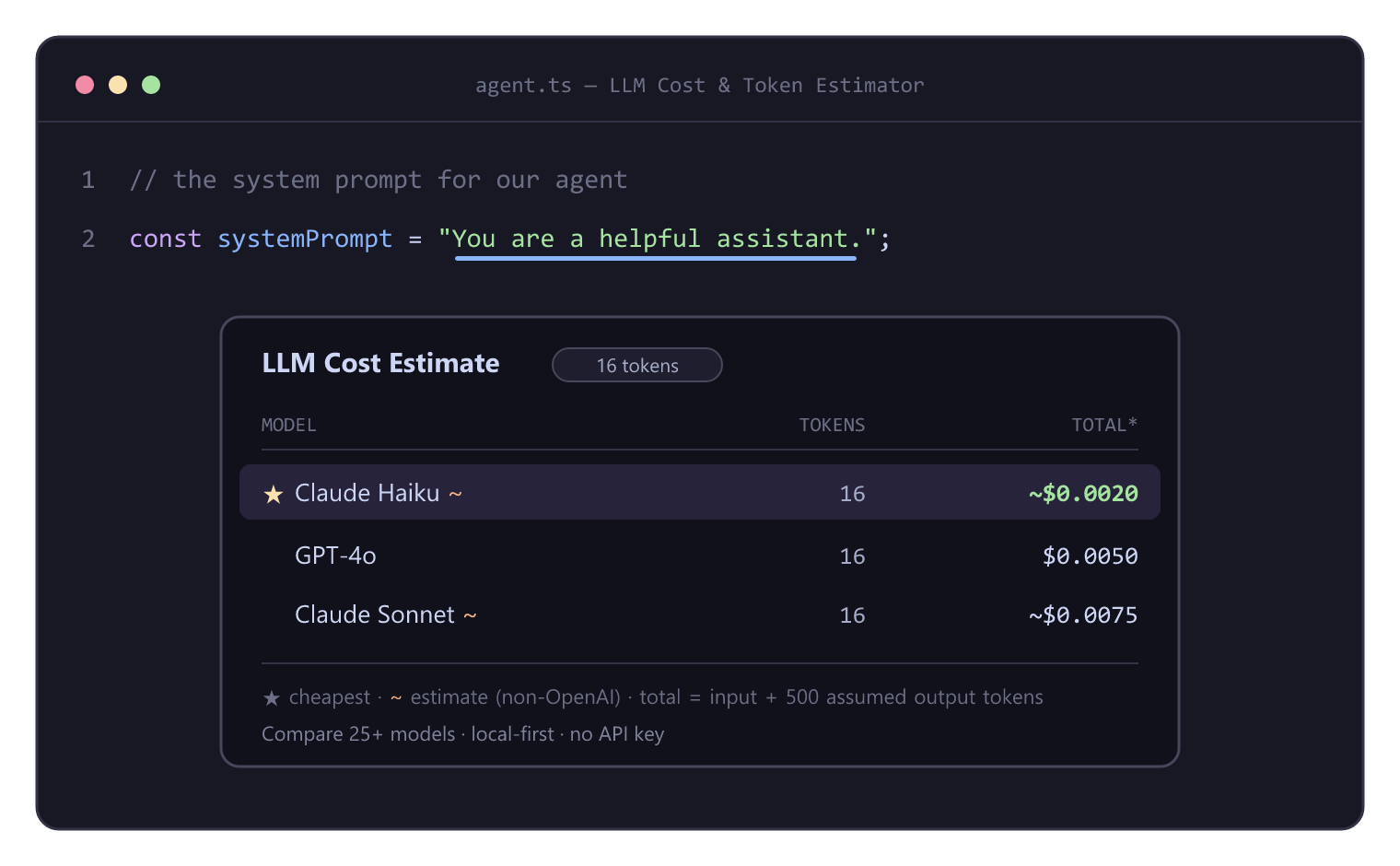
Hover any prompt (or select text) to see its token count and cost across your models, side by side — cheapest first. Same comparison powers the CodeLens, the live status bar, and the Comparison Panel. (animated version)
Features
- 🔀 Multi-model cost comparison — token count + estimated cost across all your configured models, side by side. This is the whole point.
- 🛈 Hover tooltip — hover over a selection or a string literal (JS/TS/Python, plus Markdown/JSON/YAML/plaintext) to see the comparison inline.
- 🔎 CodeLens on prompts — a token-count + cost lens appears right above detected prompt strings in your code. Click it for the full breakdown.
- 📊 Live status bar — select any text and its token count + cost appear in the status bar instantly (no command needed); the tooltip shows every model.
- 🗔 Comparison Panel — a visual dashboard comparing the whole catalog with a live output-token slider (recomputes instantly), sortable columns, and a "configured models only" filter.
- ⌨️ Commands —
Estimate Selection,Estimate Clipboard,Open Comparison Panel, andSelect Models to Compare. - 🗂 25+ models — GPT-4o/4.1/o-series, Claude 4/3.7/3.5, Gemini 2.5/2.0/1.5, DeepSeek, Mistral, Llama, Grok. Pick what you care about.
- 📁 Workspace scan — one command finds every prompt in your project and reports the total estimated cost per run, with a clickable per-file breakdown.
- ➕ Custom models — add your own models/prices (or a negotiated rate) in settings; no need to edit bundled files.
- ⚠️ Context-window warnings — a
⚠appears when a prompt exceeds a model's context window. - 📋 Copy as Markdown — drop a ready-to-paste comparison table on your clipboard.
- 🔒 Local-first, zero config — exact OpenAI tokenization runs entirely on your machine; pricing is bundled. No network calls, no API key.
A note on accuracy
- OpenAI models use real BPE tokenization (
o200k_basefor the GPT-4o family,cl100k_basefor GPT-4 / GPT-3.5) viajs-tiktoken. - Anthropic, Google, and everyone else (DeepSeek, Mistral, Llama, Grok, …)
do not publish reliable local tokenizers, so their counts are approximated
using an OpenAI encoding and are clearly marked with a
~and a disclaimer in the UI. They're great for ballpark cost comparison, not for exact billing. (An optional API-based accurate mode is a candidate for a future release.)
Also available as an MCP server (use it in Claude / Cursor)
This repo also ships an MCP server that exposes the same
tokenizer + pricing engine as tools (estimate_cost, count_tokens,
list_models) to Claude Desktop, Claude Code, Cursor, or any MCP client — so you
can ask "what does this prompt cost on GPT-4o vs Claude vs Gemini?" right in
your chat. See mcp-server/README.md for setup. Same
local-first, no-API-key core — just a different front end.
Install
From the Marketplace (once published):
- Open the Extensions view (
Ctrl+Shift+X/Cmd+Shift+X). - Search for "LLM Cost & Token Estimator".
- Click Install.
From a .vsix:
code --install-extension llm-cost-estimator-0.3.2.vsix
From source (for development): see Contributing.
Usage
- Hover: hover over a string literal — or select text — in a supported file. A tooltip shows the per-model token count and cost.
- CodeLens: open a JS/TS/Python file with prompt strings; a
N tokens · ~$X · comparelens sits above each one. Click it for the full breakdown. - Live status bar: select any text — the status bar instantly shows its token count and cheapest cost; hover the item for the full comparison. Click it to open the Comparison Panel.
- Comparison Panel: Command Palette → LLM Cost: Open Comparison Panel (or the editor toolbar icon). Drag the output-token slider to see costs update live, sort by any column, or filter to your configured models.
- Commands (Command Palette,
Ctrl+Shift+P):- LLM Cost: Estimate Selection — selection, or the whole file if nothing is selected. Also on the editor right-click menu.
- LLM Cost: Estimate Clipboard — estimate whatever you've copied.
- LLM Cost: Open Comparison Panel — the visual dashboard.
- LLM Cost: Scan Workspace for Prompts — project-wide prompt cost report.
- LLM Cost: Copy Comparison as Markdown — table to clipboard.
- LLM Cost: Select Models to Compare — pick models from the catalog.
- LLM Cost: Refresh Pricing from the Web — pull current prices (see below).
- LLM Cost: Reset Session Total — clear the running total.
How "total" is calculated: cost = input tokens + an assumed number of output tokens (output pricing is usually higher than input, so it matters). The assumption is configurable and always shown in the tooltip.
cost = (inputTokens  / 1e6) * inputPer1M
     + (outputTokens / 1e6) * outputPer1M
Settings
All settings live under llmCostEstimator.*:
| Setting | Type | Default | Description |
|---|---|---|---|
llmCostEstimator.models | string[] | ["gpt-4o", "claude-sonnet", "claude-haiku"] | Models to compare. Each entry must be a key in pricing.json. |
llmCostEstimator.outputTokenAssumption | number | 500 | Assumed output (completion) tokens used for the total-cost calculation. |
llmCostEstimator.currency | string | "USD" | Currency label shown next to costs. Display only — does not convert (pricing is in USD). |
llmCostEstimator.enableHover | boolean | true | Show the hover tooltip. |
llmCostEstimator.enableCodeLens | boolean | true | Show a CodeLens above detected prompt strings (JS/TS/Python). |
llmCostEstimator.enableStatusBarSelection | boolean | true | Show the live token count + cost of the current selection in the status bar. |
llmCostEstimator.customModels | object | {} | Add or override models without editing pricing.json (see Custom models). |
llmCostEstimator.refreshPricingOnStartup | boolean | false | Fetch current prices from the web on startup (cached; falls back to bundled prices offline). See Live pricing. |
llmCostEstimator.pricingSourceUrl | string | LiteLLM data | URL of the live pricing source (LiteLLM-compatible JSON). |
Available model keys (out of the box) — run LLM Cost: Select Models to Compare to pick from these visually:
- OpenAI:
gpt-4o,gpt-4o-mini,gpt-4.1,gpt-4.1-mini,gpt-4.1-nano,o3,o4-mini,gpt-4-turbo,gpt-4,gpt-3.5-turbo - Anthropic:
claude-opus,claude-sonnet,claude-haiku,claude-3.7-sonnet,claude-3.5-sonnet,claude-3-opus - Google:
gemini-2.5-pro,gemini-2.5-flash,gemini-2.0-flash,gemini-1.5-pro,gemini-1.5-flash - Others:
deepseek-chat,deepseek-reasoner,mistral-large,mistral-small,llama-3.3-70b,llama-3.1-405b,grok-2
Example settings.json:
{
  "llmCostEstimator.models": ["gpt-4o", "gpt-4o-mini", "claude-sonnet", "gemini-1.5-flash"],
  "llmCostEstimator.outputTokenAssumption": 800,
  "llmCostEstimator.currency": "USD"
}
Custom models
Add your own models — or override a built-in price with a negotiated rate —
without touching the bundled files, via llmCostEstimator.customModels:
{
  "llmCostEstimator.customModels": {
    "my-finetune": {
      "label": "My Fine-tune",
      "provider": "openai", // "openai" = exact tokenization; anything else = estimate
      "inputPer1M": 1.0,
      "outputPer1M": 2.0,
      "contextWindow": 128000 // optional, enables the ⚠ over-limit warning
    },
    "gpt-4o": { "label": "GPT-4o (our rate)", "provider": "openai", "inputPer1M": 2.0, "outputPer1M": 8.0 }
  }
}
Then add the key to llmCostEstimator.models (or pick it via Select Models to
Compare). Invalid entries are reported and skipped, not silently dropped.
Live pricing
The bundled prices are representative placeholders. Run LLM Cost: Refresh
Pricing from the Web (or enable llmCostEstimator.refreshPricingOnStartup) to
pull current prices from a maintained source — by default
LiteLLM's pricing data. The result is
cached, so it keeps working offline and falls back to bundled prices on error.
Each model in pricing.json declares a liveId (the
source's key for that model); models without one keep their bundled price. Point
llmCostEstimator.pricingSourceUrl at any LiteLLM-compatible JSON to use a
different source. User customModels always win over live prices.
Updating pricing (bundled defaults)
⚠️ The bundled prices are representative placeholders and change frequently. Verify them against each provider's official pricing page before relying on them.
- OpenAI — https://openai.com/api/pricing/
- Anthropic — https://www.anthropic.com/pricing
- Google — https://ai.google.dev/pricing
Prices live in src/pricing/pricing.json, keyed by
model alias. Each entry looks like:
"gpt-4o": {
  "label": "GPT-4o",
  "provider": "openai",
  "encoding": "o200k_base",
  "inputPer1M": 2.5,
  "outputPer1M": 10.0
}
inputPer1M/outputPer1Mare USD per 1,000,000 tokens.providerisopenai,anthropic, orgoogle(determines the tokenizer and whether the count is exact or an estimate).encodingis the BPE used to count tokens —o200k_baseorcl100k_base. For Anthropic/Google it's only an approximation proxy.
To add a model or change a price, edit the JSON and rebuild
(npm run compile). The pricing file is bundled into the extension, so changes
take effect after a rebuild/reinstall. Pull requests that keep prices current
are very welcome.
Contributing
Contributions are welcome — bug reports, pricing updates, new providers, and
features alike. New here? Start with CONTRIBUTING.md,
browse the ROADMAP, or pick a
good first issue.
By participating you agree to our Code of Conduct.
git clone https://github.com/waqarulwahab/llm-cost-estimator.git
cd llm-cost-estimator
npm install

npm test           # run unit + load tests (Vitest)
npm run test:load  # just the load/performance suite
npm run e2e        # bundle + end-to-end test against a mocked VS Code
npm run lint       # ESLint
npm run typecheck  # tsc --noEmit
npm run compile    # bundle to dist/ with esbuild
Then press F5 in VS Code to launch the Extension Development Host and try your changes live.
Project layout:
src/
  tokenizer/   # Tokenizer interface + per-provider implementations
  pricing/     # pricing.json + lookup & cost math
  core/        # estimator, prompt detector, workspace scan, export, formatting (all pure)
  ui/          # hover, status bar, CodeLens, QuickPick, comparison + scan webviews
  commands/    # command handlers
  extension.ts # activate() / deactivate()
test/          # Vitest unit + load tests for the core logic
mcp-server/    # MCP server (reuses src/core, src/pricing) — use it in Claude/Cursor
The core/, tokenizer/, and pricing/ layers are intentionally free of any
vscode import so they can be unit-tested directly.
This project is licensed under the MIT License.
Packaging & publishing
The extension is bundled with esbuild and packaged
with @vscode/vsce; the MCP server is
published to npm. Both are automated via GitHub Actions on a version tag.
npm run package       # production bundle -> dist/extension.js
npm run vsce:package  # create the .vsix
npm run mcp:build     # build the MCP server
npm run mcp:test      # build + stdio end-to-end test the MCP server
👉 Full step-by-step guide — Marketplace, Open VSX, npm, GitHub Actions, secrets, and how end users install each artifact — is in PUBLISHING.md.
Built with js-tiktoken. Not affiliated with
OpenAI, Anthropic, or Google.
Reviews
No reviews yet
Be the first to review this server!
More Developer Tools MCP Servers
Fetch
Freeby Modelcontextprotocol · Developer Tools
Web content fetching and conversion for efficient LLM usage
Paperclip
Freeby Paperclipai · Developer Tools
Trending hip-hop artist momentum scores across four cultural dimensions.
Netdata
Freeby Netdata · Developer Tools
Real-time infrastructure monitoring with metrics, logs, alerts, and ML-based anomaly detection.
Toleno
Freeby Toleno · Developer Tools
Toleno Network MCP Server — Manage your Toleno mining account with Claude AI using natural language.
mcp-creator-python
Freeby mcp-marketplace · Developer Tools
Create, build, and publish Python MCP servers to PyPI — conversationally.
MCP Marketplace
Freeby mcp-marketplace · Developer Tools
Search and install MCP servers from inside your AI client.