
Server data from the Official MCP Registry
Secure Umami Analytics MCP server for Cloud and self-hosted deployments
About
Secure Umami Analytics MCP server for Cloud and self-hosted deployments
Security Report
Valid MCP server (1 strong, 1 medium validity signals). No known CVEs in dependencies. Package registry verified. Imported from the Official MCP Registry.
3 files analyzed · 1 issue found
Security scores are indicators to help you make informed decisions, not guarantees. Always review permissions before connecting any MCP server.
What You'll Need
Set these up before or after installing:
Environment variable: UMAMI_API_KEY
Environment variable: UMAMI_ACCESS_TOKEN
Environment variable: UMAMI_USERNAME
Environment variable: UMAMI_PASSWORD
Environment variable: UMAMI_URL
Environment variable: UMAMI_API_URL
Environment variable: UMAMI_WEBSITE_IDS
Environment variable: UMAMI_TEAM_IDS
Environment variable: UMAMI_TOOLSETS
Environment variable: UMAMI_MAX_RESPONSE_BYTES
How to Install
Add this to your MCP configuration file:
{
  "mcpServers": {
    "io-github-webcredo-umami-compass": {
      "env": {
        "UMAMI_URL": "your-umami-url-here",
        "UMAMI_API_KEY": "your-umami-api-key-here",
        "UMAMI_API_URL": "your-umami-api-url-here",
        "UMAMI_PASSWORD": "your-umami-password-here",
        "UMAMI_TEAM_IDS": "your-umami-team-ids-here",
        "UMAMI_TOOLSETS": "your-umami-toolsets-here",
        "UMAMI_USERNAME": "your-umami-username-here",
        "UMAMI_WEBSITE_IDS": "your-umami-website-ids-here",
        "UMAMI_ACCESS_TOKEN": "your-umami-access-token-here",
        "UMAMI_MAX_RESPONSE_BYTES": "your-umami-max-response-bytes-here"
      },
      "args": [
        "-y",
        "umami-compass"
      ],
      "command": "npx"
    }
  }
}Documentation
View on GitHubFrom the project's GitHub README.
Umami Compass
Open-source MCP server for Umami Analytics — Cloud and self-hosted.
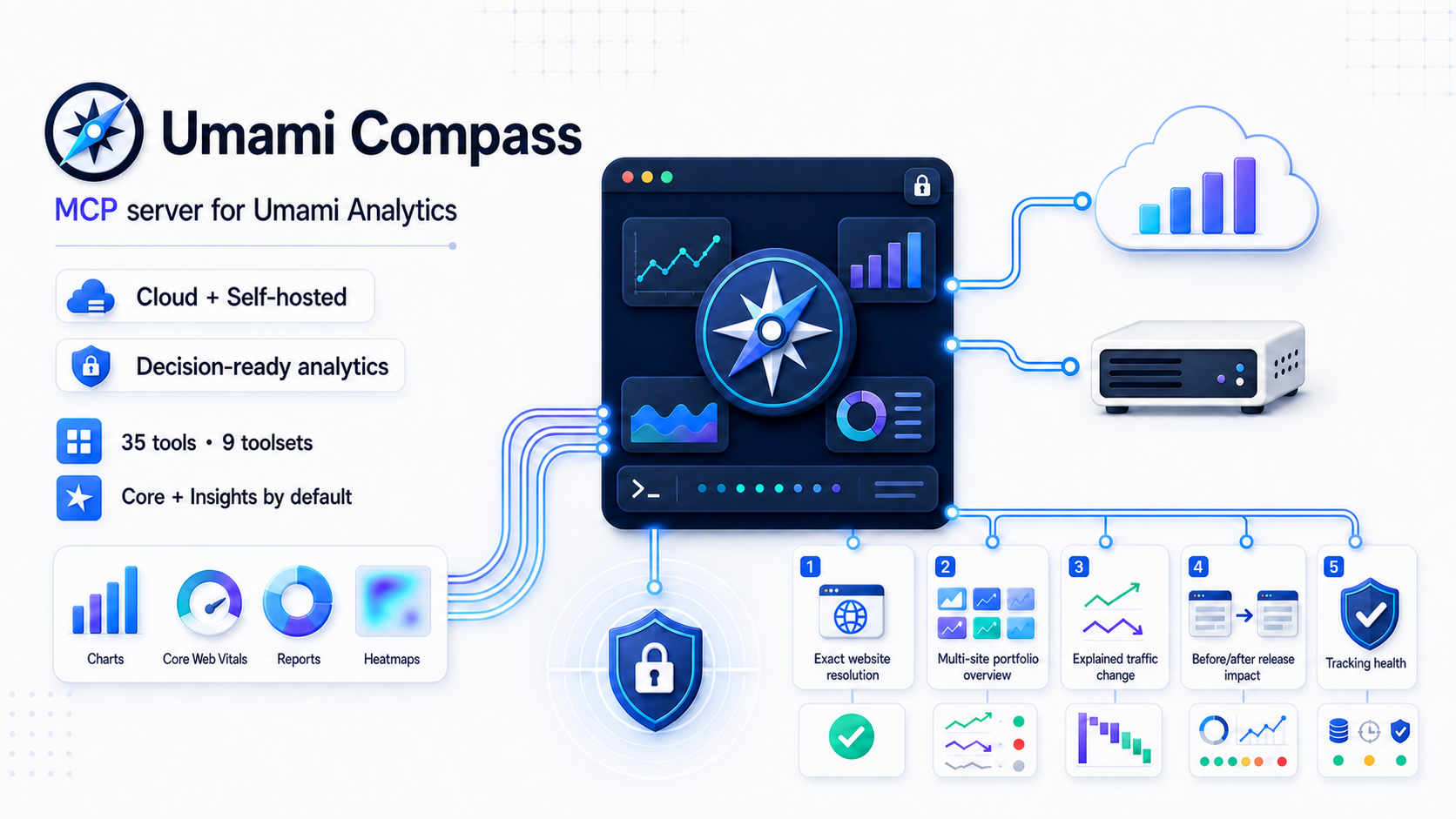



Distribution: umami-compass on npm · io.github.webcredo/umami-compass in the official MCP Registry
Umami Compass is a secure, read-only Model Context Protocol server for Umami Analytics. It gives MCP clients accurate Umami 3.2 analytics without exposing a database or allowing arbitrary network requests.
Version 0.5.1 is the current source release. See Compatibility before using it with older Umami versions.
The
npxexamples follow the stable npm release channel and check it whenever the MCP process starts. For source-based evaluation, clone this repository, runpnpm install --frozen-lockfile && pnpm build, and usenode /absolute/path/to/umami-compass/dist/cli.jsas the MCP command.
Why this project
Existing Umami MCP servers each cover part of the problem, but our July 2026 review found gaps around Umami 3.2 response correctness, Cloud authentication, safety boundaries, or extensibility. Umami Compass sets a higher, testable quality bar:
- Correct auth for both products:
x-umami-api-keyfor Umami Cloud and Bearer/login auth for self-hosted instances. - Umami 3.2-aware responses, including both
pageviewsandsessions, Core Web Vitals, funnels, journeys, attribution, retention, revenue, bounded heatmaps, and replay metadata. - Read-only by construction: every tool declares MCP safety annotations; no create, update, delete, raw HTML, or arbitrary URL tool exists.
- Defense in depth: fixed upstream origin, HTTPS policy, website and team allowlists, range/page/response-byte caps, request timeout, cancellation propagation, and redacted errors.
- Decision-ready insights: bounded traffic and performance portfolio overviews, traffic-change evidence, release-impact analysis, tracking-health audits, and website resolution without arbitrary API access.
- Agent-friendly output: machine-readable
structuredContent, a common status/range/truncation envelope, two resources, and six guided prompts. - Contributor-friendly architecture: endpoint modules, dependency-injected HTTP, a central access policy, ADRs, and real MCP integration tests.
See the dated landscape review for the evidence and methodology.
Quick start
Requirements: Node.js 22 or newer and an Umami identity with view-only access where possible.
The examples use the auto-updating stable launcher:
npx --yes --prefer-online umami-compass@latest
@latest selects the stable npm channel and --prefer-online makes npm check the registry even when package metadata is cached. npm still reuses the cached package when that exact release is already present. Updates take effect the next time the MCP process starts; an already running local server cannot replace itself.
Use umami-compass@next instead to opt into preview releases. For reproducible CI or centrally managed environments, pin an exact release and omit the online check, for example npx --yes umami-compass@0.5.1. Never use the preview channel for an unattended production setup.
Umami Cloud
{
  "mcpServers": {
    "umami": {
      "command": "npx",
      "args": ["--yes", "--prefer-online", "umami-compass@latest"],
      "env": {
        "UMAMI_API_KEY": "replace-with-your-api-key"
      }
    }
  }
}
With UMAMI_API_KEY and no URL, the API root defaults to https://api.umami.is/v1.
Self-hosted Umami
{
  "mcpServers": {
    "umami": {
      "command": "npx",
      "args": ["--yes", "--prefer-online", "umami-compass@latest"],
      "env": {
        "UMAMI_URL": "https://analytics.example.com",
        "UMAMI_USERNAME": "mcp-viewer",
        "UMAMI_PASSWORD": "replace-me",
        "UMAMI_WEBSITE_IDS": "6b2c8c10-908c-4a8e-a924-4049eb3bde8c"
      }
    }
  }
}
UMAMI_URL is an instance origin; /api is appended. Use UMAMI_API_URL instead when a reverse proxy exposes a custom, exact API root.
UMAMI_WEBSITE_IDS is an optional safety allowlist, not a credential. Replace the example UUID with a website ID from Umami (or from list_websites), separate multiple IDs with commas, or remove the variable to discover every website visible directly or through a team membership.
UMAMI_TEAM_IDS is a strict team boundary for discovery and direct website/report access. When it is set, user-owned websites without one of the selected team IDs are excluded. If UMAMI_WEBSITE_IDS is also set, a website must pass both allowlists.
Do not commit real credentials. Prefer a dedicated view-only Umami account and the client/OS secret store when available.
Tools
The least-privilege default enables core,insights: eight primitive aggregate tools plus seven decision-ready aggregate workflows. Row-level events, sessions, replay, heatmaps, and other more sensitive modules remain opt-in.
| Toolset | Tools | Default |
|---|---|---|
core | get_server_info, list_websites, get_website, get_website_stats, get_pageviews, get_metrics, get_active_visitors, get_website_date_range | Yes |
insights | resolve_website, get_portfolio_overview, analyze_performance_portfolio, explain_traffic_change, compare_traffic_series, analyze_release_impact, tracking_health_check | Yes |
events | list_events, get_event_stats, get_event_series | No |
sessions | list_sessions, get_session_stats, get_session, get_session_activity | No |
performance | get_web_vitals, get_performance_breakdown, compare_web_vitals, compare_performance_breakdown, get_performance_cross_tab, get_route_group_performance | No |
reports | Saved reports and segments plus goal, funnel, journey, retention, UTM, attribution, and multi-field breakdown reports | No |
revenue | get_revenue_stats, get_revenue_metrics | No |
replay | list_replays (metadata only; never raw rrweb payloads) | No |
heatmaps | get_heatmap (click/scroll pages and bounded detail points) | No |
Set UMAMI_TOOLSETS=all or a comma-separated subset. The default has 15 aggregate tools; all has 42. Multi-website insights are bounded to 50 websites with four concurrent website workers. High-cardinality report, performance, heatmap, channel fan-out, and activity results carry explicit limits and truncation metadata.
get_performance_breakdown requires at least 20 performance events per row by default for page, page-title, device, and browser rankings. This is an exploratory p75 quality guard, not a claim of statistical significance. Umami 3.2 calculates these counts with count(*), not count(metric), so Compass labels them as event counts and never presents them as metric-specific samples. Set minimumSampleCount explicitly to tighten the guard or lower it to 1 to include every otherwise valid row.
Umami 3.2 caps page, page-title, and browser candidates at 500 before Compass can apply the sample guard. Breakdown responses therefore report the effective minimum, excluded-row counts, candidate coverage, and whether that upstream cap may make the filtered ranking incomplete. If all complete candidates are undersized, emptyReason is insufficient_sample_size; if the candidate cap prevents that conclusion, dataStatus is unknown.
Successful tool responses preserve the existing data field and add a common meta envelope. Depending on the request it includes dataStatus, emptyReason, websiteId, requestedRange, and timezone. Truncation is split into responseTruncated for an incomplete primary result and sectionsTruncated for bounded nested sections; the aggregate truncated field remains for compatibility.
The server exposes umami://websites and the sanitized umami://capabilities resource. Website discovery returns only id, name, and domain; request get_website explicitly when detailed metadata is required. get_server_info returns the same local version, enabled toolsets, limits, and feature flags as a tool. Guided prompts cover an analytics report, weekly portfolio briefing, traffic investigation, release impact, tracking health, and conversion audit; each prompt is registered only when its required toolset is enabled. Scheduling a recurring briefing remains the MCP client's responsibility; the local stdio server does not run a background scheduler or send messages.
Performance analysis and upstream limits
analyze_performance_portfolio performs two bounded performance requests and two aggregate traffic requests per selected website, with four website workers. verbosity="compact" is the default decision summary; standard adds concise per-site rows and metric-specific drill-downs; full returns complete normalized per-site evidence. Drill-down websites are selected only by detailMetric. Performance events per pageview are returned as a ratio that may exceed 1; true collection coverage remains unknown_upstream because Umami does not return distinct covered pageviews. Portfolio p75 values are ranked but never averaged because percentiles from separate websites are not composable.
compare_web_vitals compares all five summary metrics. compare_performance_breakdown aligns page, title, device, or browser rows, returns comparable rows first, excludes rows below minimumSampleCount by default, and omits candidates whose absence is uncertain because an upstream top-500 list was capped. Set includeInsufficient=true to append undersized rows after useful comparisons. get_performance_cross_tab derives combinations through at most ten filtered fan-out requests and reports whether candidates came from performance events or traffic metrics. get_route_group_performance accepts caller-defined path regexes and queries every route group directly; route groups may overlap and PostgreSQL/ClickHouse regex dialect details can differ.
Performance tools accept only page/title and persisted environment filters that are consistent across Umami's supported database backends. excludeBounce, referrer, UTM, hostname, query, event, tag, and other non-persisted performance fields are rejected instead of ignored. In particular, Umami 3.2 builds but does not use its excludeBounce join in the performance report.
Umami 3.2 does not return metric-specific sample counts or counts in chart buckets. Compass therefore returns count: null for a chart point when the field is absent, includes sampleCounts.status="unavailable_upstream", and marks incomplete requested/current buckets with partial: true. Overall counts are named performanceEventCount. Non-CLS all-zero percentile placeholders are treated as unavailable; a zero CLS remains valid.
LCP decomposition, LCP element/resource attribution, cache status, and edge region are explicitly reported as unavailable because Umami's aggregate performance report does not collect or expose them. Compass does not infer a decomposition by subtracting unrelated aggregate percentiles.
Filters, direct traffic, channels, and traffic quality
Plain string filters remain compatible. Structured filters add equals, not_equals, contains, not_contains, regex, not_regex, is_empty, and is_not_empty. Equality operators accept an array for native IN or NOT IN behavior:
{
  "filters": {
    "referrer": { "operator": "is_empty" },
    "path": { "operator": "not_equals", "value": ["/admin", "/internal"] }
  }
}
For compatibility, {"referrer": ""} also isolates rows whose referrer domain is empty. This is not always the same as Umami's direct channel: a no-referrer visit with campaign parameters can be attributed to affiliate, email, paid, or another channel. Use filters.channel: "direct" when exact Umami channel attribution matters. Compass uses Umami's neutral referrer-domain column for structured and empty-referrer filters so internal/no-referrer traffic is not accidentally removed by Umami's external-referrer behavior.
explain_traffic_change, analyze_release_impact, and run_breakdown_report accept filters.channel, including direct. run_breakdown_report also accepts channel as a field, so requests such as channel × device work. Umami 3.2 does not natively expose channel as a filter or breakdown field; Compass derives these results through bounded expanded-metric fan-out and reports candidate coverage, omitted rows, request count, and truncation under dataQuality. Channel cross-tabs cannot be combined with custom events or with filters.match: "any", because Umami cannot express the required candidate predicate outside that OR group; Compass rejects these requests instead of returning overlapping totals.
Traffic-change, release-impact, comparison-series, and breakdown results conservatively flag referral-spam candidates using the combined pattern of a generated-looking domain, very high bounce rate, near-zero visit duration, and minimum traffic. Set trafficSegment to human to exclude only those candidates from traffic results with native negative filters. The preset fails closed when both periods cannot be assessed or when mandatory exclusions would be weakened by filters.match: "any". Findings remain heuristics, not a definitive bot classification, and include their evidence and thresholds. Referrer exclusions cannot be applied to Umami 3.2 performance events; release-impact analysis marks that performance evidence scope_mismatch rather than comparing a different audience silently.
analyze_release_impact returns a compact executive summary, exact comparison periods, and recommended checks by default while avoiding breakdown fan-out; set detailLevel to full for breakdowns, traffic-quality evidence, and complete Web Vital changes. Pass known neighboring deployments through otherReleases so Compass can mark the result as confounded instead of attributing the whole window to one release. When Web Vital samples are insufficient, the primary verdict is insufficient_data and sampleReadiness reports traffic and performance deficits, an estimated recheckAt, and a longer equal window when the observed rate makes one feasible.
compare_traffic_series fills sparse rows against real buckets in the requested timezone, including DST transitions. If current and comparison periods contain different numbers of local-time buckets, it returns the raw series with alignedChangesAvailable: false and omits derived bucket deltas instead of shifting the comparison.
Structured filters retain field-specific length limits, at most 20 values per condition, 30 conditions and 100 values across one request, and a 16 KiB serialized-query budget.
Configuration
Choose exactly one authentication mode.
Authentication
UMAMI_API_KEY— Umami Cloud/client API key. It is sent only asx-umami-api-key.UMAMI_ACCESS_TOKEN— existing Bearer token.UMAMI_USERNAME+UMAMI_PASSWORD— lazy self-hosted login with a cached token and one refresh on 401.
Authentication variables have no default. Configure only one of the three modes above.
Endpoint and access scope
UMAMI_URL— self-hosted instance origin;/apiis appended. With API-key auth and no URL, the default is the Umami Cloud API root.UMAMI_API_URL— exact API root; takes the place ofUMAMI_URL. No default.UMAMI_WEBSITE_IDS— comma-separated website UUID allowlist. Defaults to every site visible directly or through a team membership.UMAMI_TEAM_IDS— comma-separated strict team UUID allowlist for discovery and direct website/report access; at most 25 IDs. User-owned websites are excluded while it is set, andUMAMI_WEBSITE_IDSis intersected when both are configured.UMAMI_TOOLSETS— comma-separated toolsets orall. Available values arecore,insights,events,sessions,performance,reports,revenue,replay, andheatmaps. Defaults tocore,insights.
Safety limits
UMAMI_REQUEST_TIMEOUT_MS— per-request timeout from 1,000 to 120,000 ms. Defaults to30000.UMAMI_MAX_RANGE_DAYS— maximum analytics range from 1 to 3,650 days. Defaults to366.UMAMI_MAX_RESPONSE_BYTES— maximum decoded upstream JSON body from 102,400 to 52,428,800 bytes. Defaults to10485760.UMAMI_ALLOW_INSECURE_HTTP— permits non-loopback HTTP when set totrue. Defaults tofalse.
HTTPS is mandatory by default. Plain HTTP is accepted automatically only for localhost, 127.0.0.1, and ::1.
Client setup
All examples below use Umami Cloud. Export the secret in the environment that launches your client:
export UMAMI_API_KEY="replace-with-your-api-key"
For self-hosted Umami, replace UMAMI_API_KEY with the variables shown in Self-hosted Umami. Add UMAMI_TOOLSETS=all only if the account has the matching Umami section permissions and you want the optional data surfaces.
Codex CLI, IDE extension, and ChatGPT desktop
Codex clients and ChatGPT desktop on the same host share ~/.codex/config.toml. env_vars forwards the secret without writing its value into the config:
[mcp_servers.umami-compass]
command = "npx"
args = ["--yes", "--prefer-online", "umami-compass@latest"]
env_vars = ["UMAMI_API_KEY"]
Run codex mcp list or /mcp to verify it. In the Codex IDE extension or ChatGPT desktop, you can also open MCP servers, add a STDIO server with command npx --yes --prefer-online umami-compass@latest, then restart the client. See the official Codex and ChatGPT MCP guide.
ChatGPT web does not read local Codex config. The current package is local stdio; a hosted plugin requires the future authenticated remote transport.
Claude Code
Use user scope to keep the personal server outside the repository:
claude mcp add --scope user --transport stdio \
  --env UMAMI_API_KEY="$UMAMI_API_KEY" \
  umami-compass -- npx --yes --prefer-online umami-compass@latest
Verify with claude mcp list or /mcp. For a team-safe .mcp.json, Claude Code supports ${UMAMI_API_KEY} expansion; never commit the actual value. See the official Claude Code MCP guide.
Claude Desktop
Open Settings → Developer → Edit Config. On macOS the file is ~/Library/Application Support/Claude/claude_desktop_config.json; on Windows it is %APPDATA%\Claude\claude_desktop_config.json.
{
  "mcpServers": {
    "umami-compass": {
      "command": "npx",
      "args": ["--yes", "--prefer-online", "umami-compass@latest"],
      "env": {
        "UMAMI_API_KEY": "replace-with-your-api-key"
      }
    }
  }
}
Protect the config file because this client format stores the value, then fully quit and restart Claude Desktop. See the official local MCP server guide.
Cursor
Put this in the private global ~/.cursor/mcp.json, or in .cursor/mcp.json only when it contains no real credentials:
{
  "mcpServers": {
    "umami-compass": {
      "command": "npx",
      "args": ["--yes", "--prefer-online", "umami-compass@latest"],
      "env": {
        "UMAMI_API_KEY": "replace-with-your-api-key"
      }
    }
  }
}
Enable the server in Cursor Settings → MCP. See the official Cursor MCP documentation.
VS Code / GitHub Copilot
Use MCP: Open User Configuration for a personal config, or .vscode/mcp.json for a shared command. VS Code uses servers (not mcpServers) and can prompt for a masked secret:
{
  "inputs": [
    {
      "type": "promptString",
      "id": "umami-api-key",
      "description": "Umami API key",
      "password": true
    }
  ],
  "servers": {
    "umami-compass": {
      "type": "stdio",
      "command": "npx",
      "args": ["--yes", "--prefer-online", "umami-compass@latest"],
      "env": {
        "UMAMI_API_KEY": "${input:umami-api-key}"
      }
    }
  }
}
Run MCP: List Servers to start, inspect, or troubleshoot it. See the official VS Code MCP guide.
Gemini CLI
Add this to the user-level ~/.gemini/settings.json (or project .gemini/settings.json). Gemini expands shell variables in env:
{
  "mcpServers": {
    "umami-compass": {
      "command": "npx",
      "args": ["--yes", "--prefer-online", "umami-compass@latest"],
      "env": {
        "UMAMI_API_KEY": "$UMAMI_API_KEY"
      },
      "trust": false
    }
  }
}
Verify with gemini mcp list or /mcp. See the official Gemini CLI MCP guide.
Troubleshooting
- Run
npx --yes --prefer-online umami-compass@latest --versionfirst; Node.js 22+ is required. - After a package update, restart the MCP server so the client requests the new tool list. A client still showing an old or empty list may also need its cached tools cleared.
401means the credential or auth mode is wrong;403can mean the Umami account lacks permission for that website section.- For self-hosted local development,
http://localhost:3000is allowed. Other plain HTTP origins require the explicit unsafe opt-in. - Start with the default toolsets. Enable
performance,reports,revenue,replay, orheatmapsonly as needed. - Enable
eventsorsessionsonly when the client needs row-level data and the Umami identity is allowed to expose it.
Architecture
flowchart LR
  Client["MCP client"] -->|stdio / JSON-RPC| Server["MCP server"]
  Server --> Policy["Module + access policy"]
  Policy --> Modules["Core / Events / Sessions / Performance / Reports / Revenue / Replay / Heatmaps"]
  Modules --> API["Typed, fixed-origin Umami client"]
  API -->|"API key / Bearer / lazy login"| Umami["Umami Cloud or self-hosted 3.2+"]
The package intentionally ships stdio first. A public HTTP transport needs OAuth 2.1, tenant isolation, rate limits, and an operational threat model; binding an unauthenticated endpoint would weaken the project.
Future management tools are anticipated but cannot slip into the read-only build accidentally. Every module declares access: "read" | "write", and the server rejects write modules under the default policy. See architecture and ADR-0001.
See the Umami 3.2 API coverage matrix for what is implemented, deliberately excluded, and prioritized next.
Development
corepack enable
pnpm install --frozen-lockfile
pnpm check
pnpm dev
To add an endpoint, follow Adding a tool. For project expectations and pull requests, see CONTRIBUTING.md.
Compatibility
- Umami 3.2.x is the reference implementation and test target.
- Older Umami releases may work for unchanged endpoints but are not promised yet.
- Node.js 22, 24, and 26 are tested in CI.
- MCP SDK v1 is used because it is the stable production line as of July 2026; the v2 branch is still pre-release.
Security and privacy
Analytics, session metadata, revenue, and replay metadata can be sensitive. Use least-privilege credentials, an allowlist, the smallest toolset, and short time ranges. Read SECURITY.md before production use.
Umami Compass is an independent community project and is not affiliated with Umami Software.
Support the project
Umami Compass is free and open source. If it saves you time or improves your analytics workflow, you can support the project by buying me a coffee on Ko-fi.
License
MIT © 2026 webcredo and Umami Compass contributors.
Reviews
No reviews yet
Be the first to review this server!
More Developer Tools MCP Servers
Git
Freeby Modelcontextprotocol · Developer Tools
Read, search, and manipulate Git repositories programmatically
Fetch
Freeby Modelcontextprotocol · Developer Tools
Web content fetching and conversion for efficient LLM usage
Worldmonitor
Freeby Koala73 · Developer Tools
Live markets, conflicts, country risk, chokepoints, energy, and China decision signals. 90 tools.
Paperclip
Freeby Paperclipai · Developer Tools
Trending hip-hop artist momentum scores across four cultural dimensions.
Toleno
Freeby Toleno · Developer Tools
Toleno Network MCP Server — Manage your Toleno mining account with Claude AI using natural language.
mcp-creator-python
Freeby mcp-marketplace · Developer Tools
Create, build, and publish Python MCP servers to PyPI — conversationally.