
Server data from the Official MCP Registry
The shared task board for coding agents: claim tasks, comment, message agents, save memory.
About
The shared task board for coding agents: claim tasks, comment, message agents, save memory.
Security Report
Valid MCP server (1 strong, 1 medium validity signals). No known CVEs in dependencies. ⚠️ Package registry links to a different repository than scanned source. Imported from the Official MCP Registry. Trust signals: 9 highly-trusted packages. 1 finding(s) downgraded by scanner intelligence.
11 files analyzed · 1 issue found
Security scores are indicators to help you make informed decisions, not guarantees. Always review permissions before connecting any MCP server.
How to Install
Add this to your MCP configuration file:
{
  "mcpServers": {
    "io-github-wsoule-dispatch": {
      "args": [
        "-y",
        "@dispatch-foo/mcp"
      ],
      "command": "npx"
    }
  }
}Documentation
View on GitHubFrom the project's GitHub README.
Dispatch
The shared board your team's coding agents work from, on your own machines. Give agents tasks, not chats: Claude Code, Codex or any MCP agent claims work from one board, runs it in its own worktree inside the files it declared, and lands it through review and a merge queue. dispatch.foo
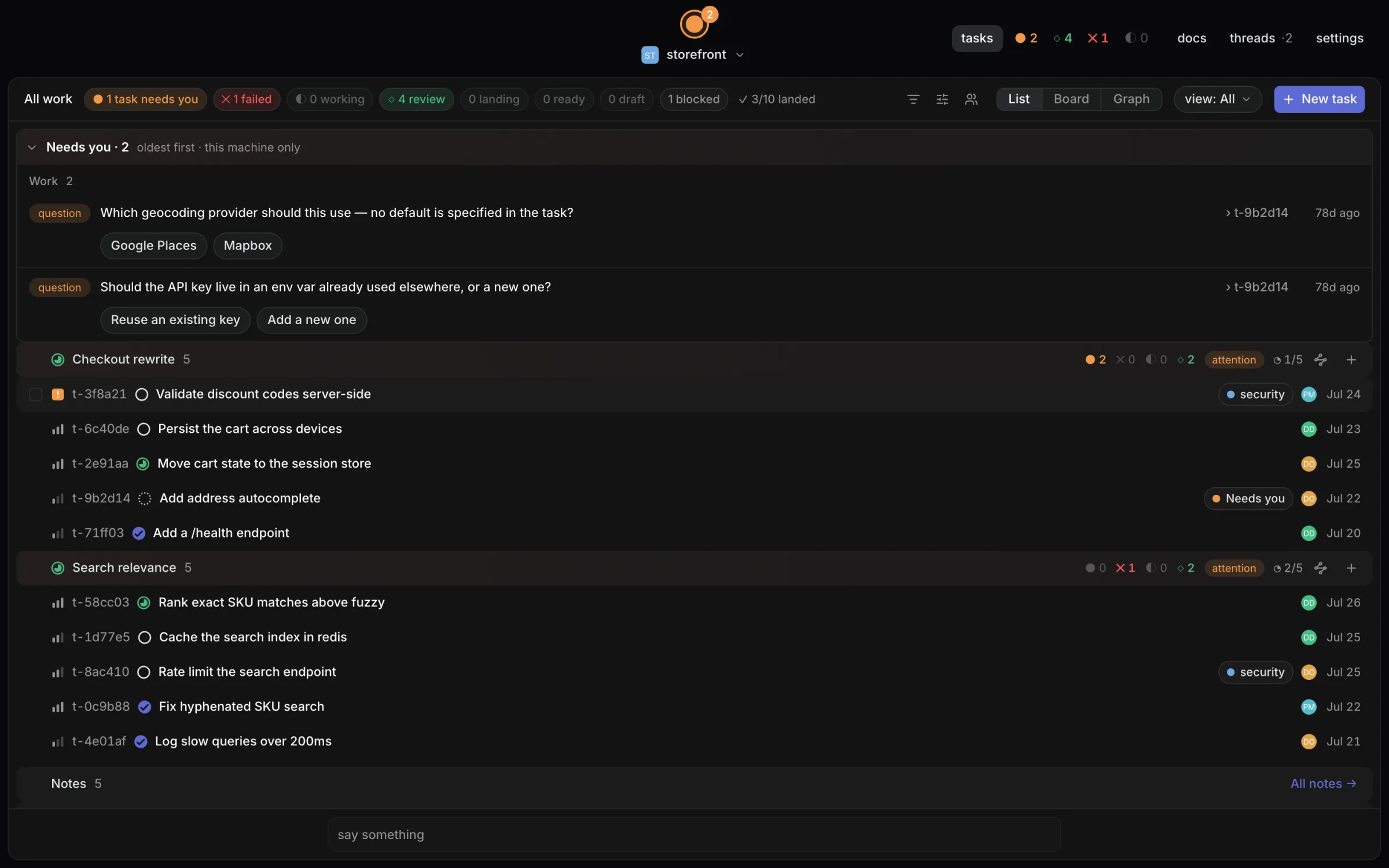
Licensing: open core. The integration packages (core, client, CLI, MCP server) are MIT; the desktop app and daemon are source-available under FSL-1.1-ALv2 and each release becomes Apache-2.0 two years after it ships; the team features are Elastic-2.0. Free for up to three people with every feature. See LICENSING.md and pricing.
- Your repo stays yours.
.dispatch/holds config you would want to commit anyway. Point a project at the daemon's database (dispatch init --db) anddispatchdowns the tasks, findings and history outright, writing them to a git-versioned receipt log outside your repo — a full audit trail with no churn in your own diffs. Or keep the default and have every task be a markdown file in.dispatch/tasks/*.md, synced by git. - Agents run with guardrails. A task declares the paths it may write before the agent starts; runs carry budget and turn caps, verify gates, and human-gated scope escalation.
- Everything is on the record. Findings, decisions, evidence, and transcripts from every run are kept — reviewable, not scrolled past.
- Local-first. Runs on your machine, against your checkout, with your API key. No account, no server, nothing uploaded.
Prerequisites
- macOS (Apple Silicon or Intel) or Linux.
- A project folder, ideally a git repository you push to GitHub. Setup can turn a plain folder into one.
- Git. On a Mac without it, Setup runs Apple's installer.
- An AI coding agent: Claude Code (Claude Pro or Max plan, or an API key), Codex (ChatGPT plan or an API key), or Gemini CLI, Cursor Agent, opencode, Qwen Code, Crush, Goose or Aider. Setup installs the one you pick or opens its install page, then opens its sign-in.
- Optional: the GitHub CLI (
gh) to clone from GitHub and open pull requests.
Install
Desktop app for macOS via Homebrew:
brew install --cask wsoule/tap/dispatch
Or grab an installer from the
latest release: macOS DMGs
(Apple Silicon and Intel) and Linux .deb/.rpm/.AppImage. macOS builds are
signed and notarized (Developer ID).
The Homebrew cask also puts the dispatch CLI on your PATH (it links the
binary bundled inside Dispatch.app). After a DMG or Linux install, add it from
Settings › Setup › Terminal command › Install command.
Quickstart
In any git repo:
dispatch init
dispatch task create "My first task" --priority high
dispatch task list
dispatch task next
dispatch doctor
To keep the tasks in the daemon's database instead of markdown files, use
dispatch init --db (and start dispatch serve before creating tasks — only
the daemon may open the database). See How it works.
Then open the Dispatch app and point it at the repo: the board shows your tasks, and dispatching one hands it to a coding agent in an isolated git worktree — live output, review, and merge all happen in the app.
Every read command accepts --json for agent/script consumption.
dispatch init also registers Dispatch's MCP server in the project's
.mcp.json, so tools like Claude Code can read and write the same tasks — see
MCP server.
How it works
A task carries frontmatter — status, priority, blocked-by, declared writes
paths, and more — and a human-readable body. The CLI, the desktop app, the MCP
server and the orchestrator all reach the same task through dispatchd, which
is the single writer.
Where that state lives is a per-project choice, recorded in
.dispatch/storage.json:
-
Files (the default) keeps every task as markdown in
.dispatch/tasks/*.md, committed to your repo. Git is both the sync layer and the history, and the CLI can read the board with no daemon running. -
Database (
dispatch init --db, ordispatch migratefor a project you already have) keeps them in a SQLite database onlydispatchdmay open. Your.dispatch/shrinks toconfig.yml,team.ymland the marker; the database is gitignored, and the audit trail reaches git as a receipt log — a standalone repository under~/.dispatch/projects/<id>/receiptsthat the daemon commits to as things change. Because that log is laid out exactly like a file-backed project, restoring it needs no special tooling: copy its.dispatch/into a repo and it is a working board again.On this backend
dispatch taskcommands go through the daemon, so start one (dispatch serve) before creating tasks.
Dispatching a task runs a coding agent in an isolated git worktree, scoped to
the task's declared writes. Touching anything else requires a human-gated
scope request at runtime; runs carry budget (maxBudgetUsd) and turn caps, and
verify gates check exit criteria before review. Findings, rulings, evidence, and
decisions from each run are recorded alongside the tasks.
dispatchd, a local daemon, watches the repo and feeds the app live runs,
review, and merge. It is local HTTP only — nothing leaves the machine.
Moving a project to the database
An existing project moves in two deliberate steps, with the daemon stopped:
dispatch migrate --dry-run    # rehearse: report what would move, write nothing
dispatch migrate              # import tasks, findings and ledger into the database
The import is additive — it copies, never moves, so it is safe to re-run and your markdown is untouched if anything goes wrong. Once the daemon has been up long enough to export a receipt log, retire the copies it left behind:
dispatch migrate --retire --dry-run
dispatch migrate --retire
--retire deletes only what the receipt log already contains, checked record by
record, and reports anything it kept and why. Three files stay behind on
purpose: fix-loops.jsonl, notes.json and inbox/ have no table in the
database yet, so the daemon still writes them as ordinary files and the receipt
log does not carry them. On the database backend they are gitignored rather than
committed.
Working in the app
Beyond the board and review, the app carries the surfaces you would otherwise leave it for.
Terminals. Shells on the repo or on a run's worktree, split any number of
ways. The child runs under a real pty, so prompts, colour and full-screen
programs behave normally, and scrollback is kept on disk — closing the window,
or restarting dispatchd, does not lose what a session printed. A session the
daemon inherits from a previous process comes back readable but not writable.
Files. Browse and edit a checkout — the project's, or one run's worktree —
with an editor that saves as you type and previews for Markdown, images, PDFs,
audio and video. ⌘P is fuzzy quick open across everything git ls-files knows
about, so build output and dependencies stay out of the results.
Design. Open your app in a browser Dispatch drives, click the element that
is wrong, and get its selector, markup, computed styles and a cropped screenshot
as text to hand an agent. Needs a Chromium-based browser (Chrome, Chromium, Edge
or Brave) on the machine; set CHROME_PATH if it is somewhere unusual.
dispatch browser open http://localhost:5173
dispatch browser pick <id> --out element.png
dispatch browser snapshot <id> --out page.png
Worktrees and remotes.
dispatch worktree create feature/login
dispatch worktree list --json
dispatch remote list
dispatch remote exec build-box -- pnpm test
dispatch remote forward build-box 5173
Remotes are declared in .dispatch/config.yml; everything else about the
connection comes from your own ~/.ssh/config:
remotes:
  build-box:
    host: build-box
    path: /srv/repo
Terminals can be opened on a remote. Agent runs cannot — the orchestrator works in local worktree paths throughout.
Running more than one agent
Dispatch ships native executors for Claude and Codex. Any other coding agent that takes a prompt on the command line can be declared and dispatched:
executors:
  gemini:
    command:
      run: [gemini, '-p', '{prompt}']
{prompt} and {model} are substituted before the process starts; an argv with
no {prompt} gets the prompt on stdin instead. Well-known agents already on
your PATH are offered without any config at all. A CLI agent has no approval
protocol, so runs on one are refused under permission modes that imply a human
gate, and neither cost nor turns are reported.
To try the same work several ways at once:
dispatch fanout <taskId> --executors claude,codex,gemini
Each agent gets its own clone of the task, its own worktree and its own branch, so comparing them is the review you already do — one diff each — and merging the winner is merging that task.
Sharing a run
dispatch share r-abc123
dispatch share r-abc123 --out review.html
Writes a self-contained HTML page of one run — summary, diff, findings,
decisions, evidence and transcript — with no scripts, no remote assets and no
link back to the project. It is a file you can attach to a ticket, hand to a
reviewer who has never installed Dispatch, or keep as the receipt for what an
agent did. --json prints the assembled data instead, for feeding a different
template.
Previewing a run
A run's work is a diff until you can look at it. dispatch serve will start a
dev server inside a finished run's own worktree and proxy it at
/preview/<runId>/, which the desktop app shows in the task's Preview tab.
The command is detected from the worktree's package.json (dev, else
start); set preview.command in .dispatch/config.yml to name one yourself,
and preview.installCommand for a fresh worktree that needs dependencies first:
preview:
  enabled: true
  command: pnpm run dev
  installCommand: pnpm install
  readyTimeoutSec: 180
  idleTimeoutSec: 900
Previews start only when asked for, stop with the daemon, and are swept once
they have had no request for idleTimeoutSec.
Working as a team on one daemon
A daemon is yours by default: it binds 127.0.0.1 and nothing else can reach
it. Team-local mode lets teammates on your network use the same board from a
browser, each as themselves.
Dispatch is free for up to three people working together, with every feature —
on a shared daemon or a synced board. More than that needs a license key:
install one under Settings → License or with dispatch license set <key>,
and dispatch license shows how many seats are in use. The team features are
under the Elastic License 2.0; see LICENSING.md.
moonx desktop:build                     # the bundle teammates are served
dispatch serve --host 0.0.0.0           # prints the address to share
dispatch team invite ada@example.com    # prints Ada's token, once
Ada opens the printed address, pastes her token, and is signed in. From then on
her findings, notes, scope decisions and dispatched runs are credited to
human:ada, not to you; the presence stack beside the project name shows who is
connected; the waiting-on-you count holds only what is yours to answer, with
teammates' asks under Teammates in Needs you; and the dispatch dialog warns,
by name, before you start work on files someone else's live run has claimed.
The same controls are in the app under Settings → Team: invite by email with a tier and an expiry, copy the token and the address to send, see who is online and when each token was last used, and remove someone. The presence stack also says which task each person has open, and a task's header shows who else has it open right now.
dispatch team invite ada --tier decide  # let Ada approve, too
dispatch team tokens                    # who holds a credential
dispatch team revoke ada                # her token stops working at once
Each teammate holds one token at one tier, and each tier includes the ones below it:
| Tier | Adds |
|---|---|
request | The board, dispatching runs, reviewing and merging them, reading files |
decide | Approving tool calls and assistant actions, scope decisions, previews, inviting teammates |
operator | Terminals, the driven browser, writing files, and git on this checkout — all as you |
A new teammate gets request. Grant operator only to someone you would hand a
shell on this machine, because that is what it is. Nobody can grant, replace or
revoke a tier above their own, so a decide lead can invite reviewers but not
mint a shell. Inviting someone again replaces their token, which is also how you
change their tier.
Tokens are stored only as hashes, outside the repo, and are shown once — lose
one and issue a new one. They expire after 90 days unless you say otherwise
(--expires 30, --expires never), and dispatch team tokens shows when each
expires and when it was last used, so a token nobody has touched in months is
easy to spot and revoke. Every team command needs the daemon's app token
(--token or DISPATCH_APP_TOKEN), or a teammate token at decide or above.
In the browser, the token is traded at sign-in for an HttpOnly session cookie: the page never keeps it where script can read it, and revoking or expiring the token ends the session too.
On a network you do not fully trust, serve teammates over HTTPS so tokens and sessions never cross it in the clear:
dispatch serve --host 0.0.0.0 --tls-cert cert.pem --tls-key key.pem --tls-port 4772
Teammates then open https://<address>:4772. The plain listener drops back to
127.0.0.1, where the CLI, the MCP server and the desktop app reach it, so
nothing on the network can talk to the daemon unencrypted. Any certificate your
teammates' browsers trust works — one from your own CA, mkcert, or
tailscale cert for a Tailscale machine name. With a TLS-terminating proxy in
front instead (Caddy, tailscale serve), keep the daemon plain on loopback and
name the proxy's address with --public-origin.
Running it on a shared machine
Team-local mode lives on whoever's machine runs the daemon, so the board goes to sleep with their laptop. For a team, run it on something that stays up — a small VM, a spare box, anything on the network or Tailscale you all reach:
git clone <your repo> /srv/project
# The page teammates load is the desktop app's browser build, which comes
# from a Dispatch checkout rather than from your project:
git clone https://github.com/wsoule/dispatch /opt/dispatch
(cd /opt/dispatch && pnpm install && moonx desktop:build)
umask 077 && printf 'DISPATCH_APP_TOKEN=%s\n' "$(openssl rand -hex 32)" > /etc/dispatch.env
The app token is the operator's credential. Passing it in through the
environment rather than letting the daemon mint one means it is not printed —
under a service manager stdout is a journal kept on disk, which is exactly where
that token must not end up. Keep /etc/dispatch.env readable only by the
account the daemon runs as. A systemd unit:
[Unit]
Description=dispatchd for /srv/project
After=network-online.target

[Service]
User=dispatch
WorkingDirectory=/srv/project
EnvironmentFile=/etc/dispatch.env
ExecStart=/usr/local/bin/dispatch serve --port 4771 --host 0.0.0.0 \
  --web-dist /opt/dispatch/apps/desktop/dist \
  --tls-cert /etc/dispatch/cert.pem --tls-key /etc/dispatch/key.pem --tls-port 4772
Restart=on-failure

[Install]
WantedBy=multi-user.target
Pick a fixed --tls-port below the kernel's ephemeral range (on Linux, below
32768): it is the address you hand teammates, and a port in that range can be
briefly held by an outgoing connection when the daemon starts. Then, on that
machine and as the account the daemon runs as (the CLI finds the daemon through
that account's ~/.dispatch), invite people with the token from the file:
sudo -u dispatch sh -c 'set -a; . /etc/dispatch.env; cd /srv/project && dispatch team invite ada@example.com --tier decide'
What to back up: .dispatch/ in the checkout (the board's database, config and
roster) and ~/.dispatch/ for the service account (hashed teammate tokens, the
receipt log, run history, and each run's worktree — including any work an agent
has not committed yet, so do not treat those as disposable while runs are open).
A restart keeps teammates signed in — their tokens are on disk as hashes — but
ends any live previews and hands out fresh preview links.
What changes when the daemon is shared, and why:
- No token is ever put in the served page. On loopback the page carries the daemon's agent token; on a shared bind that would hand it to anyone who can reach the port, so teammates sign in with their own.
- Only the daemon's own address is a trusted origin, never whatever a Host header claims, so a DNS-rebinding page cannot pass for a teammate.
- Live previews stay on your machine. A preview has no credential of its
own, so it is served only to loopback; teammates see the diff and can be sent
a
dispatch sharepage instead. --hostaccepts127.0.0.1or0.0.0.0only. A single interface address would stop the daemon answering on loopback, where the CLI, MCP server and app reach it.
This is plain HTTP on your network, like any dev server — run it on a network
you trust, or put it behind a TLS-terminating proxy and name that origin with
--public-origin.
Syncing the board between machines
Each daemon keeps the board in its own database, so without help two people running Dispatch on the same repository have two boards. Board sync makes them one, through git — no server to run. The board travels one of two ways.
On a branch of the project's own repository (the default). Nothing else to set up: everyone who can push the code can sync the board.
# .dispatch/config.yml, committed so everyone gets it
sync:
  enabled: true
  remote: origin          # the default; any of the project's remotes by name
  branch: dispatch-sync   # the default; nothing but sync writes to it
In a repository of its own. For when the board should not live next to the code: a code repository whose branches are locked down, people who plan the work but should not be able to push code, or boards for several projects kept in one place.
sync:
  enabled: true
  repo: git@github.com:acme/dispatch-board.git   # a URL, or a path
  branch: dispatch-sync   # one board per branch — give each project its own
repo takes any URL git does, or a path. A relative path is read from the
project root, so repo: ../dispatch-board.git means the same on every machine
whose checkouts sit side by side. remote and repo are two different places,
so a config sets one or the other; remote only takes a name, and a URL there
is refused with the repo line to write instead. Changing either later brings
the board across: the next sync pushes everything this machine knows to the new
place.
Restart the daemon after changing it. From then on every change to a task is
recorded, pushed to that branch, and applied on everyone else's daemon within
the sync interval (30 seconds by default, sooner after an edit).
dispatch sync status says how it is going, dispatch sync now does not wait,
and the same is under Settings → Daemon in the app.
How it merges, so nothing surprises you:
- Different fields merge. You move a task to review while a teammate adds a label: both happen, on both machines.
- The same field keeps the later change, by a clock that stays consistent even when machines' clocks disagree, so everyone lands on the same answer.
- Activity keeps everyone's lines, in the same order everywhere.
- Deletes win over edits made before them, and lose to edits made after.
- Offline is fine. Work carries on locally, and goes out the next time the remote is reachable.
- A new machine gets the whole board on its first sync: clone, turn sync on, start the daemon.
- Longer ids. A synced board mints eight-character ids (
t-1a2b3c4d) so two machines picking the same one is vanishingly unlikely. Existing ids keep working. If it happens anyway, neither task is overwritten: sync reports the clash under Settings → Daemon for someone to rename one.
Each machine only ever appends to its own file on the sync branch, so git never has a conflict to hand you and nothing is ever force-pushed. What travels is the tasks themselves. Findings, ledger entries, notes and run evidence stay on the machine that made them, and so do attachment files, although the task still lists them.
Keeping the audit log off the machine
The receipt log (every task, finding, decision and piece of run evidence, as plain files in git) can be pushed after every change — to a branch of the project's own repository, or to a repository of its own, the same two choices board sync has:
receipts:
  remote: origin              # one of the project's remotes, by name
  branch: dispatch-receipts   # one machine per branch — its own history

receipts:
  repo: git@github.com:acme/dispatch-audit.git   # or a repository of its own
If that machine is lost, rebuild its board on a fresh checkout, with the daemon
stopped. --from takes a remote's name, a URL or a path:
dispatch receipts restore --from origin
dispatch receipts restore --from git@github.com:acme/dispatch-audit.git
Memory
Runs keep what they learn as memory: short entries, a one-line title and a body
of up to 8 KiB, that later runs are shown. Every dispatch prompt carries a
budgeted index of the entries that reach the task (1,000 tokens by default,
memory.indexTokens), best-ranked first, and the agent reads a body only when
it needs one. The four memory_* tools below are how a run reaches it:
memory_search and memory_read look things up, memory_save adds an entry,
and memory_forget retires one. dispatch memory does the same for a person;
Settings → Memory shows memory's health, the ledger import and your
identity.
An entry has one of three scopes:
- Personal belongs to one human and follows them across projects unless it
is saved for one project only. A run writes its operator's personal memory
directly, and Settings → Memory can undo it. Nobody else sees it. A run's
operator is whoever started, continued or woke it; the owner only on the app
token, and no one when an agent, a run or policy did. An epic's auto-fill acts
for whoever last started or resumed the epic, and only on tasks that person
created and last edited. The desktop app and a signed-in browser present the
app token; the CLI presents the daemon file's agent token, so a run the owner
starts from the CLI acts for no one unless the CLI is given the app token
(
--tokenorDISPATCH_APP_TOKEN). A teammate belowdecidecannot message a live run that acts for someone else; they message its task or that person instead. An agent registered in your name reads your personal memory only once you approve it with the app token, so one approved before that rule must be approved again. - Team is the default for a code lesson: the constraints, hazards and
decisions every run of this project should know. The ledger's old lessons were
imported here; the ledger keeps the audit receipts. Replicating team memory to
teammates' daemons comes later (see
docs/TEAM-SERVER.md). - Project is for facts true only on this machine ("proto shims were missing here"). It never leaves the machine.
An agent's write to project or team memory is a proposal, never an entry, until
someone decides on it. It raises the memory gate: a card in Threads → Needs
you with the proposed entry, where it would reach and who asked, to approve or
reject. At autonomy rung 4 (policy.rung: 4) policy approves a routine task's
proposal instead and records a receipt. A proposal with no task, one from an
elevated or critical task, and one that repeats a personal entry of the author's
operator still wait for a human.
For Claude runs, memory.claudeAutoMemory: export (the default) points Claude
Code's own auto memory at a directory Dispatch writes for the run, with the
index as its MEMORY.md; what the agent saves there comes back as memory
writes. off disables Claude Code's auto memory and keeps the index in the
prompt. The daemon imports your existing Claude Code notes for the project into
your personal memory once, before its first run; dispatch memory import-claude
runs it again. Memory lives in memory.db beside the project's run state, and
personal memory under ~/.dispatch/memory. See
docs/specs/2026-09-25-memory-design.md.
MCP server
dispatch init registers a stdio MCP server in the project's .mcp.json
(created or merged — existing servers and keys are preserved):
{
  "mcpServers": {
    "dispatch": { "command": "dispatch", "args": ["mcp"] }
  }
}
Pass --no-mcp to skip this. Start the server directly with dispatch mcp
(reads the current directory) or the standalone dispatch-mcp --root <dir>
binary from @dispatch-foo/mcp.
On the file backend the five task_* tools operate directly on
.dispatch/tasks/*.md and need no daemon (a running dispatchd picks up their
file changes through its watcher like any other edit); on the database backend
they go through the daemon like everything else. The other fifteen always talk
to dispatchd over its local HTTP API, and return a clear error when it isn't
running.
Tools (server name dispatch):
| Tool | Input | Output |
|---|---|---|
task_list | { status?, kind?, parent? } | { tasks: TaskSummary[], problems: string[] } |
task_get | { id } | { meta, body } |
task_save | { id?, title?, status?, kind?, parent?, blockedBy?, labels?, priority?, assignee?, description?, writes? } | { meta, body } |
task_comment | { id, text } | { meta } |
task_next | {} | { tasks: TaskSummary[], problems: string[] } |
run_list | {} | { runs, note? } |
msg_send | { to, kind, body, refs?, data?, urgent?, blocking?, choices?, wake? } | { message, deliveries?, downgraded?, answer?, note? } |
msg_reply | { messageId, body, choice? } | { message, deliveries?, downgraded? } |
inbox_read | { state?, limit?, markRead? } | { items, marked, markReadErrors? } |
thread_read | { threadId } | { messages, deliveries } |
channel_join | { name, member? } | { ok } |
channel_leave | { name, member? } | { ok } |
channel_list | {} | { channels } |
dispatch_note | { kind, title, body? } | { ok, id } |
memory_search | { query, scope?, kind?, includeStale?, limit? } | { hits, search } |
memory_read | { id } | { entry, body, provenance, revisions } |
memory_save | { scope, kind, title, body, refs?, epic?, appliesTo?, supersedes?, projectOnly? } | { status, id?, handle?, proposal?, gate? } |
memory_forget | { id, reason } | { status, id?, handle?, proposal?, gate? } |
record_evidence | { command, exitCode, durationMs, summary } | { ok } |
record_mutation | { guard, file, testsFailed } | { ok } |
task_save creates when id is omitted (title required) and updates only the
given fields otherwise; kind and description take effect on create only.
msg_send with blocking: true blocks until the recipient answers or the wait
times out (30 minutes for a human). That is how an agent asks a person a
question, and how a run asks to edit outside its declared writes: a blocking
question with choices grant/deny and this data:
{ type: 'scope', paths, reason }. A workflow://onboarding resource briefs a
connecting agent on the same conventions. See
docs/archive/plans/2026-07-20-phase-3-mcp-server.md for the original design,
and docs/specs/2026-09-23-messaging-core-design.md for the messaging tools.
Answering from the CLI
The desktop app shows a run's tool approvals, questions and scope requests as cards. From a terminal:
dispatch approve <runId> [requestId]  # --deny, or --session for the rest of the run
dispatch scope decide <messageId>     # --deny to refuse
dispatch message <runId> <text>       # --resume requests changes on a finished run
A run can park several tool calls at once, each its own gate: name the one to
answer by the request id dispatch run show <runId> lists. These act as a
human, so each needs the daemon's app token: pass --token or set
DISPATCH_APP_TOKEN to the value dispatch serve prints at startup. The agent
token in the daemon file is refused. A daemon that another command started in
the background printed its app token to /dev/null; stop it and run
dispatch serve instead.
Dependency graph with Carto (optional)
Dispatch can use Carto to compute
which files a change can break, which narrows code-review scope to the actual
blast radius instead of just the changed files. Without it, Dispatch falls back
to a built-in scanner that only understands TypeScript/TSX — on a Go, Python, or
Rust repo it finds nothing, and review scope silently shrinks to the changed
files alone. dispatch doctor reports which backend is in use, including a
warning when there's neither carto nor TypeScript to work from.
npm install -g carto-md
carto.enabled in .dispatch/config.yml controls the policy (default on):
on builds a carto container if one is missing, detect uses one only if it
already exists, and off sticks to the built-in scanner. on is a build
policy, not a requirement — a missing carto binary always degrades to the
scanner rather than failing. Whatever builds the container — dispatch init or
the daemon on a project that upgraded into this — adds the .carto/ build
output to .gitignore automatically.
carto's native dependencies (better-sqlite3, tree-sitter) don't build on
every Node version: in our testing only npm install -g under Node 22 LTS
produced a working install; newer Node lines failed to compile the bindings, and
bun install -g did not produce a working native build. A half-built install is
easy to miss, because carto --version answers fine without loading a single
native module — dispatch doctor runs carto's own doctor to catch it.
carto's MCP server (carto serve) is wired into dispatched agents' tool config
from carto 2.1.4 onward. Earlier releases started the server without connecting
its transport (carto#9), so
Dispatch withholds the MCP entry below that version rather than spawning one
that answers nothing. Blast radius is unaffected either way: that path reads the
container as a library, not over MCP.
Development
All six roadmap phases are complete — tracker core, CLI, dispatchd, the MCP
server, the desktop app, and the orchestrator. Roadmap:
docs/archive/plans/2026-07-13-dispatch-roadmap.md.
To run the CLI from a checkout instead of the installed app:
proto use && pnpm install && moon run :build
node packages/cli/dist/cli.js init
node packages/cli/dist/cli.js doctor
pnpm + moon monorepo (dependency catalog in pnpm-workspace.yaml, tsdown
builds, bun test, oxlint/oxfmt). From anywhere in the repo: moon run :build,
moon run :test, moonx <project>:typecheck, moon run root:format,
moon run root:lint. Agent conventions live in AGENTS.md and
.agents/skills/.
Daemon + web UI
apps/desktop is the product's UI and where frontend work happens;
packages/web is frozen as a browser fallback.
Run the daemon and the web UI's dev server side by side for live-reloading frontend work:
bun packages/server/src/bin.ts --root <path-to-a-dispatch-repo> --port 4771
moonx web:dev
moonx web:dev proxies /api and /ws to http://127.0.0.1:4771 (see
packages/web/vite.config.ts), so the Vite dev server on its own port talks to
a real dispatchd. For a production-style check, moonx web:build builds the web
UI into packages/web/dist, then dispatchd serves it directly — no separate
frontend server needed. dispatch serve / dispatch ui (from @dispatch/cli)
wrap this daemon for end users.
Design docs
- Architecture:
docs/ARCHITECTURE.md— what the system is today. Start here. - Historical plans, specs, and research live in
docs/archive/. They record why decisions were made and are not maintained; where they disagree withARCHITECTURE.md, the architecture doc is the checked one.
License
Dispatch is open core — see LICENSING.md for the
plain-language map:
- MIT — the integration surface:
@dispatch-foo/core,@dispatch-foo/protocol,@dispatch/client,@dispatch/cli,@dispatch-foo/mcp. Build on the task model, embed the message bus, drive the daemon, or embed the MCP tools without a license review. - FSL-1.1-ALv2 — the desktop app and the daemon/orchestrator. Source-available, not OSI open source: read, build, modify, self-host, and redistribute for any purpose except shipping a competing product or service. Internal use, non-commercial education and research, and professional services you deliver to a licensee are all explicitly permitted. Each release converts to Apache-2.0 two years after it ships, irrevocably.
- Commercial — team features (presence, claims, shared run visibility, web dashboard, audit) live in the team server, a separate private repo (direction). The solo app is complete without it.
Versions up to and including v0.13.1 were published under Apache-2.0 and remain Apache-2.0 forever.
Reviews
No reviews yet
Be the first to review this server!
More Developer Tools MCP Servers
Fetch
Freeby Modelcontextprotocol · Developer Tools
Web content fetching and conversion for efficient LLM usage
Git
Freeby Modelcontextprotocol · Developer Tools
Read, search, and manipulate Git repositories programmatically
Worldmonitor
Freeby Koala73 · Developer Tools
Live markets, conflicts, country risk, chokepoints, energy, and China decision signals. 93 tools.
Toleno
Freeby Toleno · Developer Tools
Toleno Network MCP Server — Manage your Toleno mining account with Claude AI using natural language.
MCP Marketplace
Freeby mcp-marketplace · Developer Tools
Search and install MCP servers from inside your AI client.
mcp-creator-python
Freeby mcp-marketplace · Developer Tools
Create, build, and publish Python MCP servers to PyPI — conversationally.