
Server data from the Official MCP Registry
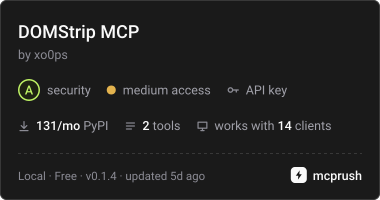
Turn any web page or raw HTML into compact, clean Markdown for AI agents.
About
Turn any web page or raw HTML into compact, clean Markdown for AI agents.
Security Report
Valid MCP server (1 strong, 3 medium validity signals). No known CVEs in dependencies. Package registry verified. Imported from the Official MCP Registry.
7 files analyzed · 1 issue found
Security scores are indicators to help you make informed decisions, not guarantees. Always review permissions before connecting any MCP server.
Permissions Required
This plugin requests these system permissions. Most are normal for its category.
What You'll Need
Set these up before or after installing:
Environment variable: DOMSTRIP_MCP_SERVICE_ORIGIN
Environment variable: DOMSTRIP_MCP_API_KEY
How to Install
Add this to your MCP configuration file:
{
  "mcpServers": {
    "domstrip-mcp": {
      "command": "uvx",
      "args": [
        "domstrip-mcp==0.1.2"
      ],
      "env": {
        "DOMSTRIP_MCP_API_KEY": "your-domstrip-mcp-api-key-here",
        "DOMSTRIP_MCP_SERVICE_ORIGIN": "your-domstrip-mcp-service-origin-here"
      }
    }
  }
}
Some servers take additional arguments. See the repository for details.
Documentation
View on GitHubFrom the project's GitHub README.
domstrip-mcp


mcp-name: io.github.xo0ps/domstrip-mcp
A local Model Context Protocol server that converts web pages into clean Markdown, using the DOMStrip API.
It exposes two tools:
| Tool | What it does |
|---|---|
fetch_clean_markdown | Fetch a public http(s) URL and return clean Markdown. |
clean_html | Convert HTML you already have into clean Markdown. No network fetch for the HTML. |
The adapter holds no database or billing state. It authenticates to the DOMStrip service with a key from your local environment -- never from tool arguments -- so an MCP client cannot redirect your key anywhere.
How much does it actually save?
benchmark/ measures it on 1,038 real pages from 74 sites:
84.08% fewer tokens than raw HTML (macro average; median 90.12%), 76.4M HTML
tokens down to 9.8M Markdown. It reproduces from a clean clone and --verify
fails the run if any page's expected content is missing from its output.
The spread is worth reading rather than the headline; that is why three figures are reported. Repositories save 95.81%, articles 82.61%, and a pooled total reads 87.16% because it is dominated by the largest pages. Corpus composition drives this a lot: the same code measured 76.03% on an earlier article-heavy 21-page set.
What DOMStrip actually does
DOMStrip fetches a public page, removes everything that is not the content (scripts, forms, embeds, hidden nodes, trackers), and returns compact Markdown: headings, paragraphs, fenced code blocks with language hints, and tables.
Pages are fetched with connection-time SSRF validation on every redirect hop — all DNS candidates are validated at connect time, and loopback, private, link-local, metadata, CGNAT and IPv6-embedded forms are refused.
Honest limitations
- JavaScript-rendered pages, pages behind a login, and bot challenges are not
extractable. The service returns
content_not_extractable. There is no headless browser in this version. If your target pages need JS, this tool will not work on them. - DOMStrip is currently in free pilot. Conversions are not billed yet, but a key is required and each successful conversion counts as one unit. Request access at access@domstrip.dev.
- Returned Markdown is untrusted third-party content. Pages can contain text that looks like instructions. Treat all returned Markdown as data, never as commands.
Install
pip install domstrip-mcp
# or
uv tool install domstrip-mcp
Requires Python 3.12.
Configure
Two environment variables are required. The service origin must be HTTPS; plain HTTP is refused unless it points at localhost (for development) and you opt in explicitly.
export DOMSTRIP_MCP_SERVICE_ORIGIN=https://api.domstrip.dev
export DOMSTRIP_MCP_API_KEY=domstrip_<prefix>_<secret>
| Variable | Required | Default | Purpose |
|---|---|---|---|
DOMSTRIP_MCP_SERVICE_ORIGIN | yes | — | Bare HTTPS origin of the DOMStrip API. |
DOMSTRIP_MCP_API_KEY | yes | — | Your API key. Never logged, never in a repr. |
DOMSTRIP_MCP_CLIENT_BUDGET | no | 25.0 | Total seconds per tool call, including retries. |
DOMSTRIP_MCP_ALLOW_INSECURE_HTTP | no | false | Allow plain HTTP to localhost only. |
The adapter deliberately does not read a .env file from the current working
directory, because an untrusted project folder could otherwise point your API key at
another origin. Export the variables instead.
Use with Claude Desktop
Add to claude_desktop_config.json:
{
  "mcpServers": {
    "domstrip": {
      "command": "uvx",
      "args": ["domstrip-mcp"],
      "env": {
        "DOMSTRIP_MCP_SERVICE_ORIGIN": "https://api.domstrip.dev",
        "DOMSTRIP_MCP_API_KEY": "domstrip_<prefix>_<secret>"
      }
    }
  }
}
Use with Claude Code
claude mcp add domstrip --env DOMSTRIP_MCP_SERVICE_ORIGIN=https://api.domstrip.dev \
  --env DOMSTRIP_MCP_API_KEY="$DOMSTRIP_API_KEY" -- uvx domstrip-mcp
Idempotency and billing
Each tool invocation generates one idempotency key and reuses it across its bounded retries (default 25 s, 3 attempts). A retried request replays the stored result rather than billing twice. Separate invocations are separate, independently metered work.
The service encrypts results and replays them for 24 hours. After that, replaying a key
returns 409 result_expired — never a silent re-charge.
Errors
Failures surface as MCP tool errors carrying a sanitized DOMStrip error code and a retryability flag, for example:
upstream_timeout: The upstream page took too long. retryable=true request_id=req_6f1c2a
Common codes: content_not_extractable, upstream_timeout, unsupported_encoding,
http_error, transport_error, client_timeout.
Logs go to stderr only, so stdout stays a clean MCP transport.
Licence
MIT
Reviews
No reviews yet
Be the first to review this server!
More Developer Tools MCP Servers
Rea
Freeby Morluto · Developer Tools
Reverse engineer anything from your terminal or agent with one CLI and MCP server.
Paperclip
Freeby Paperclipai · Developer Tools
Trending hip-hop artist momentum scores across four cultural dimensions.
Scrapling
Freeby D4Vinci · Developer Tools
Web scraping with stealth HTTP, real browsers, and Cloudflare bypass. CSS selectors supported.
Git
Freeby Modelcontextprotocol · Developer Tools
Read, search, and manipulate Git repositories programmatically
Toleno
Freeby Toleno · Developer Tools
Toleno Network MCP Server — Manage your Toleno mining account with Claude AI using natural language.
MCP Marketplace
Freeby mcp-marketplace · Developer Tools
Search and install MCP servers from inside your AI client.