
Server data from the Official MCP Registry
Inspect and download authorized media or precise clips locally with yt-dlp.
About
Inspect and download authorized media or precise clips locally with yt-dlp.
Security Report
Valid MCP server (3 strong, 2 medium validity signals). No known CVEs in dependencies. Package registry verified. Imported from the Official MCP Registry.
11 files analyzed · 1 issue found
Security scores are indicators to help you make informed decisions, not guarantees. Always review permissions before connecting any MCP server.
Permissions Required
This plugin requests these system permissions. Most are normal for its category.
What You'll Need
Set these up before or after installing:
Environment variable: RECLIP_MCP_DOWNLOAD_DIR
Environment variable: RECLIP_MCP_MAX_CLIP_SECONDS
How to Install
Add this to your MCP configuration file:
{
  "mcpServers": {
    "io-github-yagyaanshk-reclip": {
      "env": {
        "RECLIP_MCP_DOWNLOAD_DIR": "your-reclip-mcp-download-dir-here",
        "RECLIP_MCP_MAX_CLIP_SECONDS": "your-reclip-mcp-max-clip-seconds-here"
      },
      "args": [
        "reclip-mcp"
      ],
      "command": "uvx"
    }
  }
}Documentation
View on GitHubFrom the project's GitHub README.
ReClip
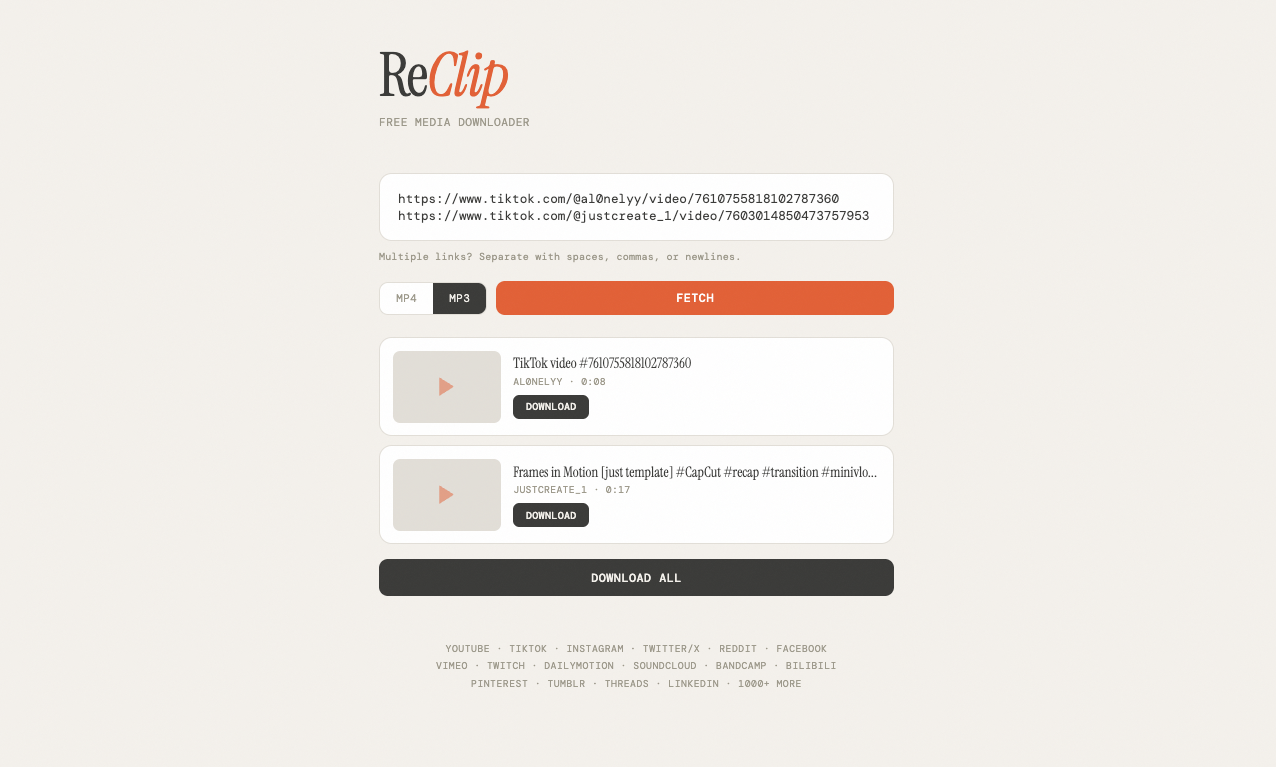
A self-hosted, open-source video and audio downloader with a clean web UI. Paste links from YouTube, TikTok, Instagram, Twitter/X, and 1000+ other sites — download as MP4 or MP3.


https://github.com/user-attachments/assets/419d3e50-c933-444b-8cab-a9724986ba05
Features
- Download videos from 1000+ supported sites (via yt-dlp)
- MP4 video or MP3 audio extraction
- Quality/resolution picker
- Download precise clips by start/end time without first storing the full source
- Bulk downloads — paste multiple URLs at once
- Automatic URL deduplication
- Clean, responsive UI — no frameworks, no build step
- Native Desktop Apps — zero-install standalone executables for Windows, macOS, and Linux.
- Intelligent Filename Generation — extracts and formats metadata gracefully (
Artist - Track.mp3orChannel - Title.mp4). - Local-first operation — downloads run on the user's own machine and network connection.
- Automated Build Pipeline — GitHub Actions automatically compiles and publishes new executables upon every version tag push.
🚀 Download ReClip App
You don't need to install Python or use the terminal. Download the pre-built standalone executable for your operating system:
- 🪟 Windows: ReClip.exe
- 🍎 macOS: ReClip-macos.dmg
- 🐧 Linux: ReClip
Note: The native apps contain a bundled server and PyWebView browser. Simply open the app and it will launch right in its own native window!
Keeps itself working when YouTube changes. The app ships with a copy of yt-dlp but does not depend on it staying current: once a day, and whenever a download fails in a way a newer yt-dlp usually fixes (HTTP 403, "sign in to confirm", player changes), ReClip fetches the latest yt-dlp from PyPI into your user profile, verifies its checksum, and retries. You can also click Check for updates at the bottom of the window. Nothing else is downloaded or sent anywhere.
YouTube needs a JavaScript runtime. yt-dlp solves YouTube's player challenges with Deno (recommended) or Node.js. Install one and restart ReClip if you see "YouTube needs a JavaScript runtime".
🔏 Code Signing Policy
Free code signing provided by SignPath.io, certificate by SignPath Foundation.
Windows releases of ReClip.exe are built on GitHub Actions and Authenticode-signed with a SignPath Foundation certificate. The publisher shown by Windows is SignPath Foundation. Signing runs only for tagged releases; the full pipeline lives in .github/workflows/build.yml and the artifact configuration in .signpath/artifact-configuration.xml.
Team roles
| Role | Member |
|---|---|
| Committers and reviewers | @yagyaanshK |
| Approvers | @yagyaanshK |
Privacy policy
This program will not transfer any information to other networked systems unless specifically requested by the user or the person installing or operating it. The only automatic network access is a daily check of pypi.org for a newer yt-dlp release (see "Keeps itself working when YouTube changes" above); the request carries no user data. ReClip only contacts the media sites you paste URLs for, and the desktop app runs entirely on your own computer.
🛠️ Run from Source (Terminal)
git clone https://github.com/yagyaanshK/reclip.git
cd reclip
On Windows:
Double-click start_windows.bat.
On Mac / Linux:
./reclip.sh
Open http://localhost:8899 in your browser.
Build Executables Locally
To manually compile ReClip into a standalone executable:
- Windows: Run
build_windows.bat-> Output indist/ - Mac / Linux: Run
./build_unix.sh-> Output indist/
Or with Docker:
docker build -t reclip . && docker run -p 8899:8899 reclip
Usage
- Paste one or more video URLs into the input box
- Choose MP4 (video) or MP3 (audio)
- Click Fetch to load video info and thumbnails
- Select quality/resolution if available
- Optionally enable Clip and enter start/end times as
SS,MM:SS, orHH:MM:SS.000 - Click Download on individual videos, or Download All
Command-Line Interface
ReClip also exposes a structured local CLI for shell scripts and AI agents. Install it in a Python 3.10+ environment with uv:
uv tool install reclip-mcp
Then run:
reclip inspect "https://example.com/media" --json
reclip download "https://example.com/media" --format mp4 --quality 1080p --output downloads --json
reclip clip "https://example.com/media" --start 01:20:15.500 --end 01:25:00 --format mp3 --output downloads --json
reclip sites --json
All JSON responses contain an ok field. Failures include a stable machine-readable error code and a human-readable message. Downloads occur locally and return the absolute output path, filename, byte size, format, source URL, and clip range.
AI Agent Integration (MCP)
Configure an MCP host to install and start ReClip over stdio without cloning the repository:
{
  "mcpServers": {
    "reclip": {
      "command": "uvx",
      "args": ["reclip-mcp"],
      "env": {
        "RECLIP_MCP_DOWNLOAD_DIR": "/absolute/path/to/downloads"
      }
    }
  }
}
Use the absolute path to uvx if the MCP host does not inherit your shell PATH. The server exposes inspect_media, download_media, download_clip, and list_supported_sites. Download tools require explicit user authorization and can write only to RECLIP_MCP_DOWNLOAD_DIR, which defaults to ~/Downloads/ReClip.
For development from a checkout, run python -m pip install . and configure the host to execute python -m reclip_mcp.
Supported Sites
Anything yt-dlp supports, including:
YouTube, TikTok, Instagram, Twitter/X, Reddit, Facebook, Vimeo, Twitch, Dailymotion, SoundCloud, Loom, Streamable, Pinterest, Tumblr, Threads, LinkedIn, and many more.
Stack
- Backend: Python + Flask
- Frontend: Vanilla HTML/CSS/JS (single file, no build step)
- Download engine: yt-dlp + ffmpeg
- Dependencies:
flask,yt-dlp,yt-dlp-ejs,pycryptodomex,pywebview,pyinstaller,imageio-ffmpeg
Disclaimer
This tool is intended for personal use only. Please respect copyright laws and the terms of service of the platforms you download from. The developers are not responsible for any misuse of this tool.
License
Reviews
No reviews yet
Be the first to review this server!
More Developer Tools MCP Servers
Rea
Freeby Morluto · Developer Tools
Reverse engineer anything from your terminal or agent with one CLI and MCP server.
Paperclip
Freeby Paperclipai · Developer Tools
Trending hip-hop artist momentum scores across four cultural dimensions.
Git
Freeby Modelcontextprotocol · Developer Tools
Read, search, and manipulate Git repositories programmatically
Fetch
Freeby Modelcontextprotocol · Developer Tools
Web content fetching and conversion for efficient LLM usage
Toleno
Freeby Toleno · Developer Tools
Toleno Network MCP Server — Manage your Toleno mining account with Claude AI using natural language.
MCP Marketplace
Freeby mcp-marketplace · Developer Tools
Search and install MCP servers from inside your AI client.