
Server data from the Official MCP Registry
Read-only Yahoo! Shopping product search via the Yahoo! Shopping Item Search API v3.
About
Read-only Yahoo! Shopping product search via the Yahoo! Shopping Item Search API v3.
Security Report
This is a well-structured MCP server for Yahoo! Shopping product search with strong security fundamentals. Authentication is not required (appropriate for read-only product search), credentials are properly managed via environment variables, and permissions align well with the stated purpose. The codebase demonstrates good security practices including input validation, response sanitization, rate limiting, and careful handling of sensitive data in caching. Minor code quality observations exist but do not constitute security risks. Supply chain analysis found 3 known vulnerabilities in dependencies (0 critical, 3 high severity).
4 files analyzed · 6 issues found
Security scores are indicators to help you make informed decisions, not guarantees. Always review permissions before connecting any MCP server.
Permissions Required
This plugin requests these system permissions. Most are normal for its category.
What You'll Need
Set these up before or after installing:
Environment variable: YAHOO_SHOPPING_APP_ID
How to Install
Add this to your MCP configuration file:
{
  "mcpServers": {
    "io-github-ymuichiro-yahoo-shopping-mcp": {
      "env": {
        "YAHOO_SHOPPING_APP_ID": "your-yahoo-shopping-app-id-here"
      },
      "args": [
        "yahoo-shopping-mcp"
      ],
      "command": "uvx"
    }
  }
}Documentation
View on GitHubFrom the project's GitHub README.
Yahoo! Shopping MCP
An open-source, community-maintained MCP server for read-only Yahoo! Shopping product search through the Yahoo! Shopping Item Search API v3. Search by keyword or JAN code with price, stock, condition, shipping, sorting, category, brand, seller, image-size, and pagination filters. Local and self-hosted deployments use Streamable HTTP; a separate stdio entrypoint is provided for Glama managed hosting and local stdio clients.

This is not an official Yahoo! Shopping, LINE Yahoo, or OpenAI service. The maintainers do not represent, endorse, operate, or guarantee Yahoo! Shopping, the Yahoo! Developer Network, or OpenAI.
Project status and hosted endpoints
This project is intended for self-hosting. It does not provide a guaranteed shared or production-hosted endpoint.
If a Cloudflare Tunnel URL is shared separately by a maintainer for testing, that URL is a temporary verification endpoint. It may be stopped, restarted, changed, or unavailable at any time; it has no uptime, SLA, support, privacy, or data-retention guarantee. Do not use it for production or confidential workloads. Run this server on infrastructure you control instead.
A maintainer-operated sample deployment may be available at:
- MCP endpoint: https://non-official-yahoo-shopping-mcp.notelligent.app/mcp
- Health check: https://non-official-yahoo-shopping-mcp.notelligent.app/healthz
- Root health check: https://non-official-yahoo-shopping-mcp.notelligent.app/
These URLs are provided for demonstration and connectivity checks only. They are not an official Yahoo! or OpenAI service and are not guaranteed to be online, stable, supported, private, or available to any particular user.
The current registry and directory publication status is tracked in docs/PUBLICATION.md.
This is a community implementation. Before using it, independently review the current Yahoo! Developer Network and Yahoo! Shopping API terms, quotas, attribution requirements, content restrictions, and any rules applicable to your jurisdiction and deployment. The maintainers do not guarantee that the implementation or its usage complies with a third-party policy.
Demo
The short demo below shows a Yahoo! Shopping search from ChatGPT and the resulting MCP Apps product carousel.
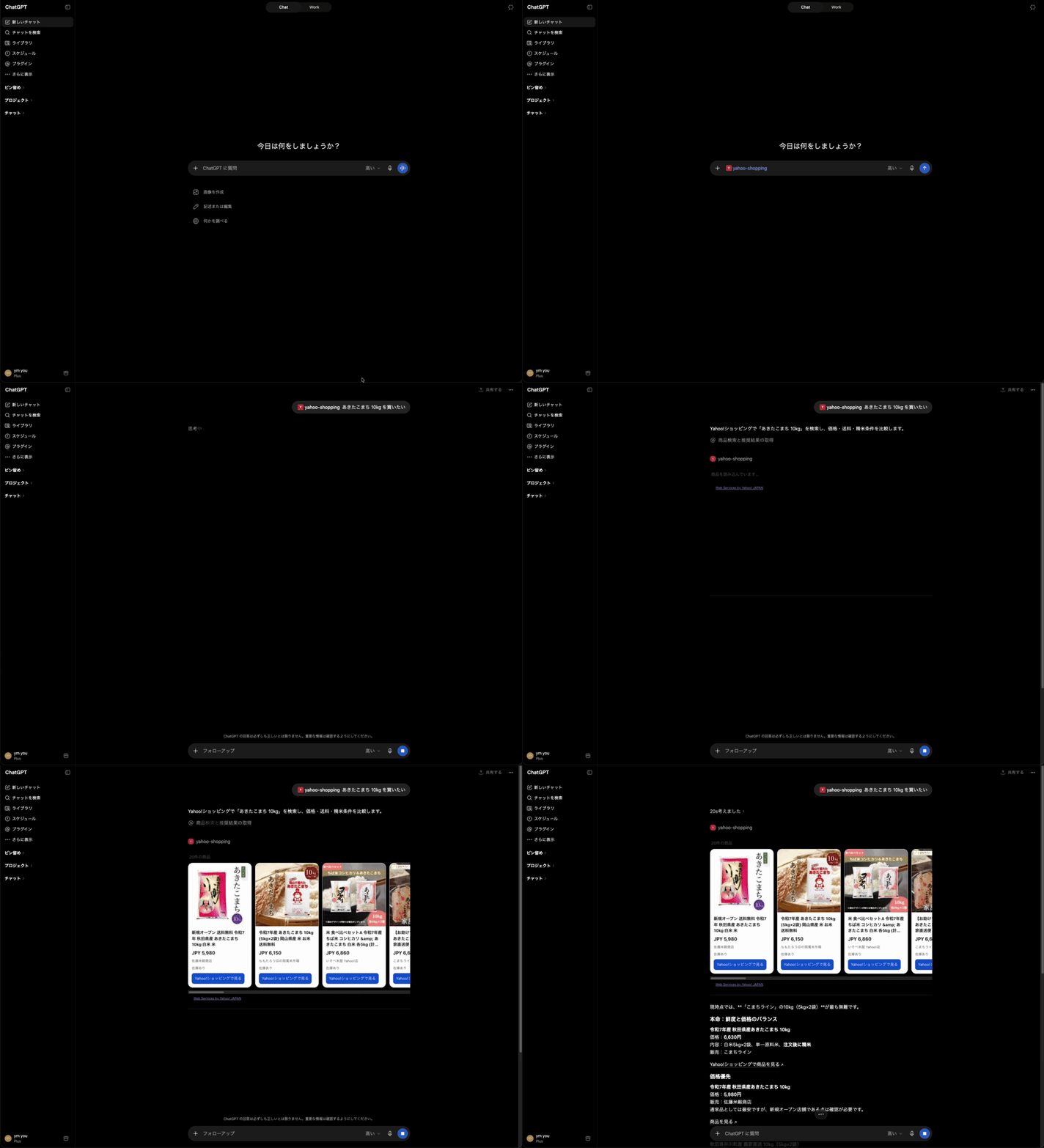
The GIF is used for inline playback because GitHub does not reliably embed repository-local MP4 files in rendered Markdown. The higher-quality MP4 is available at assets/demo.mp4.
Features
- Read-only
search_productstool for Yahoo! Shopping product search - Keyword, JAN code, price, stock, condition, shipping, sorting, category, brand, seller, image-size, and pagination filters
- A same-process interval between Yahoo request starts (1 second by default)
- Exponential backoff for Yahoo HTTP 429 responses and a bounded 5xx retry
- Short-lived cache of safety-filtered Yahoo response data
- SQLite-backed application-wide rate limiting
- MCP Apps product carousel with Yahoo attribution
- Conservative filtering of restricted product terms and non-Yahoo URLs
GET /,GET /healthz, and Streamable HTTP MCP at/mcp
The rate limiter is an application safeguard, not a Yahoo quota guarantee or an SLA. It applies within one process; separate replicas need their own controls.
Protocol and endpoints
The default yahoo-shopping-mcp entrypoint uses the MCP Streamable HTTP
transport:
- MCP endpoint:
/mcp - Health endpoint:
GET /healthz - Root health endpoint:
GET / - MCP authentication: none
The server is bound to loopback by default. An unauthenticated endpoint is not automatically an internet-public endpoint; if you expose it, add network, reverse-proxy, rate-limit, logging, and data-retention controls appropriate to your deployment.
Glama managed hosting
Glama's managed OSS build starts the MCP process over stdio and exposes its managed endpoint through Glama's HTTP gateway. Configure the Glama Dockerfile admin page with these CMD arguments:
["uv", "run", "yahoo-shopping-mcp-stdio"]
Glama adds its mcp-proxy wrapper around this command. The effective managed
command is therefore equivalent to:
mcp-proxy -- uv run yahoo-shopping-mcp-stdio
This repository's normal yahoo-shopping-mcp command and Dockerfile remain
Streamable HTTP for self-hosting. Set YAHOO_SHOPPING_APP_ID in Glama's
environment schema and use a non-production placeholder only for build checks.
Local plugin package
The repository includes metadata for local use:
.codex-plugin/plugin.json: local plugin metadata, prompts, and logo.mcp.json: local MCP client configurationassets/logo.svg: product-search icon
These files do not provide a store listing or a shared hosted service. Start your own server and configure your own Yahoo Client ID before using them.
Quick start
Requirements: Python 3.12+, uv, and a Yahoo!
Shopping API appid obtained by the operator.
make sync-dev
YAHOO_SHOPPING_APP_ID="your-app-id" make run
The local MCP endpoint is http://127.0.0.1:8000/mcp and the health check is
http://127.0.0.1:8000/healthz.
To bind a different interface or port for a controlled deployment:
YAHOO_SHOPPING_APP_ID="your-app-id" make run HOST=0.0.0.0 PORT=8080
Keep the Yahoo Client ID in an environment variable. Never commit it or place it in a search query.
Docker and self-hosting
Create the local environment template and start the container:
make init-env
make up
The default local Compose endpoint is
http://127.0.0.1:18000/mcp. See Deployment for a
production-oriented container and reverse-proxy checklist.
To run the container directly without Compose, build the image and publish the container's port to loopback:
docker build --tag yahoo-shopping-mcp:local .
docker run --rm \
  --name yahoo-shopping-mcp \
  --publish 127.0.0.1:18000:8000 \
  --env YAHOO_SHOPPING_APP_ID="your-app-id" \
  --volume yahoo-shopping-mcp-data:/data \
  yahoo-shopping-mcp:local
The MCP endpoint is http://127.0.0.1:18000/mcp and the health check is
http://127.0.0.1:18000/healthz. To use a published versioned preview image,
replace the local build with a specific tag from GitHub Container
Registry:
CONTAINER_IMAGE="ghcr.io/ymuichiro/yahoo-shopping-mcp:v0.9.0-preview.2"
docker pull "$CONTAINER_IMAGE"
docker run --rm \
  --name yahoo-shopping-mcp \
  --publish 127.0.0.1:18000:8000 \
  --env YAHOO_SHOPPING_APP_ID="your-app-id" \
  --volume yahoo-shopping-mcp-data:/data \
  "$CONTAINER_IMAGE"
For direct application startup, use the YAHOO_SHOPPING_MCP_* environment
variables. Compose maps its convenience variables ALLOWED_HOSTS and
ALLOWED_ORIGINS to the application settings.
Optional Cloudflare Tunnel
Cloudflare Tunnel is an optional developer deployment path, not a requirement. It is only enabled by:
make up-tunnel
Set CLOUDFLARE_TUNNEL_TOKEN only when using that Compose profile. The tunnel
hostname and published application are configured in Cloudflare, outside this
repository. Replace the local values in .env with the exact external
hostname and origin used by your deployment:
YAHOO_SHOPPING_APP_ID=replace-with-your-yahoo-app-id
CLOUDFLARE_TUNNEL_TOKEN=replace-with-your-cloudflare-tunnel-token
ALLOWED_HOSTS=mcp.example.com
ALLOWED_ORIGINS=https://mcp.example.com
The tunnel does not add MCP authentication. Do not treat a tunnel URL shared by the maintainer as a supported hosted service; use a hostname and infrastructure that you control.
Claude Desktop
This repository provides two startup commands:
yahoo-shopping-mcp: Streamable HTTP for local or self-hosted deploymentsyahoo-shopping-mcp-stdio: stdio for local stdio clients and Glama managed hosting
To run the stdio entrypoint locally, add the following to
claude_desktop_config.json after running make sync-dev. Replace the
directory with the absolute path to this repository:
{
  "mcpServers": {
    "yahoo-shopping": {
      "command": "uv",
      "args": [
        "run",
        "--directory",
        "/absolute/path/to/yahoo-shopping-mcp",
        "yahoo-shopping-mcp-stdio"
      ],
      "env": {
        "YAHOO_SHOPPING_APP_ID": "your-app-id"
      }
    }
  }
}
Keep the Yahoo Client ID in the server environment and never commit it.
To connect a self-hosted, authenticated deployment, open Claude Desktop's
Settings → Connectors → Add custom connector and enter the complete HTTPS
MCP URL, including /mcp:
https://mcp.example.com/mcp
Complete the authentication flow provided by that deployment. The current
maintainer demo endpoint is unauthenticated and temporary, so do not use it as
a production Claude connector. Keep YAHOO_SHOPPING_APP_ID on the MCP server
and never place it in Claude Desktop configuration.
For local development, start the server and verify the endpoint with MCP Inspector:
YAHOO_SHOPPING_APP_ID="your-app-id" make run
The Streamable HTTP endpoint is http://127.0.0.1:8000/mcp. See the MCP
documentation for local
servers
and remote servers.
Using the tool
Use the endpoint you started from ChatGPT Developer Mode or another MCP client. No MCP authentication header is expected.
search_products requires at least one of query and jan_code. Important
constraints include:
query: 1–200 charactersjan_code: an 8–13 digit stringgenre_category_idsandbrand_ids: arrays of 1–20 positive integersresults: 1–50start: 1 or greaterstart + results <= 1000price_from <= price_towhen both are supplied
See the complete contract in docs/API.md.
Example:
{
  "query": "desk lamp",
  "in_stock": true,
  "sort": "-score",
  "results": 10,
  "start": 1
}
The tool returns model-readable JSON in content[0].text, with product data
under results. Carousel data is returned in structuredContent.products.
The UI Resource is versioned as
ui://yahoo-shopping/product-carousel-v4.html and displays Yahoo attribution.
The server does not place orders, process payments, modify accounts, or guarantee product availability, prices, sellers, shipping, or legal compliance.
Privacy and safety
Search fields are sent to the operator's MCP server and to Yahoo! Shopping. The server stores only safety-filtered Yahoo response data in a short-lived cache and global rate-limit state in local storage. It does not provide user accounts or persist full chat history.
Do not send secrets, payment data, passwords, government identifiers, or sensitive personal data as search terms. Public operators must publish privacy, support, and retention details that match their actual infrastructure.
The safety filter is conservative and does not guarantee complete product classification. It is not a substitute for Yahoo's policies, legal advice, or operator review.
See PRIVACY.md, TERMS.md, SECURITY.md, and docs/DATA_HANDLING.md.
Yahoo! Developer Network references
The following official pages define the external requirements that apply to the operator's own Yahoo! application. They are not part of this repository's license or a substitute for reading the current versions:
- Yahoo! Developer Network guidelines
- Yahoo! Shopping API portal
- Yahoo! Shopping product search v3
- Credit and attribution rules
- Usage limits
- Developer guide and Client ID registration
Each operator must obtain and protect their own Client ID and independently confirm the applicable terms, usage limits, attribution, and legal requirements before operating this server.
Development and verification
make test
Tests use httpx.MockTransport and do not call Yahoo! from CI. For MCP
Inspector and UI checks, see docs/VERIFICATION.md.
Reviewable positive and negative cases are in
docs/SUBMISSION_TEST_CASES.md.
Contributions are welcome. Read CONTRIBUTING.md before opening a change. For support, use SUPPORT.md; report security issues using the private process in SECURITY.md.
Japanese documentation
日本語の概要・導入手順は docs/README.ja.md を参照してください。
License
Reviews
No reviews yet
Be the first to review this server!
More Developer Tools MCP Servers
Paperclip
Freeby Paperclipai · Developer Tools
Trending hip-hop artist momentum scores across four cultural dimensions.
Fetch
Freeby Modelcontextprotocol · Developer Tools
Web content fetching and conversion for efficient LLM usage
Git
Freeby Modelcontextprotocol · Developer Tools
Read, search, and manipulate Git repositories programmatically
Toleno
Freeby Toleno · Developer Tools
Toleno Network MCP Server — Manage your Toleno mining account with Claude AI using natural language.
MCP Marketplace
Freeby mcp-marketplace · Developer Tools
Search and install MCP servers from inside your AI client.
mcp-creator-python
Freeby mcp-marketplace · Developer Tools
Create, build, and publish Python MCP servers to PyPI — conversationally.