
Server data from the Official MCP Registry
Delegate summarising, extraction, classification and OCR to the macOS 27 on-device model.
About
Delegate summarising, extraction, classification and OCR to the macOS 27 on-device model.
Security Report
Valid MCP server (2 strong, 4 medium validity signals). No known CVEs in dependencies. Imported from the Official MCP Registry.
5 files analyzed · No issues found
Security scores are indicators to help you make informed decisions, not guarantees. Always review permissions before connecting any MCP server.
Permissions Required
This plugin requests these system permissions. Most are normal for its category.
Documentation
View on GitHubFrom the project's GitHub README.
fm-mcp
An MCP server that lets coding agents such as Claude Code and Codex hand simple text work to the on-device model for Apple Foundation Models, the fm that ships with macOS 27. It's free, private, and runs offline.
mcp-name: io.github.yrangana/fm-mcp
Site: yrangana.github.io/fm-mcp, with what we learned building it: the measured limits of the on-device model.
Why
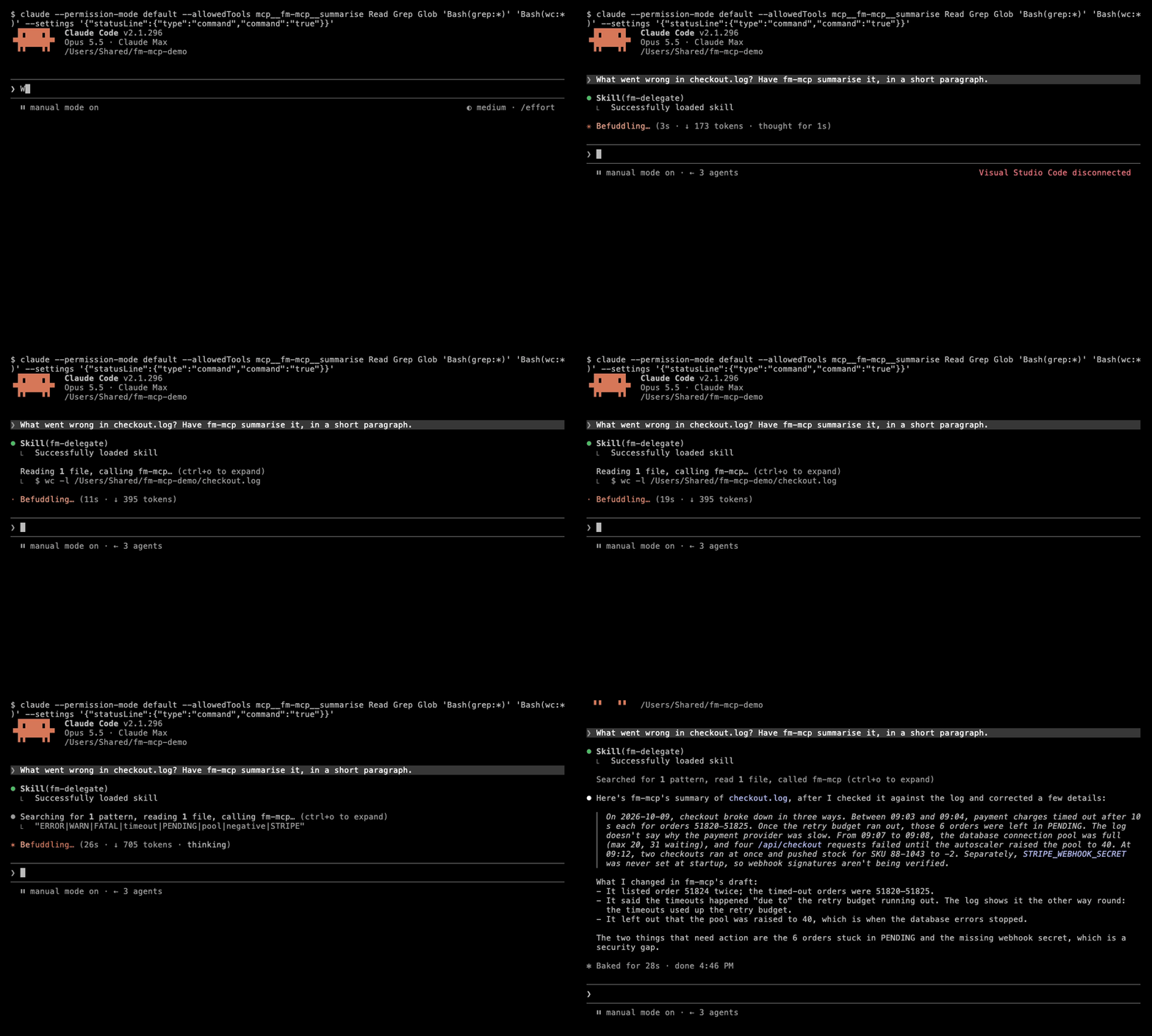
Coding agents spend paid, remote tokens on simple jobs, like summarising a log or pulling fields out of a document. A small model already on your Mac can do much of that for nothing, and your text never leaves the machine. fm-mcp lets the agent hand off that work, and tells it plainly what the small model can't do.
Install
fm-mcp is a public beta (0.1.x): it works and is tested, but tool details may change between releases. CHANGELOG.md lists what changed.
You need a Mac with Apple Silicon (Intel Macs are not supported), macOS 27 with Apple Intelligence turned on, and the fm licence accepted once (fm license). That's the whole support policy: fm-mcp doctor checks each of these, and nothing else is supported.
No Homebrew yet? Install it from brew.sh first. Its installer asks to install Xcode's command line tools: accept, and let it finish.
brew install yrangana/tap/fm-mcp
fm-mcp install    # sets up Claude Code and Codex
fm-mcp doctor     # checks everything fm-mcp needs

Then start a new Claude Code or Codex session. fm-mcp starts the model server (fm serve) itself the first time a tool is called, and stops it when the session ends.
Other ways to get the binary:
curl --proto '=https' --tlsv1.2 -LsSf https://github.com/yrangana/fm-mcp/releases/latest/download/fm-mcp-installer.sh | sh
cargo install fm-mcp
What fm-mcp install changes
- Claude Code: adds the
fm-mcpMCP server to~/.claude.json(throughclaude mcp addwhen theclaudecommand is there), and installs thefm-delegateskill in~/.claude/skills/. - Codex: adds
[mcp_servers.fm-mcp]to~/.codex/config.toml, and a marked section in~/.codex/AGENTS.md(or inAGENTS.override.md, if you use one).
It backs up each file before changing it and prints every path it touched; running it again changes nothing. --claude or --codex picks one agent, --dry-run shows the changes without writing, and --no-guidance skips the skill and the AGENTS.md section. fm-mcp install --uninstall removes everything it added.
The skill and the AGENTS.md section tell the agent when to delegate. Without them the agent sees only the tool descriptions, and delegates less well.
Or: the Claude Code plugin
The plugin gives Claude Code the MCP server and the skill, without fm-mcp install. It still needs the binary on your PATH, so install that first (Homebrew above); otherwise Claude Code reports the server as failed to connect.
/plugin marketplace add yrangana/fm-mcp
/plugin install fm-mcp@fm-mcp
Use the plugin or fm-mcp install for Claude Code, not both: both together give Claude Code two fm-mcp servers. With the plugin, run fm-mcp install --codex to set up Codex only.
Other MCP clients
fm-mcp is a plain stdio MCP server, so other clients that run local servers on the same Mac can use it. fm-mcp install doesn't set them up, and they don't get the delegation guidance: the agent decides from the tool descriptions alone. Each client below was tried on a real Mac; others may work but are untested.
Claude Desktop (tried with 2.31226.1, 2026-10-11). In Settings › Developer › Edit Config, add this to mcpServers in claude_desktop_config.json, then quit and reopen Claude Desktop:
"fm-mcp": {
  "command": "/opt/homebrew/bin/fm-mcp",
  "args": []
}
Use the full path (which fm-mcp prints it). fm-mcp helps most with files on your Mac: give Claude the file's path and it passes path, so the text never goes through Claude. For a web page, Claude Desktop reads the page itself first, so delegating it saves nothing.
Devin (formerly Windsurf) (tried with Devin.app 3.8.20, 2026-10-11). Add this to mcpServers in ~/.config/devin/mcp_config.json:
"fm-mcp": {
  "type": "stdio",
  "command": "/opt/homebrew/bin/fm-mcp",
  "args": []
}
Tools
| Tool | What it does | How much it takes |
|---|---|---|
summarise | Condenses logs, documents, notes and transcripts into a gist: a paragraph, or at most 7 bullets. Not a full record. | About 30,000 words of prose, but only about 1,000 lines of a dense log. Long input is split and combined, which takes a minute or two and can drop details. |
extract | Pulls named fields out of one text as JSON, from a JSON Schema you give. Works best with a flat schema. | About 3,500 words of prose. |
classify | Sorts one text into labels you choose (one label, or several with multi). | About 3,500 words of prose. |
ocr | Reads the text in a PNG, JPEG, HEIC, TIFF, GIF or BMP image. Not PDF. | One image. |
summarise, extract and classify take text, or a path to a text file (up to 1 MB) so the agent never has to read the file itself. docs/TOOLS.md lists every parameter, with example calls.
Limits
- Small model, small context: about 8K tokens, shared by the input and the answer. Logs full of IDs and numbers use far more tokens per word than prose.
- Not for code, maths, reasoning, facts the text doesn't contain, or anything where a wrong answer is costly and you can't check it.
- It makes mistakes. Summaries can drop or distort details.
extractoften returnsnullfor a field the text doesn't contain, but not reliably: on short invoices a missing PO number took the supplier's name in 10 of 25 runs. When the model gets stuck on a field, fm-mcp keeps the finished fields, sets the stuck one tonulland says so; that call takes about 15 s. Ask only for fields the text is likely to have. Nested schemas are less reliable than flat ones. Check what matters. - One request at a time. The model is shared by every session on the Mac, so calls queue: a short
extracttakes 1–2 s, a longsummarisea minute or more. - Safety filter: the on-device model sometimes refuses harmless input. fm-mcp reports that clearly, and the agent does the task itself.
Privacy
Everything runs on your Mac. fm-mcp talks to fm serve over a local Unix socket and sends nothing over the network. Your text goes only to the on-device model. SECURITY.md has the details, and how to report a security problem privately.
Troubleshooting
Run fm-mcp doctor. It checks the Mac, macOS, fm, the licence, the model, a test request, and both agents' setup, and says how to fix anything that fails.
| Problem | Fix |
|---|---|
| Licence not agreed | Run fm license once. |
| Model not available | Turn on Apple Intelligence in System Settings and wait for the model to finish downloading. |
| A tool says the model "got stuck" | Usually a schema with fields the text doesn't contain, or another session using the model. Try a flatter schema. |
| A tool times out on long input | Raise the limit: set FM_MCP_REQUEST_TIMEOUT_SECS (default 120) in the MCP server's environment. |
| You need more detail | Set FM_MCP_LOG=debug in the MCP server's environment. fm-mcp logs to stderr only (stdout carries the MCP protocol). |
Uninstall
fm-mcp install --uninstall
brew uninstall fm-mcp
Development
git clone https://github.com/yrangana/fm-mcp.git
cd fm-mcp
cargo build --release
./target/release/fm-mcp install    # points your agents at this build

cargo test --features fake-fm      # needs no Apple Intelligence: uses a fake fm
cargo clippy --all-targets --all-features -- -D warnings
cargo fmt --check
scripts/real_fm_smoke.sh           # checks against the real fm on this Mac
AGENTS.md has the architecture, the tested facts about fm serve, and the project rules. docs/MANUAL_TEST.md is the checklist for each release.
Licence
MIT. fm-mcp is not affiliated with or endorsed by Apple. It calls the fm tool installed on your Mac and includes nothing from Apple.
Reviews
No reviews yet
Be the first to review this server!
More Developer Tools MCP Servers
Fetch
Freeby Modelcontextprotocol · Developer Tools
Web content fetching and conversion for efficient LLM usage
Git
Freeby Modelcontextprotocol · Developer Tools
Read, search, and manipulate Git repositories programmatically
Worldmonitor
Freeby Koala73 · Developer Tools
Live markets, conflicts, country risk, chokepoints, energy, and China decision signals. 93 tools.
Toleno
Freeby Toleno · Developer Tools
Toleno Network MCP Server — Manage your Toleno mining account with Claude AI using natural language.
MCP Marketplace
Freeby mcp-marketplace · Developer Tools
Search and install MCP servers from inside your AI client.
mcp-creator-python
Freeby mcp-marketplace · Developer Tools
Create, build, and publish Python MCP servers to PyPI — conversationally.