
Server data from the Official MCP Registry
Validate app and SaaS ideas: search demand, competitors, app store data and a verdict.
About
Validate app and SaaS ideas: search demand, competitors, app store data and a verdict.
Remote endpoints: streamable-http: https://tgget.io/mcp
Security Report
Valid MCP server (1 strong, 1 medium validity signals). No known CVEs in dependencies. Imported from the Official MCP Registry.
10 tools verified · Open access · No issues found
Security scores are indicators to help you make informed decisions, not guarantees. Always review permissions before connecting any MCP server.
Permissions Required
This plugin requests these system permissions. Most are normal for its category.
How to Connect
Remote Plugin
No local installation needed. Your AI client connects to the remote endpoint directly.
Add this to your MCP configuration to connect:
{
  "mcpServers": {
    "io-tgget-niche-research": {
      "url": "https://tgget.io/mcp"
    }
  }
}Documentation
View on GitHubFrom the project's GitHub README.
TGGET Niche Research MCP server
Remote Model Context Protocol server of TGGET, a niche research tool for mobile apps and online services. It lets an AI assistant check an idea against measured data instead of guessing from a description.
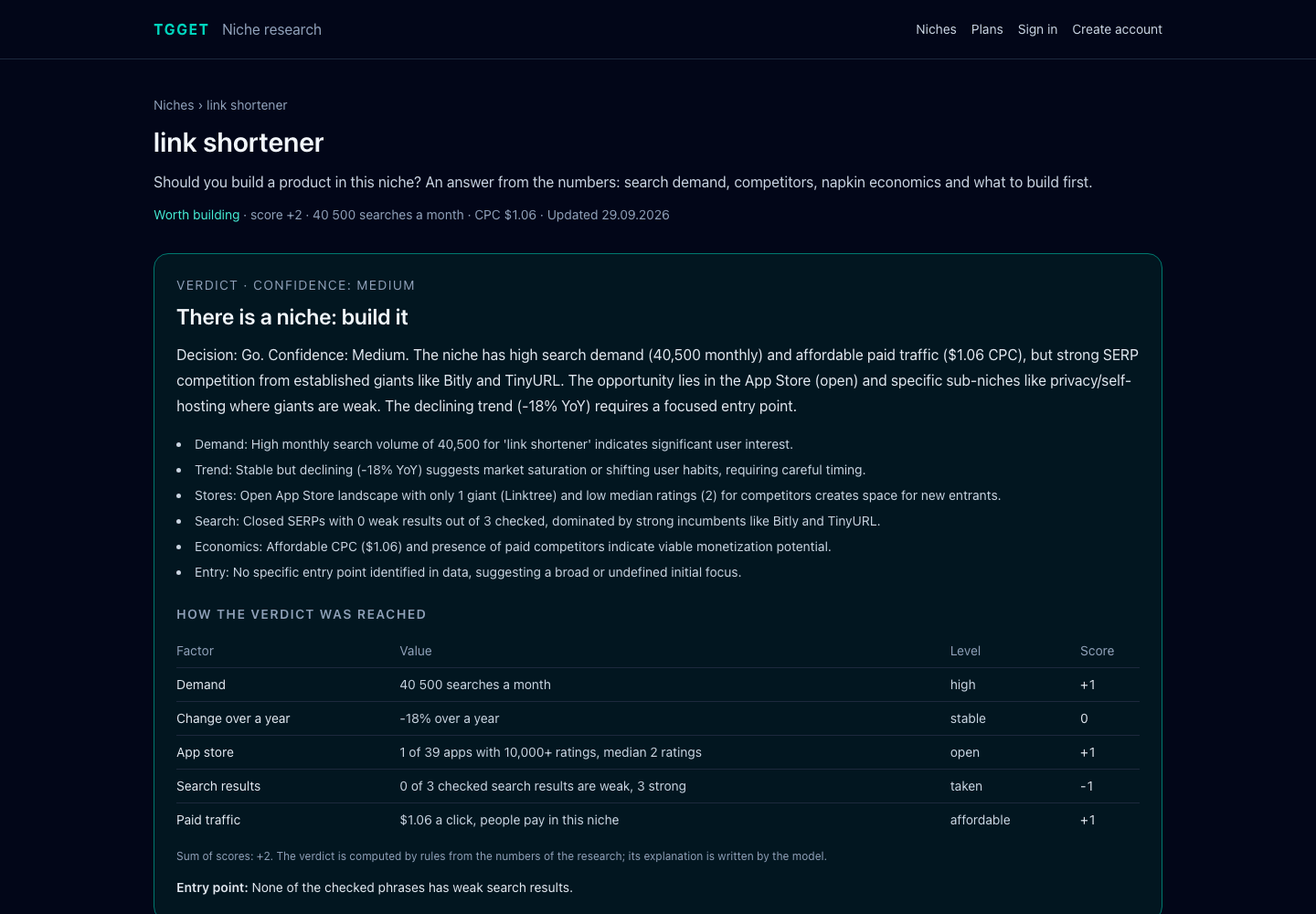
Give it a search phrase or a description of an idea in your own words. It returns monthly search demand, sub-niches, competitor sites from search results, App Store apps with what their users complain about, community signals and a final report with a verdict: worth building, needs validation or no niche. The verdict is computed by rules from five measured factors, so the same numbers always give the same answer; the language model only explains it.
- Endpoint:
https://tgget.io/mcp(Streamable HTTP) - Authentication: personal access token, sent as a Bearer token. The server tells what it is and lists its tools without a token; every call needs one
- Name in the MCP Registry:
io.tgget/niche-research - Documentation: tgget.io/docs/api
What you can ask
- "Validate this idea: an app that reminds you to water plants and explains how to care for them."
- "Is there demand for an expense tracker for couples? Who are the competitors?"
- "Research the niche 'invoice generator' and give me the report as Markdown."
- "Compare my last three researches and tell me which idea to start with."
- "Follow the niche of my research about habit trackers and show what changed since last month."
Getting a token
- Create an account at tgget.io or in the Android app and confirm your email. A free account is enough.
- Open Settings, section "API and AI assistants", and create a token. It is shown once.
Tokens expire after a year and are revoked when you change your password or close your sessions. An account holds up to five tokens.
Connecting
Replace <token> with your token. Ready-made files are in examples.
Claude Code
claude mcp add --transport http tgget https://tgget.io/mcp --header "Authorization: Bearer <token>"
Cursor
~/.cursor/mcp.json or .cursor/mcp.json in a project:
{
  "mcpServers": {
    "tgget": {
      "url": "https://tgget.io/mcp",
      "headers": { "Authorization": "Bearer <token>" }
    }
  }
}
VS Code
.vscode/mcp.json:
{
  "inputs": [
    { "type": "promptString", "id": "tgget-token", "description": "TGGET access token", "password": true }
  ],
  "servers": {
    "tgget": {
      "type": "http",
      "url": "https://tgget.io/mcp",
      "headers": { "Authorization": "Bearer ${input:tgget-token}" }
    }
  }
}
Codex
~/.codex/config.toml, with the token in the TGGET_TOKEN environment variable:
[mcp_servers.tgget]
url = "https://tgget.io/mcp"
bearer_token_env_var = "TGGET_TOKEN"
Clients that only run local servers
Use the mcp-remote bridge:
{
  "mcpServers": {
    "tgget": {
      "command": "npx",
      "args": ["-y", "mcp-remote", "https://tgget.io/mcp", "--header", "Authorization: Bearer <token>"]
    }
  }
}
Tools
| Tool | What it does | Parameters |
|---|---|---|
start_research | Starts a research from a search phrase or a description of an idea. A phrase is scanned directly; a description is first turned into real search queries and the strongest one is scanned. | text (required), deep, locale |
get_research | Current state and findings: status, headline numbers, ranked candidate phrases, competitor overview, child researches, skipped stages. | id (required) |
get_report | The final niche report: verdict, customer pains, MVP, napkin economics, SEO and ASO plans, name options, landing page draft, distribution channels, validation steps and risks. | id (required), format (markdown or json) |
list_research | The most recent researches of the account, newest first. | limit (1 to 50) |
run_signal | Adds one check to a finished research: competitors for a phrase, demand history, App Store, reviews, community signals, paid search metrics, or a rebuilt report. | id, kind (required), phrase, locale |
compare_research | Puts two to five finished researches side by side and marks the better value of every measure. The marks come from the numbers, not from the language model. | ids (required) |
follow_niche | Starts following the niche of a finished research that has a report: it is scanned anew every month and a digest of what changed is sent to the account. Monthly checks do not spend researches. | research_id (required) |
list_projects | The niches the account follows, with the latest numbers and the date of the next check. | limit (1 to 50) |
get_project | A followed niche with the history of its checks and what changed since the previous one. | id (required) |
update_project | Pauses a followed niche, follows it again or stops following it. | id, status (active, paused or deleted) (required) |
locale sets the language of the conclusions and the report; en is the one available now. The market is chosen by the language of the phrase: search demand is measured in the country of that language. Texts meant for a site or an app store are always written in the language of the market.
Resources and prompt
| Name | What it gives |
|---|---|
tgget://quota | Researches remaining on the plan and when the next one becomes available. |
tgget://sources | Research kinds available right now and what each one costs. |
find_niche (prompt) | Walks the assistant through validating an idea: start, wait, read the evidence, write a verdict. Argument: idea. |
How a research runs
Research runs in the background and takes a few minutes.
- Call
start_research. It returns the research id. - Poll
get_researchevery 20 to 30 seconds untilstatusiscompletedandpendingis0. Findings appear as they arrive. - When the research lists a
report, callget_report.
Limits and privacy
- A research is counted when it starts. Checks added to an existing research with
run_signalare free. - The free plan includes three researches to start and one more every 30 days. Paid plans are on the plans page and are bought in the mobile app; the same account works everywhere.
- A free account follows one niche, Starter two, Pro ten.
- Researches made on the free plan are public: the result may be listed in the open niche catalog. The catalog shows the researched phrase and its findings, never the description you typed. Researches on paid plans stay private.
- The API and the MCP server share a limit of 60 requests per minute.
- Search interest is evidence, not a customer count. Treat the verdict as a starting point for your own validation.
Links
- TGGET: validate an app or online business idea
- Business idea validation
- Niche finder tool
- Open niche catalog
- App ideas with measured demand
- Micro SaaS ideas with measured demand
- Android app on Google Play
- API and MCP documentation
- Contact
This repository holds the documentation and connection examples of the hosted server. The server itself runs at tgget.io.
Reviews
No reviews yet
Be the first to review this server!
More Developer Tools MCP Servers
Fetch
Freeby Modelcontextprotocol · Developer Tools
Web content fetching and conversion for efficient LLM usage
Git
Freeby Modelcontextprotocol · Developer Tools
Read, search, and manipulate Git repositories programmatically
Paperclip
Freeby Paperclipai · Developer Tools
Trending hip-hop artist momentum scores across four cultural dimensions.
Toleno
Freeby Toleno · Developer Tools
Toleno Network MCP Server — Manage your Toleno mining account with Claude AI using natural language.
mcp-creator-python
Freeby mcp-marketplace · Developer Tools
Create, build, and publish Python MCP servers to PyPI — conversationally.
MCP Marketplace
Freeby mcp-marketplace · Developer Tools
Search and install MCP servers from inside your AI client.