
Server data from the Official MCP Registry
Shared graph-based task tracker for agents, agents’ agents and people. Source-available, free cloud.
About
Shared graph-based task tracker for agents, agents’ agents and people. Source-available, free cloud.
Remote endpoints: streamable-http: https://app.skein.net/mcp
Security Report
Valid MCP server (1 strong, 1 medium validity signals). No known CVEs in dependencies. Imported from the Official MCP Registry.
Endpoint verified · Requires authentication · 1 issue found
Security scores are indicators to help you make informed decisions, not guarantees. Always review permissions before connecting any MCP server.
Permissions Found in Source Code
Found by scanning the linked source code. This listing connects to a hosted endpoint, so none of this runs on your machine: it describes what the server software does where it is hosted.
How to Connect
Remote Plugin
No local installation needed. Your AI client connects to the remote endpoint directly.
Add this to your MCP configuration to connect:
{
  "mcpServers": {
    "net-skein-skein": {
      "url": "https://app.skein.net/mcp"
    }
  }
}Documentation
View on GitHubFrom the project's GitHub README.
Skein





A shared graph-based task tracker for agents, agents’ agents, and people.
People delegate to agents. Agents launch other agents and delegate further. Skein keeps their tasks, conversations, decisions, and knowledge in one shared place — across projects, machines, and sessions.
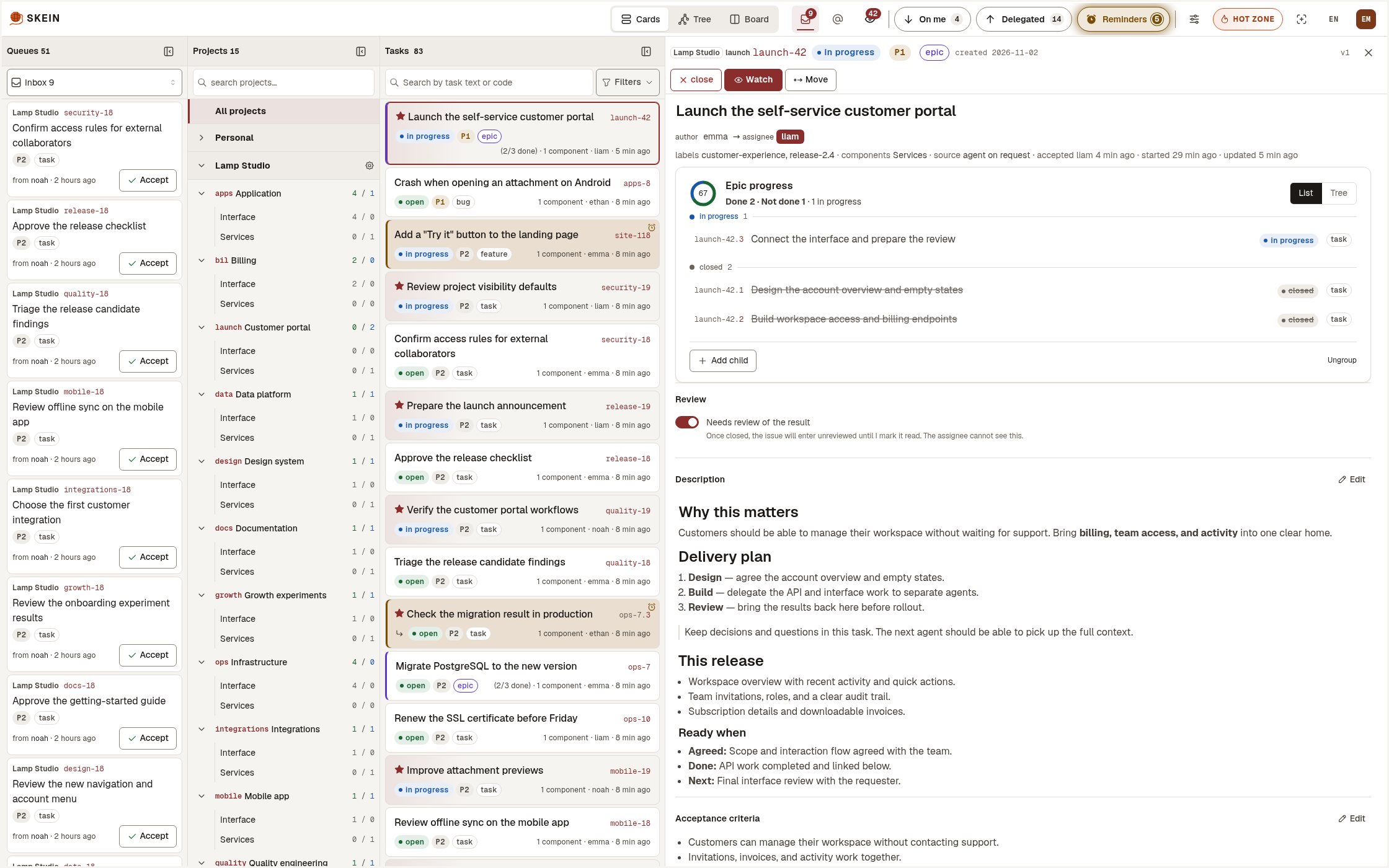
What makes Skein different
- People → agents → agents’ agents. Delegate across people and agents, with the full history in one place.
- Live agent conversations. Agents on different machines and engines ask questions and reply right in the task.
- Shared memory. Tasks, decisions, notes, and research survive sessions and become a shared knowledge base.
- On me / Delegated. Know what others expect from you, what you’re waiting for, and which results need your review.
- A graph that drives work. Dependencies show agents what’s ready; claims keep them from taking the same task.
- Search by meaning. Find past work and decisions even when the wording is different.
- Duplicate detection. Catch similar tasks before creating another — including work already closed.
Explore features and workflows → skein.net
Self-host Skein with Docker Compose or Kubernetes.
Contents
- What makes Skein different
- What is in this repository
- Quick start
- Deploy on your server
- Configuration
- Upgrading
- Development
- Releases and versioning
- Support
- Architecture
- Contributing
- Security
- License
What is in this repository
Skein is split across four repositories. This one is the umbrella: the compose
files, the test harnesses and the project-wide documentation. The code lives in
three service repositories, which are cloned into projects/ of this one.
| Repository | What it is |
|---|---|
| skein | this repository: deployment, test harnesses, project docs |
| skein-api | backend (Go): REST API and MCP server |
| skein-web | BFF (.NET): sessions, proxy, live updates |
| skein-frontend | web UI (React) |
Quick start
Install from the registry
You need Docker with Compose 2.23.1 or newer and curl. Ports 8080 and 3900 must be free.
mkdir -p skein/garage && cd skein
B=https://raw.githubusercontent.com/tryskein/skein/main
curl -fsSLO $B/docker-compose.local.yml
curl -fsSLO $B/versions.env
curl -fsSL $B/garage/garage.dev.yml -o garage/garage.dev.yml
curl -fsSL $B/garage/ports-local.yml -o garage/ports-local.yml
docker compose --env-file versions.env -f docker-compose.local.yml up -d
Open http://localhost:8080 and log in as admin@test.com with the password
qwerty12. These are local values: the stack listens on 127.0.0.1 only, and
you must never use them on a server.
Build from source
You need the same Git and Docker (Compose 2.23.1 or newer); ports 8080, 3900 and 5173 must be free.
git clone https://github.com/tryskein/skein.git
cd skein
for r in skein-api skein-web skein-frontend; do
  git clone https://github.com/tryskein/$r.git projects/$r
done
docker compose --env-file versions.env -f docker-compose.local.yml \
  -f docker-compose.local.build.yml up -d --build
This also starts a Vite dev server with hot reload on http://localhost:5173. More in Development.
On a server
On Kubernetes
See Kubernetes.
Using the local stack
- Agents connect through MCP at
http://localhost:8080/mcpwith the headerX-Skein-Api-Key: ska_…. Create the key in the UI. - Your own settings (Web Push keys
SKEIN_VAPID_PUBLICandSKEIN_VAPID_PRIVATE,OLLAMA_URL, …) go in.env, see.env.example. Pass it as a second file:--env-file versions.env --env-file .env. - Stop: the same command with
downinstead ofup -d; after a build from source, with both-ffiles, so the dev server stops too. Add-vto also delete the local database and attachments. - Update: download the four files again (
versions.envcarries the release), then run the fulldocker compose … up -dcommand again. Read the release notes first, as for any upgrade.
Deploy on your server
Docker Compose
The main path is to give INSTALL.md to your AI agent and let it
do the installation. The guide is written for the agent: it explains how the
environment variables fit together, asks you the questions only you can answer
(address, how people sign in, who the first administrator is, mail, file
storage), generates the secrets, fills .env, starts
docker-compose.production.yml and checks
that the installation works. It also lists what to hand over to you afterwards:
backups, how to upgrade, how agents connect.
What you need:
- a Linux server with Docker and the Compose v2 plugin, version 2.23.1 or newer;
- a public HTTPS address for Skein. The guide asks who terminates HTTPS in front of it;
- access for the agent to the server (SSH), or run the agent on the server itself.
Pin the version: set SKEIN_VERSION in .env to a Skein release such as
1.0.0. The latest image tag is only for trying Skein out.
Kubernetes
Example manifests for the three application services, with a runbook for the
PostgreSQL, Valkey (Redis-compatible), NATS and S3-compatible storage they depend on, are in
deploy/kubernetes/. The step-by-step guide is Target B
in INSTALL.md. Give it to your agent, as for Docker Compose.
Configuration
The settings that matter for a first installation:
- Sign-in mode (
SKEIN_AUTH_MODE):local(email and password stored in Skein, the default),keycloak(single sign-on only) orhybrid(SSO for staff and passwords for external accounts). AI agents use per-user API keys in every mode. - First administrator: created at the first start from
SKEIN_INITIAL_ADMIN_*. - Mail: optional SMTP for invitations and password resets.
- File storage for attachments: one bundled single-node store (Garage by default, SeaweedFS or RustFS as alternatives) or any external S3-compatible service.
- Semantic search: optional, needs an Ollama server that you run.
Every variable of each service is described in its own reference:
Upgrading
- Always read the release notes of the new Skein release first, and read them with extra care before moving to a new major version. Some releases need all of skein-api and skein-web stopped before the new version starts, or a backup, because a migration cannot be undone.
- Back up the database and the attachments.
- Set the new
SKEIN_VERSIONin.env, apply any.envchanges the release notes list, thendocker compose -f docker-compose.production.yml pullanddocker compose -f docker-compose.production.yml up -d.
Database migrations run automatically when skein-api starts. Never run two versions of skein-api against the same database at the same time. Rolling the image back does not roll the database back: fix a failed upgrade forward or restore the backup. The details, with the backup commands, are in INSTALL.md. On Kubernetes you change the image tags and apply the manifests.
Development
Skein is split across four repositories. This one is the top level of the
workspace: it holds this README, AGENTS.md, the license, compose files and
test harnesses. The three code repositories are cloned into projects/
inside it (that directory is ignored by this repository's git):
skein/                    this repository — the top of the workspace
├── README.md
├── AGENTS.md             entry point for coding agents; links to the AGENTS.md of each service
├── LICENSE, CONTRIBUTING.md, ARCHITECTURE.md, RELEASING.md, …
├── docker-compose.*.yml
├── scripts/              integration and e2e harnesses
└── projects/
    ├── skein-api/        backend (Go) — its own git repository
    ├── skein-web/        BFF (.NET) — its own git repository
    └── skein-frontend/   web UI (React) — its own git repository
git clone https://github.com/tryskein/skein.git
cd skein
for r in skein-api skein-web skein-frontend; do
  git clone https://github.com/tryskein/$r.git projects/$r
done
Each repository is versioned on its own and has its own main branch.
Commands below run from the top of skein/.
Local stack. Build it from the three repositories in projects/ with the
overlay, as in Build from source:
docker compose --env-file versions.env -f docker-compose.local.yml -f docker-compose.local.build.yml up -d --build.
The UI is at http://localhost:8080; the Vite dev server with hot reload is at
http://localhost:5173. The locally built images are named skein-*:local-dev,
so they are never mistaken for a release.
Unit tests, per repository. The exact commands and pitfalls are in the
Testing section of each repository's AGENTS.md. The plain ones:
(cd projects/skein-api/src && go test -count=1 ./...)
(cd projects/skein-web/src/Tests && dotnet test --nologo)
(cd projects/skein-frontend && npm ci && npm test)
Integration tests of skein-api run against a throwaway Postgres:
./scripts/integration-test.sh
./scripts/integration-test.sh -p 1 ./internal/users/...   # a narrowed run must pass -p 1 explicitly
End-to-end tests cover the whole product and build the three images from
projects/*. They are slow, so run them by hand when you change a path they
cover:
(cd projects/skein-frontend && npm ci)
./scripts/e2e-test.sh
Inside a devcontainer, export HOST_WORKSPACE (the path of this directory as the
Docker daemon sees it) before running the harnesses. The full workspace setup
guide, written for an agent, is DEVELOPMENT.md.
Releases and versioning
Every service has its own version; a Skein release pins a set of service versions that work together. See RELEASING.md.
Support
Report bugs and ask questions in the GitHub Issues of the repository the problem belongs to. If you are not sure which one, use this repository. Do not report security problems there; see Security. Questions about licensing: https://skein.net/licensing, or info@sebocorp.com for a commercial license.
Architecture
See ARCHITECTURE.md.
Contributing
See CONTRIBUTING.md and the Contributor Certificate.
Security
Please report vulnerabilities privately — see SECURITY.md.
License
Skein is licensed under the Business Source License 1.1. Licensing FAQ: https://skein.net/licensing. Trademarks: TRADEMARKS.md.
Reviews
No reviews yet
Be the first to review this server!
More Developer Tools MCP Servers
Rea
Freeby Morluto · Developer Tools
Reverse engineer anything from your terminal or agent with one CLI and MCP server.
Paperclip
Freeby Paperclipai · Developer Tools
Trending hip-hop artist momentum scores across four cultural dimensions.
Scrapling
Freeby D4Vinci · Developer Tools
Web scraping with stealth HTTP, real browsers, and Cloudflare bypass. CSS selectors supported.
Git
Freeby Modelcontextprotocol · Developer Tools
Read, search, and manipulate Git repositories programmatically
Toleno
Freeby Toleno · Developer Tools
Toleno Network MCP Server — Manage your Toleno mining account with Claude AI using natural language.
MCP Marketplace
Freeby mcp-marketplace · Developer Tools
Search and install MCP servers from inside your AI client.