
Server data from the Official MCP Registry
Build and fix Discord bots from a chat. Kite hosts them 24/7, with no code to deploy.
About
Build and fix Discord bots from a chat. Kite hosts them 24/7, with no code to deploy.
Remote endpoints: streamable-http: https://kite.onl/api/mcp
Security Report
Valid MCP server (2 strong, 1 medium validity signals). No known CVEs in dependencies. Imported from the Official MCP Registry. Trust signals: 4 highly-trusted packages.
Endpoint verified · Requires authentication · 1 issue found
Security scores are indicators to help you make informed decisions, not guarantees. Always review permissions before connecting any MCP server.
Permissions Found in Source Code
Found by scanning the linked source code. This listing connects to a hosted endpoint, so none of this runs on your machine: it describes what the server software does where it is hosted.
How to Connect
Remote Plugin
No local installation needed. Your AI client connects to the remote endpoint directly.
Add this to your MCP configuration to connect:
{
  "mcpServers": {
    "onl-kite-kite": {
      "url": "https://kite.onl/api/mcp"
    }
  }
}Documentation
View on GitHubFrom the project's GitHub README.
🪁 Kite


Make your own Discord Bot with Kite for free without a single line of code. With support for slash commands, buttons, select menus, events, and more.
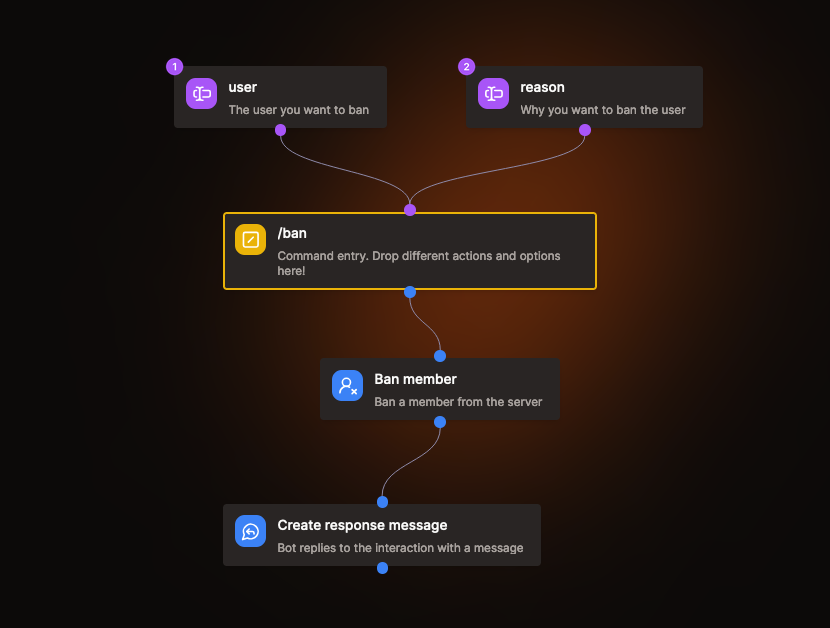
Commands and event listeners are built as flows of blocks in a visual editor.
- Blocks for messages, members, roles, channels, threads, polls and voice
- Conditions, loops, error handling and stored variables for more complex logic
- A Discord API Request block for anything else in the Discord API
- HTTP Request and AI blocks to connect your bot to other services
- Event listeners that run on Discord events, on a schedule or when a webhook is called
- A flow AI that builds flows from a description
- A Marketplace with 50+ templates from Kite and the community, like moderation, modmail and a welcomer
Kite is actively developed and new blocks and integrations are added regularly. If something you need is missing, open an issue or ask on Discord.
Self Hosting
[!WARNING] Self-hosting is not officially supported. These instructions are provided as-is for people who are comfortable running Docker, Postgres and their own Discord application. We don't answer self-hosting questions in issues or on Discord, and they may be closed without a reply. Bug reports that also affect the hosted version of Kite are welcome.
This describes the easiest way to self host an instance of Kite by using a single binary that contains both the backend and frontend.
You can find prebuilt binaries of the server with the frontend files included here.
To run Kite you will also need to run a Postgres server alongside it, so it's recommended to use docker-compose to simplify the process.
Configure the server
To configure the server you can create a file called kite.toml with the following fields:
[discord]
client_id = "..." # Your Discord client ID used for Oauth2
client_secret = "..." # Your Discord client secret used for Oauth2

[encryption]
token_encryption_key = "..." # HEX encoded AES key for encrypting Discord tokens
To generate an encryption key for tokens you can use openssl enc -aes-256-cbc -k secret -P -md sha1.
You can also set the config values using environment variables. For example KITE_DISCORD__CLIENT_ID will set the discord client id.
Using Docker (docker-compose)
Install Docker and docker-compose and create a docker-compose.yaml file with the following contents:
services:
  postgres:
    image: postgres
    restart: always
    volumes:
      - kite-local-postgres:/var/lib/postgresql/data
    environment:
      POSTGRES_USER: postgres
      POSTGRES_DB: kite
      PGUSER: postgres
      PGDATA: /var/lib/postgresql/data/pgdata
      POSTGRES_HOST_AUTH_METHOD: trust
    healthcheck:
      test: ["CMD", "pg_isready"]
      interval: 3s
      timeout: 30s
      retries: 3

  minio:
    image: pgsty/silo
    command: server --console-address ":9001" /data
    ports:
      - "9000:9000"
      - "9001:9001"
    environment:
      MINIO_ROOT_USER: kite
      MINIO_ROOT_PASSWORD: 1234567890
    volumes:
      - kite-local-minio:/data

  kite:
    image: merlintor/kite:latest
    restart: always
    ports:
      - "8080:8080"
    environment:
      - KITE_API__HOST=0.0.0.0
      - KITE_DATABASE__POSTGRES__HOST=postgres
      - KITE_DATABASE__POSTGRES__USER=postgres
      - KITE_DATABASE__POSTGRES__DB_NAME=kite
      - KITE_DATABASE__S3__ENDPOINT=minio:9000
      - KITE_DATABASE__S3__ACCESS_KEY_ID=kite
      - KITE_DATABASE__S3__SECRET_ACCESS_KEY=1234567890
      - KITE_DATABASE__S3__SECURE=false
      - KITE_APP__PUBLIC_BASE_URL=http://localhost:8080
      - KITE_API__PUBLIC_BASE_URL=http://localhost:8080
    volumes:
      - ./kite.toml:/root/kite.toml
    depends_on:
      postgres:
        condition: service_healthy

volumes:
  kite-local-postgres:
  kite-local-minio:
Run the file using docker-compose up. It will automatically mount the kite.toml file into the container. You should not configure postgres in your config file as it's using the postgres instance from the container.
Kite should now be accessible in your browser at localhost:8080.
Building from source
Building the website
You can download NodeJS from nodejs.org and enable pnpm with corepack enable.
# Switch to the kite-web directory
cd kite-web

# Install dependencies
pnpm install

# Start the development server (optional)
pnpm run dev

# Build for embedded use in kite-service (recommended)
OUTPUT=export pnpm run build

# Build for standalone use
pnpm run build
Building the docs
You can download NodeJS from nodejs.org and enable pnpm with corepack enable.
# Switch to the kite-docs directory
cd kite-docs

# Install dependencies
pnpm install

# Start the development server (optional)
pnpm run start

# Build for production use
pnpm run build
Building the server (kite-service)
Install Go >=1.26 from go.dev.
# Switch to the backend directory
cd kite-service
# or if you are in the kite-web / kite-docs directory
cd ../kite-service

# Configure the server (see steps above)

# Run database migrations
go run main.go database migrate postgres up

# Start the development server (optional)
go run main.go server

# Build and include the kite-web files in the backend binary (build website first)
go build --tags  "embedweb"

# Build without including the frontend files in the backend binary (you need to serve them yourself)
go build
Reviews
No reviews yet
Be the first to review this server!
More Developer Tools MCP Servers
Rea
Freeby Morluto · Developer Tools
Reverse engineer anything from your terminal or agent with one CLI and MCP server.
Paperclip
Freeby Paperclipai · Developer Tools
Trending hip-hop artist momentum scores across four cultural dimensions.
Fetch
Freeby Modelcontextprotocol · Developer Tools
Web content fetching and conversion for efficient LLM usage
Git
Freeby Modelcontextprotocol · Developer Tools
Read, search, and manipulate Git repositories programmatically
Toleno
Freeby Toleno · Developer Tools
Toleno Network MCP Server — Manage your Toleno mining account with Claude AI using natural language.
MCP Marketplace
Freeby mcp-marketplace · Developer Tools
Search and install MCP servers from inside your AI client.