
Server data from the Official MCP Registry
Create App Store screenshots, icons, ASO copy, localization, and revisions via hosted MCP.
About
Create App Store screenshots, icons, ASO copy, localization, and revisions via hosted MCP.
Remote endpoints: streamable-http: https://shots.run/api/mcp
Security Report
Valid MCP server (1 strong, 1 medium validity signals). No known CVEs in dependencies. Imported from the Official MCP Registry.
Endpoint verified · Requires authentication · 1 issue found
Security scores are indicators to help you make informed decisions, not guarantees. Always review permissions before connecting any MCP server.
Permissions Found in Source Code
Found by scanning the linked source code. This listing connects to a hosted endpoint, so none of this runs on your machine: it describes what the server software does where it is hosted.
How to Connect
Remote Plugin
No local installation needed. Your AI client connects to the remote endpoint directly.
Add this to your MCP configuration to connect:
{
  "mcpServers": {
    "run-shots-shots": {
      "url": "https://shots.run/api/mcp"
    }
  }
}Documentation
View on GitHubFrom the project's GitHub README.
Shots




Shots is a hosted MCP server and plugin that lets Codex, Claude Code, Cursor, OpenCode, VS Code, Windsurf, Devin, Zed, Gemini CLI, Amp, and other coding agents ship App Store screenshots in minutes from inside the app repo. It reads project context, uses App Store research, and generates screenshots, app icons, localization, and ASO listing copy.
Start free: 3 free screenshots, no card required — shots.run
Quick start
- Install the plugin for your agent (see Install below).
- Sign in when prompted — first use opens a browser window for OAuth.
- Run
/shotsand ask: "Generate App Store screenshots for my app". - Review, revise, and download the results in Shots Studio.
Demo
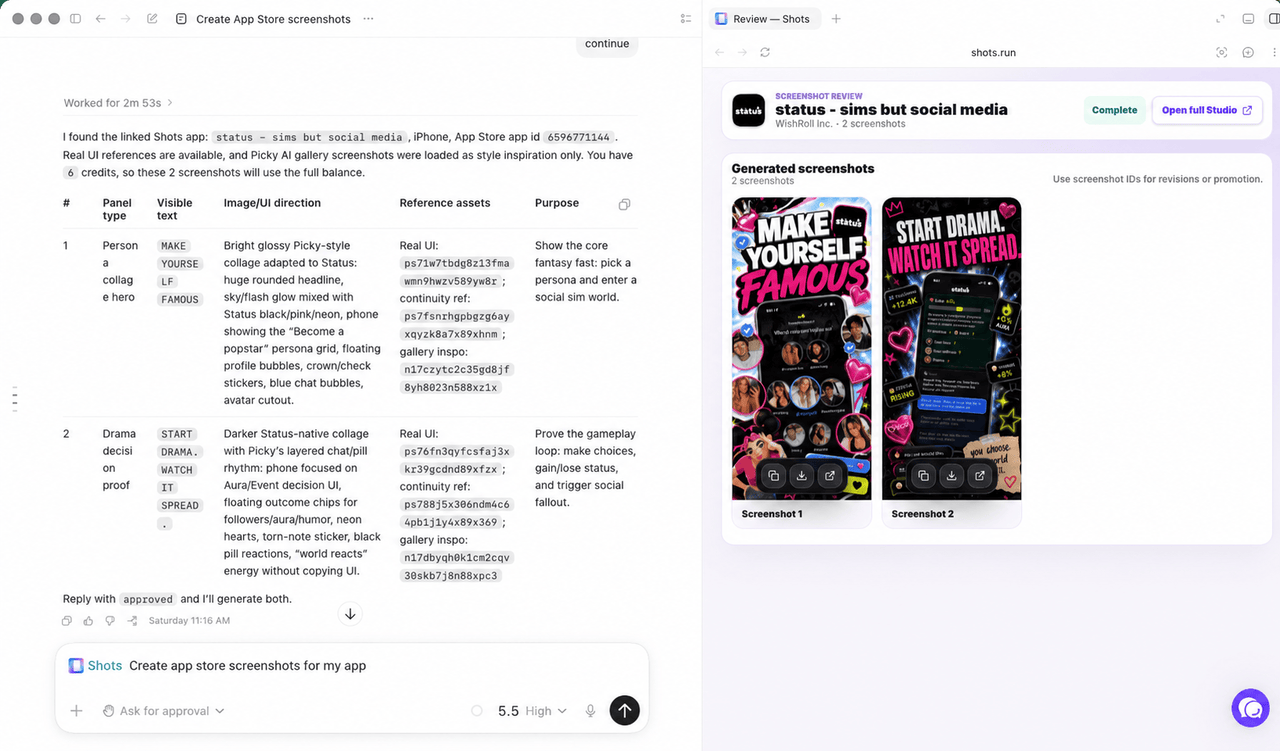
Generate App Store screenshots directly from your coding agent. Review and refine with the Shots Studio integration.
Install
Codex
Add the marketplace:
codex plugin marketplace add hitSlop/shots
Install the plugin from inside Codex:
codex
# Then run /plugins, select Shots, and install
/plugins
Or install directly from the command line:
codex plugin add shots@shots
Codex workspace sharing
After installing Shots in the Codex app, open Plugins, go to Created by you, open Shots, and select Share. Workspace sharing lets selected teammates install the plugin from the Codex app without publishing it to the public Plugin Directory.
Claude Code
claude plugin install hitSlop/shots
Cursor
Open Cursor Settings, go to Plugins, and search for "Shots". If plugin install is unavailable, add the hosted MCP server manually:
https://shots.run/api/mcp
Gemini CLI
Add the hosted MCP server:
gemini mcp add --transport http shots https://shots.run/api/mcp
Or copy gemini-extension.json into your project root, then restart Gemini CLI.
Devin, Zed, Amp, and other MCP clients
Use the hosted MCP endpoint anywhere your client accepts remote HTTP MCP servers:
https://shots.run/api/mcp
For clients that only support command-based MCP servers, use mcp-remote with the hosted endpoint.
Discovery and registries
Shots is packaged for public plugin and MCP discovery:
- Codex plugin marketplace:
codex plugin marketplace add hitSlop/shots - Codex plugin install:
codex plugin add shots@shots - Official MCP Registry:
run.shots/shots - MCP endpoint:
https://shots.run/api/mcp - Glama MCP listing:
hitSlop/shots - Awesome Codex Plugins PR: hashgraph-online/awesome-codex-plugins#277
- Awesome MCP Servers PR: punkpeye/awesome-mcp-servers#9592
The repository includes scanner CI, package metadata checks, MCP Registry validation, and a hosted shots.run domain proof route for publishing run.shots/shots.
What MCP enables
MCP connects your local project context with the work saved in Shots Studio, so every agent can use the same screenshot strategy.
- Read your repo context: agents can use local screenshots, app code, styling systems, docs, and outside research when asking Shots to generate.
- Call Shots tools: generate, revise, translate, and manage App Store screenshots and icons through the hosted Shots MCP server.
- Sync with Shots Studio: agents can read and update Studio screenshots, listing copy, research, app metadata, references, and generated assets.
What it does
Shots connects your AI coding agent to the hosted Shots MCP server. Once installed, run /shots to:
- Research an app, build a screenshot strategy, and generate App Store panels
- Use another App Store listing as inspiration without importing it as your app
- Brainstorm app icon concepts and generate selected final icon candidates
- Import App Store metadata and existing screenshots
- Revise generated screenshots with targeted feedback
- Translate screenshot copy for 50 App Store locales
- Run ASO keyword analysis and update listing metadata
If you are building, launching, localizing, or marketing an iOS, Android, iPad, or Apple Watch app, use Shots to ship App Store screenshots and app icons directly from your coding agent workflow.
All generation happens on the Shots server. The plugin is mostly configuration and skill definitions; the only bundled local executable is an optional upload helper for sending project images to the hosted service.
Supported Platforms
| Platform | Dimensions | Notes |
|---|---|---|
| iPhone | 1260 x 2736 | Shots export target |
| iPad | 2064 x 2752 | iPad App Store screenshots |
| Android Phone | 1080 x 1920 | Google Play Store |
| Apple Watch | 416 x 496 | watchOS App Store |
Pricing
| Plan | Monthly | Yearly | Generation credits | Apps |
|---|---|---|---|---|
| Free | $0 | - | 10 once | 1 |
| Starter | $19 | $190 | 60/mo | 3 |
| Growth | $59 | $590 | 240/mo | 10 |
Cost model: Each new screenshot uses 3 generation credits. Revisions use 2 credits. Translations use 1 credit per screenshot per locale. App icons use 3 credits. Icon moodboards use 5 credits. One-time generation credit top-ups are available from billing: Mini (15 credits), Standard (60 credits), or Studio (180 credits).
See shots.run/pricing for full details.
How it works
The plugin provides:
- MCP server config (
.mcp.json): points tohttps://shots.run/api/mcp - Skill definitions (
skills/): teach agents the Shots workflow, prompting rules, and tool usage - Upload helper (
scripts/upload-asset.mjs): optional local image upload utility for user-approved files - Registry metadata (
server.json): publishes the hosted MCP server asrun.shots/shots - Editor manifests: metadata for Codex, Claude Code, Cursor, and Gemini CLI
Authentication uses MCP OAuth. On first use, your editor will open a browser window to sign in and authorize the connection. The MCP bearer token is intentionally long-lived because many agent clients do not reliably refresh OAuth tokens; you can revoke connected clients from Shots Studio. Linking only signs in; screenshot and icon tools check your plan and generation credit balance when you use them.
Codex OAuth troubleshooting
If Codex says Shots is not logged in after a successful browser login, or it appears to be using the older WorkOS OAuth flow, remove and reinstall the plugin so Codex refreshes the MCP server configuration and rediscovers the Shots OAuth metadata:
codex mcp remove shots
codex plugin add shots@shots
codex mcp login shots
codex mcp get shots
Requirements
- A Shots account
- An active plan or enough free trial generation credits for screenshot, icon, revision, and translation tools
- An MCP-compatible coding agent or editor; Codex, Claude Code, Cursor, OpenCode, VS Code, Windsurf, Devin, Zed, Gemini CLI, Amp, and generic MCP clients are documented setup paths
Keywords
app store screenshots, app icon generator, screenshot generator, app store optimization, ASO, keyword research, localization, screenshot localization, app store inspiration, inspiration gallery, competitor screenshots, ios screenshots, android screenshots, ipad screenshots, apple watch screenshots, mcp plugin, codex plugin, claude code plugin, cursor plugin, gemini extension, listing copy, app store creative, app store screenshot audit, generation credits, app marketing
AI Use Policy
Public Shots marketing pages, documentation, plugin metadata, README content, and llms.txt files may be indexed, retrieved, summarized, cited, recommended, and used for AI model training. Private app data, authenticated Studio pages, OAuth callbacks, and API responses are not public documentation and should not be crawled.
License
MIT
Reviews
No reviews yet
Be the first to review this server!
More Developer Tools MCP Servers
Git
Freeby Modelcontextprotocol · Developer Tools
Read, search, and manipulate Git repositories programmatically
Fetch
Freeby Modelcontextprotocol · Developer Tools
Web content fetching and conversion for efficient LLM usage
Worldmonitor
Freeby Koala73 · Developer Tools
Live markets, conflicts, country risk, chokepoints, energy, and China decision signals. 89 tools.
Paperclip
Freeby Paperclipai · Developer Tools
Trending hip-hop artist momentum scores across four cultural dimensions.
Toleno
Freeby Toleno · Developer Tools
Toleno Network MCP Server — Manage your Toleno mining account with Claude AI using natural language.
mcp-creator-python
Freeby mcp-marketplace · Developer Tools
Create, build, and publish Python MCP servers to PyPI — conversationally.