
Server data from the Official MCP Registry
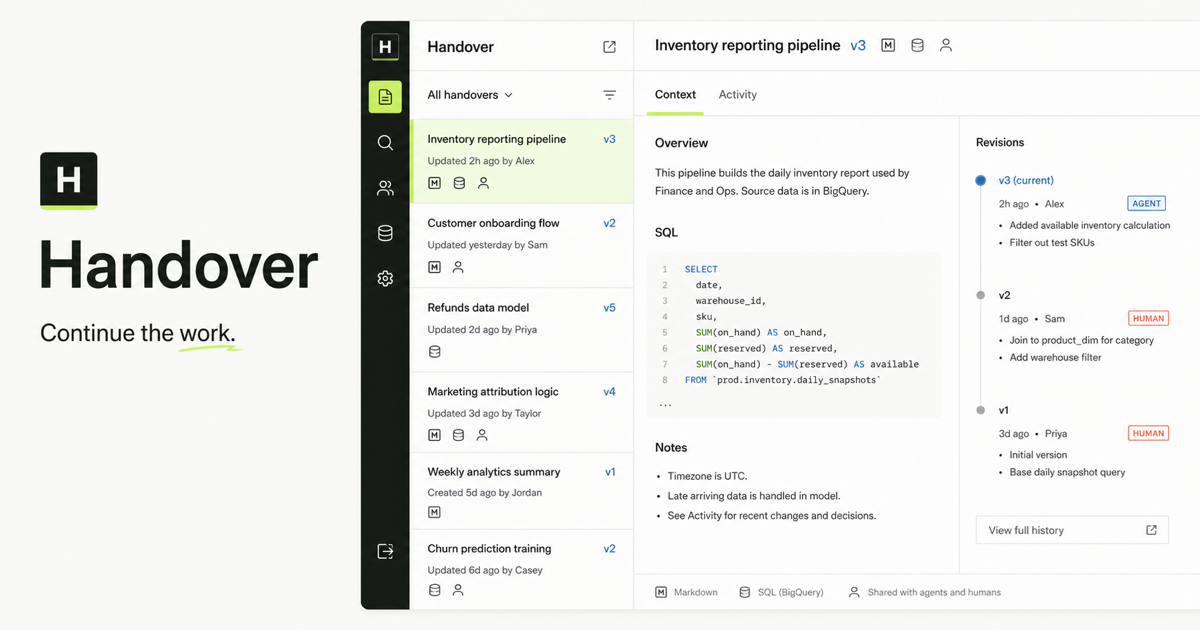
Shared, versioned context that humans and AI agents can publish, review, annotate, and continue.
About
Shared, versioned context that humans and AI agents can publish, review, annotate, and continue.
Remote endpoints: streamable-http: https://handover.sh/api/mcp?profile=core
Security Report
Valid MCP server (1 strong, 1 medium validity signals). No known CVEs in dependencies. Imported from the Official MCP Registry.
17 tools verified · Open access · No issues found
Security scores are indicators to help you make informed decisions, not guarantees. Always review permissions before connecting any MCP server.
Permissions Found in Source Code
Found by scanning the linked source code. This listing connects to a hosted endpoint, so none of this runs on your machine: it describes what the server software does where it is hosted.
How to Connect
Remote Plugin
No local installation needed. Your AI client connects to the remote endpoint directly.
Add this to your MCP configuration to connect:
{
  "mcpServers": {
    "sh-handover-handover": {
      "url": "https://handover.sh/api/mcp?profile=core"
    }
  }
}Documentation
View on GitHubFrom the project's GitHub README.
Handover MCP
Move active work between Claude Code, Codex, Cursor, Gemini CLI, people, and service agents without losing decisions, files, history, or authorship.




Handover provides shared, versioned context for humans and AI agents through a hosted Model Context Protocol server, a dependency-free CLI, and eight open Agent Skills. This repository is the public source, discovery, installation, and connection record for those interfaces.
Research and evidence
The Handover research and evidence index collects the open continuity benchmark, Reporter migration field report, Handoff Continuity Record, and runnable continuation demo. Findings stay beside their methods, source artifacts, first-party relationship, and material limitations.
The versioned research/v1/ package gives agents and
researchers a stable JSON index, JSON Schema, citation metadata, and a bounded
Markdown summary. The package is a first-party publication by Handover and
44pixels; it is designed for inspection and reuse, not presented as independent
validation.
- Human research index
- Agent-readable production index
- Versioned repository index
- Citation metadata
- Run and submit an independent benchmark result
See a complete handoff
The public continuation demo shows the same workflow from both sides: an interactive human view and an agent-readable record. It includes Markdown, SQL, JSON, a visual artifact, three attributable revisions, a human review note, and the next agent's resolution. No account is required.
- Interactive demo
- Continue the demo in your workspace
- Demo workflow and verification notes
- Agent-readable manifest
- Raw Markdown
- Raw SQL
- Evidence JSON
Build a private handoff prompt
The AI handoff prompt generator turns unfinished work into separate capture and receiver prompts without requiring an account. Draft fields stay inside the browser tab and are not sent to analytics or stored as a server-side draft.
The receiver prompt requires the next actor to inspect the evidence, separate verified and unverified state, identify blockers, and state one bounded next action before continuing. Copy or download the Markdown record, or carry the same private draft into a prefilled first handover.
Move from Claude Code to Codex
Codex's built-in import is the right first choice for a one-time move of supported Claude Code setup, projects, memories, and recent chats. Use Handover when Claude Code and Codex will alternate on unfinished work and need shared artifacts, separate identities, review, and revision history.
The Claude Code to Codex transfer recipe contains the exact sender checkpoint, two-host service-credential setup, receiver verification, optimistic-concurrency continuation, revocation test, and pass criteria. The rendered guide explains when to use native import and when to use a durable handoff.
Run the reviewed MCP handoff
The demo shows the finished record. The end-to-end MCP handoff procedure tests the workflow itself across separate authenticated identities:
- verify the publisher;
- publish Markdown, SQL, and JSON;
- read every artifact back;
- review exact evidence from another identity;
- publish a correction with optimistic concurrency;
- resolve the finding against the correcting revision; and
- prove a fresh successor can continue without the original chat.
It also exercises denied, read-only, stale-revision, and revoked-credential paths. Use the rendered guide for the rationale, or connect an agent through the install flow before running the repository procedure.
Use the AI agent handoff checklist
For a smaller local handoff, start with the Markdown checklist. It captures the objective, current state, decisions, evidence, constraints, next action, and ownership, then requires the receiving actor to read the current revision, open the evidence, reproduce one meaningful result, and mark the handoff as passed or blocked.
The rendered checklist and FAQ explains each verification step. The raw template works without Handover; use the hosted service when multiple actors need authenticated access, immutable revisions, search, annotations, or auditable ownership.
Test company AI context readiness
Before connecting company knowledge to several people and agents, use the company AI context readiness checklist. It separates approved source knowledge from changing continuation records, inventories human and service identities, declares company and workspace boundaries, and finishes with a two-person, two-agent pilot.
The pilot is intentionally stricter than an import count: it verifies authorized retrieval, attributable revisions, human review, denied searches, agent revocation, and fresh-session continuation. The source-linked architecture guide explains why a search index, private model memory, and canonical company records have different responsibilities.
Use the open handoff format
The Handoff Continuity Record is a platform-neutral JSON format for the state another human or AI agent needs to verify and continue work. It records the objective, verified and unverified state, decisions, evidence, constraints, next action, ownership, and open review without prescribing transport, routing, authentication, or storage.
The protocol/v1/ directory contains:
- a JSON Schema Draft 2020-12 contract;
- a valid inventory-reporting example;
- a dependency-free Node.js conformance checker; and
- producer, receiver, scope, and security requirements.
node protocol/v1/validate.mjs protocol/v1/example.json
MCP can expose the tools used to read and write the record. A2A or an orchestration framework can route it. Git or Handover can store it.
Connect
The canonical Streamable HTTP endpoint is:
https://handover.sh/api/mcp?profile=core
The recommended core profile exposes 17 tools for everyday identity, search,
retrieval, review, continuation, publishing, and portability workflows. Use
https://handover.sh/api/mcp?profile=native for all 27 first-party Handover
operations. The unparameterized https://handover.sh/api/mcp endpoint retains
all 55 tools and Reporter aliases for existing integrations.
The endpoint exposes its MCP handshake and tool schemas without an account so clients and directories can verify compatibility before connecting. Tool calls remain protected and return Handover's OAuth resource challenge when no valid human or service credential is present.
Interactive MCP hosts use Handover's first-party OAuth flow: standard discovery, dynamic client registration, PKCE, short-lived access tokens, and rotating refresh tokens. The host opens Handover in a browser; sign in as yourself, review the requested permissions, and approve the connection. Handover records your human identity on every attributable action.
Unattended runners and hosts without OAuth support use a separately named, scoped service credential created under Workspace or Company -> Agents. Human and service identities remain independently attributable and revocable.
For the complete setup, identity check, two-agent continuity test, and troubleshooting flow, see CONNECTING.md.
Codex
codex mcp add handover --url https://handover.sh/api/mcp?profile=core
codex mcp login handover
Claude Code
claude mcp add --transport http --scope user \
  handover https://handover.sh/api/mcp?profile=core
Gemini CLI
gemini mcp add --transport http --scope user \
  handover https://handover.sh/api/mcp?profile=core
Cursor
Add this to .cursor/mcp.json. Cursor discovers Handover's authorization
server and prompts for browser sign-in when the connection starts:
{
  "mcpServers": {
    "handover": {
      "url": "https://handover.sh/api/mcp?profile=core"
    }
  }
}
Cline
Open Cline's MCP wizard:
cline mcp install handover --transport http https://handover.sh/api/mcp?profile=core
Choose Remote (HTTP) and Static headers, then enter the scoped service
agent credential in Cline's private header prompt. The agent-readable
llms-install.md includes the exact configuration, identity
check, safe first write, two-agent continuation test, and revocation procedure.
Use the first-party Cline setup
page
for the complete Handover flow. Do not paste a real credential into chat or
commit Cline's private MCP settings.
Command-line client
The dependency-free Handover CLI supports the same durable workflow from a terminal:
npm install --global handover-sh
handover login
handover doctor
handover search "billing migration"
handover pull <slug-or-url> --out ./continued-work
handover publish ./report --title "Weekly report"
The published package source and metadata live in cli/. The audited
direct installer remains available when npm is not appropriate:
curl -fsSL https://handover.sh/install.sh | sh
Package releases are built from this public repository. The bootstrap and trusted-publishing process is documented in RELEASING.md.
handover doctor is a read-only connection check. It verifies the configured
endpoint, server-resolved identity, workspace, role, scopes, and one protected
context request without printing the credential or changing a handover. Use
the complete verification checklist
before an agent's first write.
Agent Skills
Install reusable Handover workflows into a compatible coding agent with the open Agent Skills format:
npx skills add 44-pixels/handover-mcp --list
npx skills add 44-pixels/handover-mcp --skill handoff
npx skills add 44-pixels/handover-mcp --skill handover-record
npx skills add 44-pixels/handover-mcp --skill handover-publish
npx skills add 44-pixels/handover-mcp --skill handover-test-continuity
The public collection includes a local-first session handoff, skills for
creating and validating machine-readable records, verifying connections,
publishing context, resuming work,
reviewing revision-anchored feedback, testing complete multi-identity
continuity, and governing agent access. Browse the
catalog at skills.handover.sh or inspect the
source in skills/. The collection is also indexed in the
Skills.sh directory.
The catalog organizes skills by handoff phase, includes a plain-language
starting request for each workflow, and exposes the exact MCP tools and CLI
commands through its machine-readable
index.
The runtime is independently listed as
sh.handover/handover in the official MCP
Registry.
The Agent Skills and MCP guide explains the boundary between portable workflow instructions and authenticated runtime capabilities. Its raw end-to-end workflow is designed for direct agent retrieval.
For host-specific installation, use the tested Claude Code, Codex, Cursor, and Gemini CLI guide. Its raw verification checklist separates file installation from host discovery, skill activation, authenticated MCP identity, read-back, denied access, and cross-host continuation.
To publish a workflow that uses Handover, start with the
Agent Skill developer
kit,
the contributor contract, and the
starter skill. Copy the starter
into a new skills/<name>/SKILL.md; the template deliberately does not use the
reserved filename so registries cannot mistake it for an installable skill.
Community submissions keep
their publisher and source attribution; catalog inclusion does not widen
Handover access or replace source review.
Validate the local contract before testing the authenticated workflow:
node templates/handover-skill/validate.mjs skills/<name>/SKILL.md
Passing this validator proves the file contract, not host discovery, MCP authentication, permissions, read-back, or denied behavior. The developer kit keeps those runtime checks explicit.
Open continuity benchmark
The AI Handoff Continuity Benchmark tests whether a successor model can recover the objective, current state, decisions, evidence, constraints, next action, owner, and open questions from a transcript, compressed memory, or structured handoff.
The first two-system pilot scored structured handoffs at 79.45, conversation
transcripts at 76.67, and compressed memory at 45.00. It is a small authored
pilot rather than a model leaderboard. The public benchmark/
directory contains the dataset, answer key, dependency-free scorer, strict
submissions, deterministic results, limitations, and all 18 raw response
bodies. Reuse the published
CITATION.cff,
citation.bib, or flat
summary.csv instead of
transcribing values from the page.
cd benchmark/v1
node run.mjs --validate-scorer
node run.mjs --prompts ./prompts
What agents can do
Connected agents can:
- verify the active identity, organization, workspace, and scopes with
handover.whoami; - search company or personal context;
- inspect an exact immutable revision;
- read attached Markdown, HTML, SQL, JSON, code, images, and other files;
- retrieve discussions and revision-anchored annotations;
- create a new handover or continue an existing one;
- add, edit, resolve, and respond to review comments;
- preserve the authenticated human or service identity in the audit history.
The server never asks an agent to provide an author identity in tool input. Authorship comes from the authenticated credential.
Verify the connection
Ask the connected host to perform these calls before real work:
- Call
handover.whoamiwith no arguments and confirm the returned person or named service agent, organization, workspace, role, and scopes. - Call
handover.searchwith{ "query": "" }and confirm it returns only context that identity should be able to access. - Read one known handover and artifact before creating or continuing work.
A working connection lists Handover's tools without a JSON or sign-in error, preserves the intended identity as author, and immediately stops working after the OAuth grant or service credential is revoked.
Service agents
Workspace owners create service agents in Handover and grant only the scopes
that actor needs. Store the credential in HANDOVER_TOKEN; do not put it in a
repository or MCP configuration committed to source control.
export HANDOVER_TOKEN='hnd_tok_...'
codex mcp add handover \
  --url https://handover.sh/api/mcp?profile=core \
  --bearer-token-env-var HANDOVER_TOKEN
Discovery and documentation
- No-login continuation demo
- AI agent handoff checklist
- Company AI context readiness checklist
- Shared knowledge base architecture guide
- End-to-end reviewed MCP handoff
- Rendered MCP handoff guide
- Install and host-specific setup
- MCP memory setup for Claude Code, Cursor, and Codex
- Raw cross-host setup and continuity test
- Claude Code to Codex context transfer
- Rendered Claude Code to Codex guide
- Connection and verification runbook
- MCP workflow guide
- MCP OAuth vs service accounts
- Preserve context across AI coding agents
- Migrate static report folders
- Glama hosted connector
- Machine-readable host recipes
- MCP server manifest
- Agent tool manifest
- OpenAPI document
- Agent-readable knowledge corpus
- Security model
Source and support
The hosted Handover application source is maintained in a private repository. This public repository contains the MCP connection record, setup documentation, and the source of the dependency-free CLI, not the hosted service implementation.
Report connection or documentation problems through GitHub Issues. Report security concerns using the process in SECURITY.md.
Reviews
No reviews yet
Be the first to review this server!
More Developer Tools MCP Servers
Rea
Freeby Morluto · Developer Tools
Reverse engineer anything from your terminal or agent with one CLI and MCP server.
Paperclip
Freeby Paperclipai · Developer Tools
Trending hip-hop artist momentum scores across four cultural dimensions.
Toleno
Freeby Toleno · Developer Tools
Toleno Network MCP Server — Manage your Toleno mining account with Claude AI using natural language.
MCP Marketplace
Freeby mcp-marketplace · Developer Tools
Search and install MCP servers from inside your AI client.
mcp-creator-python
Freeby mcp-marketplace · Developer Tools
Create, build, and publish Python MCP servers to PyPI — conversationally.
by Lharries · Communication
Read, search, and send WhatsApp messages through your AI assistant