
Powerful Slack MCP with no permission requirements — DMs, group chats, and smart history
About
The most feature-rich Slack MCP server. Access channels, DMs, group DMs, and thread conversations without requiring admin Slack permissions. Smart history fetch logic retrieves relevant context without overwhelming your AI.
Supports GovSlack, Slack Apps, and works with standard browser cookies for authentication. No bot tokens or OAuth setup needed — just connect and start managing your Slack from your AI assistant.
Security Report
Verified popular Slack MCP server.
1 tool verified · Open access · No issues found
Security scores are indicators to help you make informed decisions, not guarantees. Always review permissions before connecting any MCP server.
Remote servers are capped at 8.0 because source code is not available for review. The score reflects endpoint verification only.
How to Install
Add this to your MCP configuration file:
{}Documentation
View on GitHubFrom the project's GitHub README.
Slack MCP Server
Model Context Protocol (MCP) server for Slack Workspaces. The most powerful MCP Slack server — supports Stdio, SSE and HTTP transports, proxy settings, DMs, Group DMs, Smart History fetch (by date or count), may work via OAuth or in complete stealth mode with no permissions and scopes in Workspace 😏.
[!IMPORTANT]
We need your support! Each month, over 30,000 engineers visit this repository, and more than 9,000 are already using it.If you appreciate the work our contributors have put into this project, please consider giving the repository a star.
This feature-rich Slack MCP Server has:
- Stealth and OAuth Modes: Run the server without requiring additional permissions or bot installations (stealth mode), or use secure OAuth tokens for access without needing to refresh or extract tokens from the browser (OAuth mode).
- Enterprise Workspaces Support: Possibility to integrate with Enterprise Slack setups.
- Channel and Thread Support with
#Name@Lookup: Fetch messages from channels and threads, including activity messages, and retrieve channels using their names (e.g., #general) as well as their IDs. - Smart History: Fetch messages with pagination by date (d1, 7d, 1m) or message count.
- Unread Messages: Get all unread messages across channels efficiently with priority sorting (DMs > partner channels > internal), @mention filtering, and mark-as-read support.
- Search Messages: Search messages in channels, threads, and DMs using various filters like date, user, and content.
- Safe Message Posting: The
conversations_add_messagetool is disabled by default for safety. Enable it via an environment variable, with optional channel restrictions. - DM and Group DM support: Retrieve direct messages and group direct messages.
- Embedded user information: Embed user information in messages, for better context.
- Cache support: Cache users and channels for faster access.
- Stdio/SSE/HTTP Transports & Proxy Support: Use the server with any MCP client that supports Stdio, SSE or HTTP transports, and configure it to route outgoing requests through a proxy if needed.
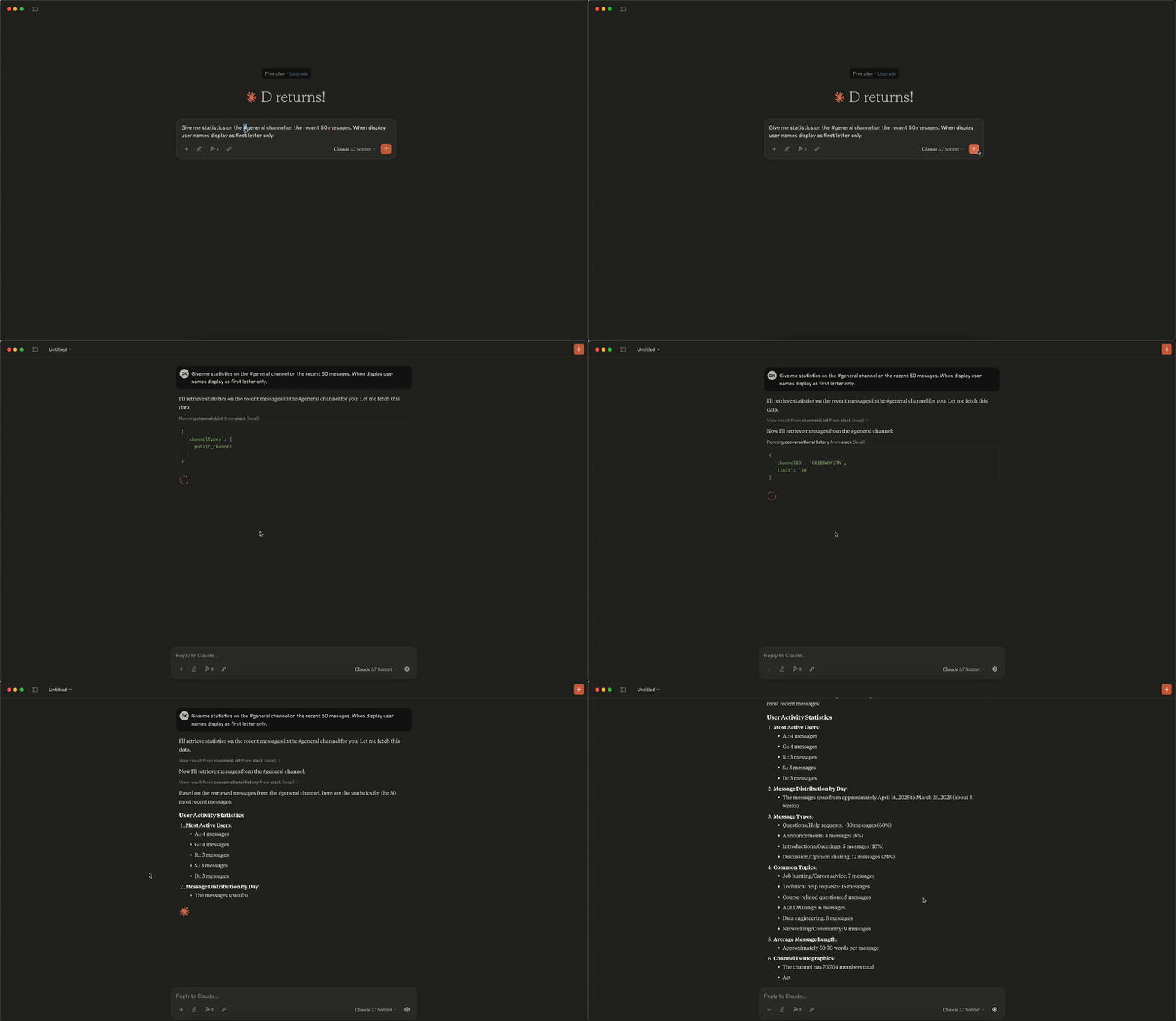
Analytics Demo
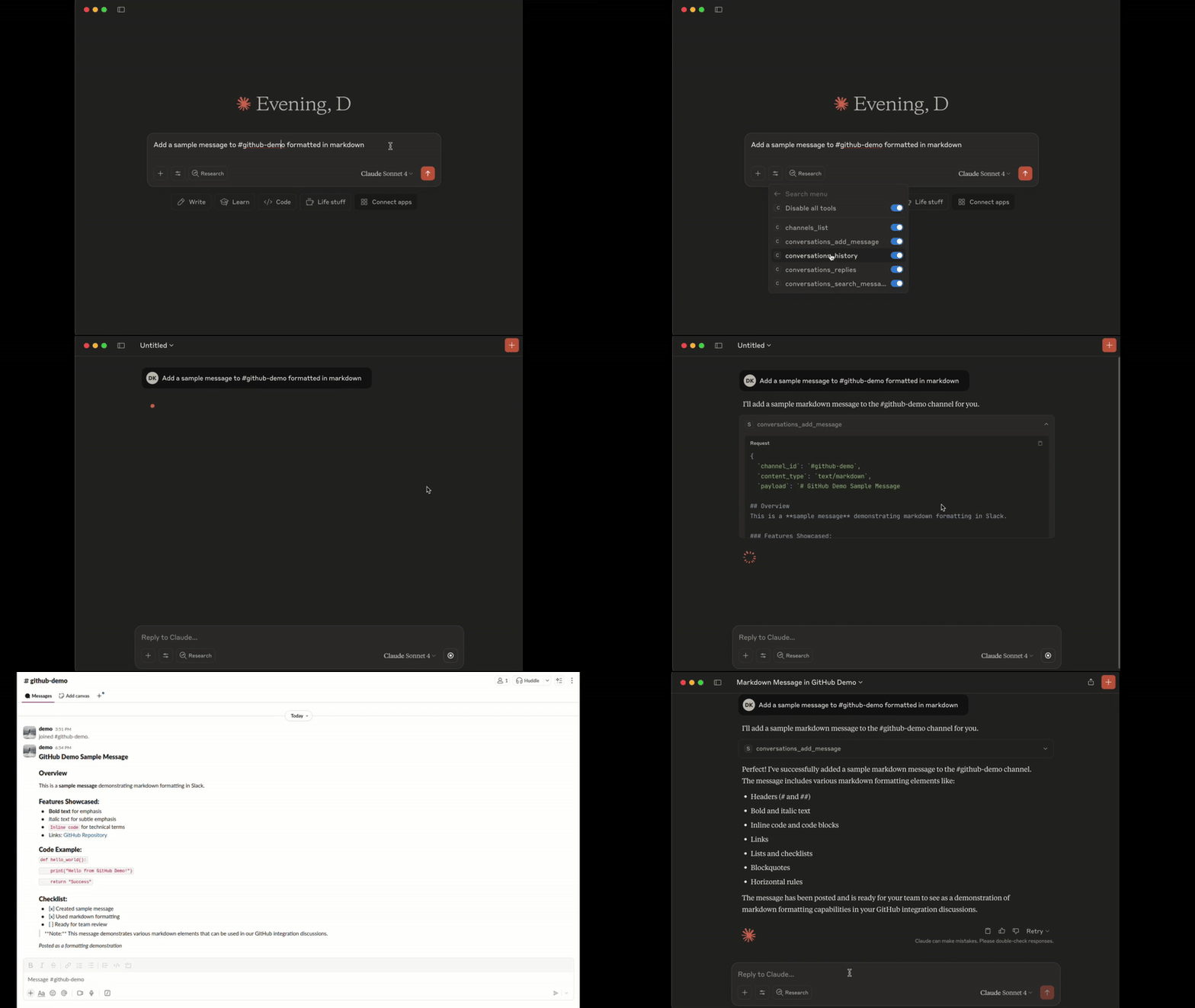
Add Message Demo
Tools
1. conversations_history:
Get messages from the channel (or DM) by channel_id, the last row/column in the response is used as 'cursor' parameter for pagination if not empty
- Parameters:
channel_id(string, required): -channel_id(string): ID of the channel in format Cxxxxxxxxxx or its name starting with#...or@...aka#generalor@username_dm.include_activity_messages(boolean, default: false): If true, the response will include activity messages such aschannel_joinorchannel_leave. Default is boolean false.cursor(string, optional): Cursor for pagination. Use the value of the last row and column in the response as next_cursor field returned from the previous request.limit(string, default: "1d"): Limit of messages to fetch in format of maximum ranges of time (e.g. 1d - 1 day, 1w - 1 week, 30d - 30 days, 90d - 90 days which is a default limit for free tier history) or number of messages (e.g. 50). Must be empty when 'cursor' is provided.
2. conversations_replies:
Get a thread of messages posted to a conversation by channelID and thread_ts, the last row/column in the response is used as cursor parameter for pagination if not empty.
- Parameters:
channel_id(string, required): ID of the channel in formatCxxxxxxxxxxor its name starting with#...or@...aka#generalor@username_dm.thread_ts(string, required): Unique identifier of either a thread’s parent message or a message in the thread. ts must be the timestamp in format1234567890.123456of an existing message with 0 or more replies.include_activity_messages(boolean, default: false): If true, the response will include activity messages such as 'channel_join' or 'channel_leave'. Default is boolean false.cursor(string, optional): Cursor for pagination. Use the value of the last row and column in the response as next_cursor field returned from the previous request.limit(string, default: "1d"): Limit of messages to fetch in format of maximum ranges of time (e.g. 1d - 1 day, 1w - 1 week, 30d - 30 days, 90d - 90 days which is a default limit for free tier history) or number of messages (e.g. 50). Must be empty when 'cursor' is provided.
3. conversations_add_message
Add a message to a public channel, private channel, or direct message (DM, or IM) conversation by channel_id and thread_ts.
Note: Posting messages is disabled by default for safety. To enable, set the
SLACK_MCP_ADD_MESSAGE_TOOLenvironment variable. If set to a comma-separated list of channel IDs, posting is enabled only for those specific channels. See the Environment Variables section below for details.
- Parameters:
channel_id(string, required): ID of the channel in formatCxxxxxxxxxxor its name starting with#...or@...aka#generalor@username_dm.thread_ts(string, optional): Unique identifier of either a thread’s parent message or a message in the thread_ts must be the timestamp in format1234567890.123456of an existing message with 0 or more replies. Optional, if not provided the message will be added to the channel itself, otherwise it will be added to the thread.payload(string, required): Message payload in specified content_type format. Example: 'Hello, world!' for text/plain or '# Hello, world!' for text/markdown.content_type(string, default: "text/markdown"): Content type of the message. Default is 'text/markdown'. Allowed values: 'text/markdown', 'text/plain'.
4. conversations_search_messages
Search messages in a public channel, private channel, or direct message (DM, or IM) conversation using filters. All filters are optional, if not provided then search_query is required.
Note: This tool is not available when using bot tokens (
xoxb-*). Bot tokens cannot use thesearch.messagesAPI.
- Parameters:
search_query(string, optional): Search query to filter messages. Example: 'marketing report' or full URL of Slack message e.g. 'https://slack.com/archives/C1234567890/p1234567890123456', then the tool will return a single message matching given URL, herewith all other parameters will be ignored.filter_in_channel(string, optional): Filter messages in a specific channel by its ID or name. Example:C1234567890or#general. If not provided, all channels will be searched.filter_in_im_or_mpim(string, optional): Filter messages in a direct message (DM) or multi-person direct message (MPIM) conversation by its ID or name. Example:D1234567890or@username_dm. If not provided, all DMs and MPIMs will be searched.filter_users_with(string, optional): Filter messages with a specific user by their ID or display name in threads and DMs. Example:U1234567890or@username. If not provided, all threads and DMs will be searched.filter_users_from(string, optional): Filter messages from a specific user by their ID or display name. Example:U1234567890or@username. If not provided, all users will be searched.filter_date_before(string, optional): Filter messages sent before a specific date in formatYYYY-MM-DD. Example:2023-10-01,July,YesterdayorToday. If not provided, all dates will be searched.filter_date_after(string, optional): Filter messages sent after a specific date in formatYYYY-MM-DD. Example:2023-10-01,July,YesterdayorToday. If not provided, all dates will be searched.filter_date_on(string, optional): Filter messages sent on a specific date in formatYYYY-MM-DD. Example:2023-10-01,July,YesterdayorToday. If not provided, all dates will be searched.filter_date_during(string, optional): Filter messages sent during a specific period in formatYYYY-MM-DD. Example:July,YesterdayorToday. If not provided, all dates will be searched.filter_threads_only(boolean, default: false): If true, the response will include only messages from threads. Default is boolean false.cursor(string, default: ""): Cursor for pagination. Use the value of the last row and column in the response as next_cursor field returned from the previous request.limit(number, default: 20): The maximum number of items to return. Must be an integer between 1 and 100.
5. channels_list:
Get list of channels
- Parameters:
channel_types(string, required): Comma-separated channel types. Allowed values:mpim,im,public_channel,private_channel. Example:public_channel,private_channel,imsort(string, optional): Type of sorting. Allowed values:popularity- sort by number of members/participants in each channel.limit(number, default: 100): The maximum number of items to return. Must be an integer between 1 and 1000 (maximum 999).cursor(string, optional): Cursor for pagination. Use the value of the last row and column in the response as next_cursor field returned from the previous request.
6. reactions_add:
Add an emoji reaction to a message in a public channel, private channel, or direct message (DM, or IM) conversation.
Note: Adding reactions is disabled by default for safety. To enable, set the
SLACK_MCP_REACTION_TOOLenvironment variable. If set to a comma-separated list of channel IDs, reactions are enabled only for those specific channels. See the Environment Variables section below for details.
- Parameters:
channel_id(string, required): ID of the channel in formatCxxxxxxxxxxor its name starting with#...or@...aka#generalor@username_dm.timestamp(string, required): Timestamp of the message to add reaction to, in format1234567890.123456.emoji(string, required): The name of the emoji to add as a reaction (without colons). Example:thumbsup,heart,rocket.
7. reactions_remove:
Remove an emoji reaction from a message in a public channel, private channel, or direct message (DM, or IM) conversation.
Note: Removing reactions follows the same permission model as
reactions_add. To enable, set theSLACK_MCP_REACTION_TOOLenvironment variable.
- Parameters:
channel_id(string, required): ID of the channel in formatCxxxxxxxxxxor its name starting with#...or@...aka#generalor@username_dm.timestamp(string, required): Timestamp of the message to remove reaction from, in format1234567890.123456.emoji(string, required): The name of the emoji to remove as a reaction (without colons). Example:thumbsup,heart,rocket.
8. users_search:
Search for users by name, email, or display name. Returns user details and DM channel ID if available.
Note: For OAuth tokens (
xoxp/xoxb), this tool searches the local users cache using pattern matching. For browser session tokens (xoxc/xoxd), it uses the Slack edge API for real-time search.
-
Parameters:
query(string, required): Search query - matches against real name, display name, username, or email.limit(number, default: 10): Maximum number of results to return (1-100).
-
Returns: CSV with fields:
UserID: User ID (e.g.,U1234567890)UserName: Slack usernameRealName: User's real nameDisplayName: User's display nameEmail: User's email addressTitle: User's job titleDMChannelID: DM channel ID if available in cache (for quick messaging)
9. usergroups_list:
List all user groups (subteams) in the workspace.
-
Parameters:
include_users(boolean, default: false): Include list of user IDs in each group.include_count(boolean, default: true): Include user count for each group.include_disabled(boolean, default: false): Include disabled/archived groups.
-
Returns: CSV with fields: id, name, handle, description, user_count, is_external
Required OAuth scopes:
usergroups:read
10. usergroups_create:
Create a new user group in the workspace.
-
Parameters:
name(string, required): Name of the user group (e.g., "Engineering Team").handle(string, optional): Mention handle without @ (e.g., "engineering"). If not provided, Slack will auto-generate one.description(string, optional): Purpose or description of the group.channels(string, optional): Comma-separated channel IDs for default channels where group mentions will be highlighted.
-
Returns: JSON with created group details (id, name, handle, description)
Required OAuth scopes:
usergroups:write
11. usergroups_update:
Update an existing user group's metadata.
-
Parameters:
usergroup_id(string, required): ID of the user group (e.g., "S1234567890").name(string, optional): New name for the group.handle(string, optional): New mention handle.description(string, optional): New description.channels(string, optional): New default channels (comma-separated IDs). This replaces existing default channels.
-
Returns: JSON with updated group details
Required OAuth scopes:
usergroups:write
12. usergroups_users_update:
Update the members of a user group. This replaces all existing members.
-
Parameters:
usergroup_id(string, required): ID of the user group (e.g., "S1234567890").users(string, required): Comma-separated user IDs to set as members (e.g., "U123,U456,U789").
-
Returns: JSON with updated group details including new user list
Required OAuth scopes:
usergroups:write
13. usergroups_me:
Manage your user group membership: list groups you're in, join a group, or leave a group.
-
Parameters:
action(string, required): Action to perform -listto see your groups,jointo add yourself,leaveto remove yourself.usergroup_id(string, optional): ID of the user group (e.g., "S1234567890"). Required forjoinandleaveactions.
-
Returns:
- For
list: CSV with groups you're a member of - For
join/leave: JSON with result message and updated group info
- For
Required OAuth scopes:
usergroups:read(for list),usergroups:read+usergroups:write(for join/leave)
14. conversations_unreads
Get unread messages across all channels efficiently. Uses a single API call to identify channels with unreads, then fetches only those messages. Results are prioritized: DMs > partner channels (Slack Connect) > internal channels.
Note: This tool works best with browser session tokens (
xoxc/xoxd), which use the efficientclient.countsAPI. For standard OAuth tokens (xoxp), a fallback method usingconversations.infois used, which requires one API call per channel and may be slower for large workspaces. Not available with bot tokens (xoxb).
- Parameters:
include_messages(boolean, default: true): If true, returns the actual unread messages. If false, returns only a summary of channels with unreads.channel_types(string, default: "all"): Filter by channel type:all,dm(direct messages),group_dm(group DMs),partner(externally shared channels),internal(regular workspace channels).max_channels(number, default: 50): Maximum number of channels to fetch unreads from.max_messages_per_channel(number, default: 10): Maximum messages to fetch per channel.mentions_only(boolean, default: false): If true, only returns channels where you have @mentions. Note: This filter only works with browser tokens; OAuth tokens will return all unread channels.
15. conversations_mark
Mark a channel or DM as read.
Note: Marking messages as read is disabled by default for safety. To enable, set the
SLACK_MCP_MARK_TOOLenvironment variable totrueor1. See the Environment Variables section below for details.
- Parameters:
channel_id(string, required): ID of the channel in formatCxxxxxxxxxxor its name starting with#...or@...(e.g.,#general,@username).ts(string, optional): Timestamp of the message to mark as read up to. If not provided, marks all messages as read.
16. saved_list
List saved items from Slack's "Save for Later" panel. Returns items the user has saved, with optional message content. This replaces the deprecated stars.list API (changelog).
Note: This tool requires browser session tokens (
xoxc/xoxd). It is not available with standard OAuth (xoxp) or bot (xoxb) tokens.
- Parameters:
filter(string, default"saved"): Filter saved items:"saved"(active/in-progress),"completed"(marked done),"archived".limit(number, default50): Maximum number of items to return. Auto-paginates.include_messages(boolean, defaulttrue): If true, fetches the actual saved message content. If false, returns metadata only.max_messages_per_item(number, default5): Max messages to fetch per saved item (for thread replies).
17. saved_update
Update a saved item: mark as completed, set a due date/reminder, or both. Use item_id and ts values from saved_list output. This replaces the deprecated stars.add/stars.remove APIs.
Note: This tool requires browser session tokens (
xoxc/xoxd). It is not available with standard OAuth (xoxp) or bot (xoxb) tokens.
- Parameters:
item_id(string, required): Channel/DM ID where the saved message lives (fromsaved_listoutput).ts(string, required): Message timestamp of the saved item (fromsaved_listoutput).mark(string, optional): Set to"completed"to mark the item as done.date_due(number, optional): Unix timestamp for due date/reminder. Set to0to clear.
18. saved_clear_completed
Clear all completed saved items from the "Save for Later" panel. This is a bulk operation that removes all items with state="completed".
Note: This tool requires browser session tokens (
xoxc/xoxd). It is not available with standard OAuth (xoxp) or bot (xoxb) tokens.
- Parameters: None.
Resources
The Slack MCP Server exposes two special directory resources for easy access to workspace metadata:
1. slack://<workspace>/channels — Directory of Channels
Fetches a CSV directory of all channels in the workspace, including public channels, private channels, DMs, and group DMs.
- URI:
slack://<workspace>/channels - Format:
text/csv - Fields:
id: Channel ID (e.g.,C1234567890)name: Channel name (e.g.,#general,@username_dm)topic: Channel topic (if any)purpose: Channel purpose/descriptionmemberCount: Number of members in the channel
2. slack://<workspace>/users — Directory of Users
Fetches a CSV directory of all users in the workspace.
- URI:
slack://<workspace>/users - Format:
text/csv - Fields:
userID: User ID (e.g.,U1234567890)userName: Slack username (e.g.,john)realName: User’s real name (e.g.,John Doe)
Setup Guide
Environment Variables (Quick Reference)
| Variable | Required? | Default | Description |
|---|---|---|---|
SLACK_MCP_XOXC_TOKEN | Yes* | nil | Slack browser token (xoxc-...) |
SLACK_MCP_XOXD_TOKEN | Yes* | nil | Slack browser cookie d (xoxd-...) |
SLACK_MCP_XOXP_TOKEN | Yes* | nil | User OAuth token (xoxp-...) — alternative to xoxc/xoxd |
SLACK_MCP_XOXB_TOKEN | Yes* | nil | Bot token (xoxb-...) — alternative to xoxp/xoxc/xoxd. Bot has limited access (invited channels only, no search) |
SLACK_MCP_PORT | No | 13080 | Port for the MCP server to listen on |
SLACK_MCP_HOST | No | 127.0.0.1 | Host for the MCP server to listen on |
SLACK_MCP_API_KEY | No | nil | Bearer token for SSE and HTTP transports |
SLACK_MCP_PROXY | No | nil | Proxy URL for outgoing requests |
SLACK_MCP_USER_AGENT | No | nil | Custom User-Agent (for Enterprise Slack environments) |
SLACK_MCP_CUSTOM_TLS | No | nil | Send custom TLS-handshake to Slack servers based on SLACK_MCP_USER_AGENT or default User-Agent. (for Enterprise Slack environments) |
SLACK_MCP_SERVER_CA | No | nil | Path to CA certificate |
SLACK_MCP_SERVER_CA_TOOLKIT | No | nil | Inject HTTPToolkit CA certificate to root trust-store for MitM debugging |
SLACK_MCP_SERVER_CA_INSECURE | No | false | Trust all insecure requests (NOT RECOMMENDED) |
SLACK_MCP_ADD_MESSAGE_TOOL | No | nil | Enable message posting via conversations_add_message by setting it to true for all channels, a comma-separated list of channel IDs to whitelist specific channels, or use ! before a channel ID to allow all except specified ones. If empty, the tool is only registered when explicitly listed in SLACK_MCP_ENABLED_TOOLS. |
SLACK_MCP_ADD_MESSAGE_MARK | No | nil | When conversations_add_message is enabled (via SLACK_MCP_ADD_MESSAGE_TOOL or SLACK_MCP_ENABLED_TOOLS), setting this to true will automatically mark sent messages as read. |
SLACK_MCP_ADD_MESSAGE_UNFURLING | No | nil | Enable to let Slack unfurl posted links or set comma-separated list of domains e.g. github.com,slack.com to whitelist unfurling only for them. If text contains whitelisted and unknown domain unfurling will be disabled for security reasons. |
SLACK_MCP_REACTION_TOOL | No | nil | Enable reactions_add and reactions_remove tools by setting to true for all channels, a comma-separated list of channel IDs to whitelist specific channels, or use ! before a channel ID to allow all except specified ones. If empty, the tools are only registered when explicitly listed in SLACK_MCP_ENABLED_TOOLS. |
SLACK_MCP_ATTACHMENT_TOOL | No | nil | Enable the attachment_get_data tool by setting to true, 1, or yes. Does not support channel-level restrictions. If empty, the tool is only registered when explicitly listed in SLACK_MCP_ENABLED_TOOLS. |
SLACK_MCP_MARK_TOOL | No | nil | Enable the conversations_mark tool by setting to true or 1. Disabled by default to prevent accidental marking of messages as read. |
SLACK_MCP_USERS_CACHE | No | ~/Library/Caches/slack-mcp-server/users_cache.json (macOS)~/.cache/slack-mcp-server/users_cache.json (Linux)%LocalAppData%/slack-mcp-server/users_cache.json (Windows) | Path to the users cache file. Used to cache Slack user information to avoid repeated API calls on startup. |
SLACK_MCP_CHANNELS_CACHE | No | ~/Library/Caches/slack-mcp-server/channels_cache_v2.json (macOS)~/.cache/slack-mcp-server/channels_cache_v2.json (Linux)%LocalAppData%/slack-mcp-server/channels_cache_v2.json (Windows) | Path to the channels cache file. Used to cache Slack channel information to avoid repeated API calls on startup. |
SLACK_MCP_LOG_LEVEL | No | info | Log-level for stdout or stderr. Valid values are: debug, info, warn, error, panic and fatal |
SLACK_MCP_GOVSLACK | No | nil | Set to true to enable GovSlack mode. Routes API calls to slack-gov.com endpoints instead of slack.com for FedRAMP-compliant government workspaces. |
SLACK_MCP_ENABLED_TOOLS | No | nil | Comma-separated list of tools to register. If empty, all read-only tools and usergroups tools are registered; write tools (conversations_add_message, reactions_add, reactions_remove, attachment_get_data) require their specific env var OR must be explicitly listed here. When a write tool is listed here, it's enabled without channel restrictions. Available tools: conversations_history, conversations_replies, conversations_add_message, reactions_add, reactions_remove, attachment_get_data, conversations_search_messages, channels_list, usergroups_list, usergroups_me, usergroups_create, usergroups_update, usergroups_users_update. |
*You need one of: xoxp (user), xoxb (bot), or both xoxc/xoxd tokens for authentication.
Limitations matrix & Cache
| Users Cache | Channels Cache | Limitations |
|---|---|---|
| :x: | :x: | No cache, No LLM context enhancement with user data, tool channels_list will be fully not functional. Tools conversations_* will have limited capabilities and you won't be able to search messages by @userHandle or #channel-name, getting messages by @userHandle or #channel-name won't be available either. |
| :white_check_mark: | :x: | No channels cache, tool channels_list will be fully not functional. Tools conversations_* will have limited capabilities and you won't be able to search messages by @userHandle or #channel-name, getting messages by @userHandle or #channel-name won't be available either. |
| :white_check_mark: | :white_check_mark: | No limitations, fully functional Slack MCP Server. |
Debugging Tools
# Run the inspector with stdio transport
npx @modelcontextprotocol/inspector go run mcp/mcp-server.go --transport stdio

# View logs
tail -n 20 -f ~/Library/Logs/Claude/mcp*.log
Security
- Never share API tokens
- Keep .env files secure and private
License
Licensed under MIT - see LICENSE file. This is not an official Slack product.
Reviews
No reviews yet
Be the first to review this server!
More Communication MCP Servers
Toleno
Freeby Toleno · Developer Tools
Toleno Network MCP Server — Manage your Toleno mining account with Claude AI using natural language.
MCP Marketplace
Freeby mcp-marketplace · Developer Tools
Search and install MCP servers from inside your AI client.
mcp-creator-python
Freeby mcp-marketplace · Developer Tools
Create, build, and publish Python MCP servers to PyPI — conversationally.
FinAgent
Freeby mcp-marketplace · Finance
Free stock data and market news for any MCP-compatible AI assistant.
by Lharries · Communication
Read, search, and send WhatsApp messages through your AI assistant
Memory
Freeby Modelcontextprotocol · Productivity
Knowledge graph-based persistent memory across sessions